
Sage Intacct does fund accounting well once your transactions are coded and posted. The problem is getting them there. Your team is still manually tagging dimensions, matching donation batches from PayPal and Stripe, and sorting which revenue hits restricted versus unrestricted funds. Sage Intacct nonprofit accounting automation solves the GL structure, but the execution layer between bank feeds and posted entries is where your close cycle gets stuck. That's the gap most nonprofits are trying to close right now.
TLDR:
- Sage Intacct automates fund accounting with dimensional tracking across grants and programs
- Real-time reporting pulls live GL data for board meetings and funder reports
- Multi-entity consolidation eliminates manual spreadsheet builds for orgs with chapters
- Truewind adds AI transaction coding and donation reconciliation to Sage Intacct
- Truewind automates donation matching from PayPal, Stripe, and other platforms into Sage
Automated Fund Accounting and Dimensional Tracking
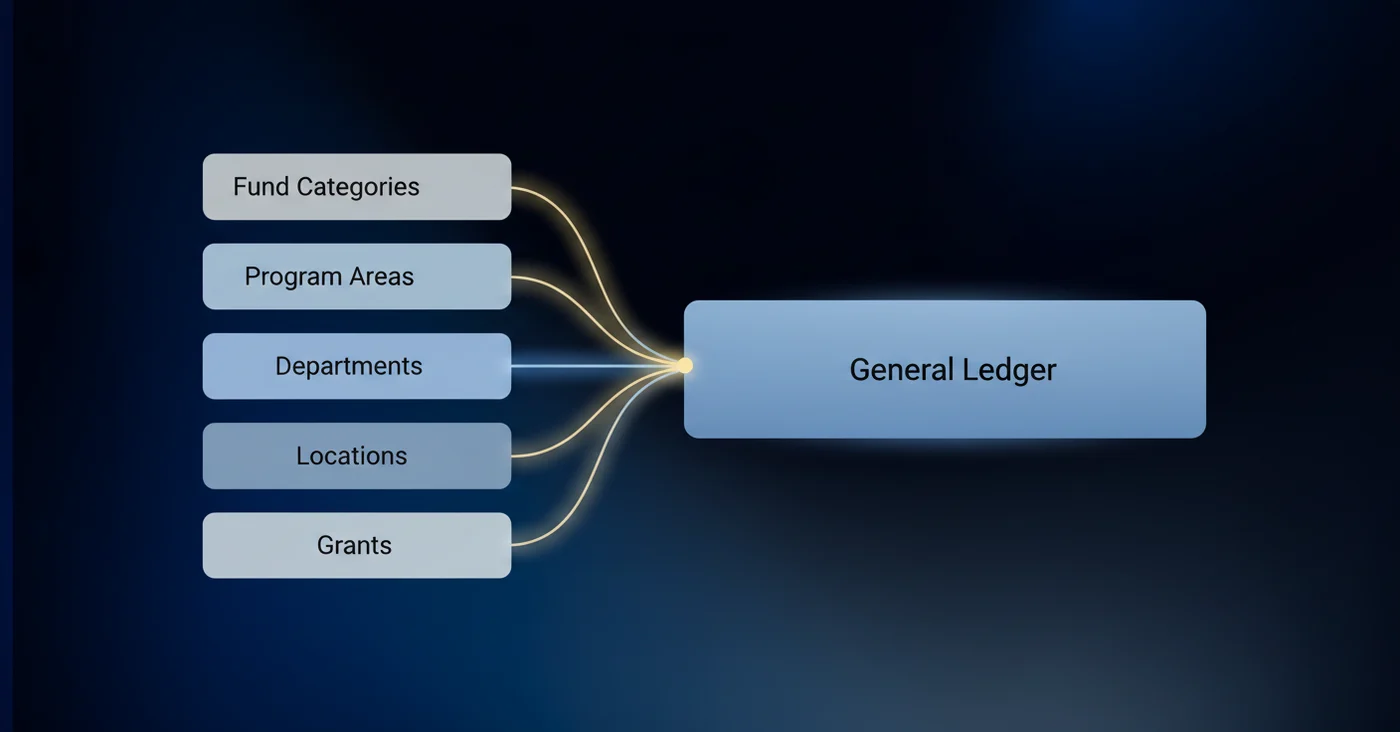
Fund accounting is where nonprofit finance gets genuinely complicated. Restricted grants, unrestricted operating dollars, and donor-designated gifts all need to stay separate, and manually tracking which dollar belongs where is tedious work that compounds across every close cycle. Over 68% of nonprofits operate with both restricted and unrestricted funds, so this is a widespread challenge.
Sage Intacct handles this through its dimensional structure. Every transaction can be tagged across multiple dimensions simultaneously: fund, program, department, location, grant, and custom dimensions your organization defines. There's no separate fund ledger to tie back to the GL because the dimensional framework is the GL.
For nonprofit teams, this matters most when reporting to funders. Pulling a grant expenditure report by program and department takes seconds instead of requiring a manual filter across multiple spreadsheets.
| Capability | Sage Intacct | QuickBooks Nonprofit | Sage Intacct + Truewind |
|---|---|---|---|
| Multi-dimensional fund tracking | Native dimensional structure tags transactions across fund, program, department, location, and grant simultaneously within single GL | Class tracking requires workarounds and breaks down when managing multiple grants across programs | Inherits Sage dimensional structure with AI transaction coding that auto-applies correct fund and program tags from bank feeds |
| Donation reconciliation automation | Requires manual matching of donation system exports to bank deposits and manual fund allocation | Manual entry or basic bank feed matching without fund-level intelligence | Pulls PayPal, Givebutter, and Stripe donations, matches to deposits, classifies to restricted or unrestricted fund, syncs Sage-ready entries |
| Grant compliance reporting | Real-time budget-vs-actual by dimensional filter, but requires accurate transaction coding at entry | Manual report assembly from class-based tracking across multiple exports | Automated transaction classification to grant dimensions means compliance reports reflect correctly coded GL data |
| Multi-entity consolidation | Native consolidation eliminates intercompany transactions and produces organizational rollup without spreadsheet builds | Separate QuickBooks files per entity require manual consolidation in Excel | Maintains Sage native consolidation with automated transaction processing across all entities |
| Transaction coding workflow | Rule-based coding engine requires extensive manual setup and fails on exceptions | Basic bank feed rules with high exception rate requiring manual review | AI learns from chart of accounts and fund structure, codes transactions with dimensional tags, routes exceptions for review |
Grant Management and Compliance Reporting
Managing one grant is administrative work. Managing five or more starts to feel like a second job. Around 74% of organizations juggle more than five funding sources at once, and 61% handle compliance across three or more reporting standards. That's a real coordination problem.
Sage Intacct centralizes grant tracking inside the same GL structure, so budget-versus-actual comparisons happen in real time. Spending limits, period restrictions, and allowable expense categories can all be monitored without building a separate tracking spreadsheet for each funder.
Compliance reporting is where this pays off most visibly. When an auditor or program officer requests a grant expenditure report, the data is already organized by the dimensional tags applied at transaction entry. No retroactive sorting, no manual exports. The report reflects exactly what was posted, tied directly to the supporting transactions. The weak point in that chain is transaction classification: if a purchase is coded to the wrong grant or program at entry, the compliance report inherits that error. Getting the classification right upstream is what keeps funder reports clean at close.
Real-Time Financial Reporting and Dashboards
Board meetings don't wait for manual reports to be assembled. Nonprofit leaders need current numbers, not last month's export reformatted in Excel the night before a governance meeting.
Sage Intacct's reporting engine pulls directly from posted GL data, which means any dashboard a CFO or program director views reflects actual transactions, not a static snapshot that aged the moment it was exported. Role-based dashboards can be configured so board members see high-level organizational health while finance staff see transaction-level detail, all from the same underlying data.
For funders and auditors, the impact is straightforward. When a program officer asks for a budget-versus-actual breakdown by grant, the report runs against live data with dimensional filters already applied. No manual assembly required.
Where this connects back to automation: reporting is only as good as the data feeding it. If transaction coding is manual and slow, dashboards lag. If reconciliations are incomplete, reports carry unresolved gaps. Accurate real-time reporting depends on a clean, consistently coded GL, which is precisely the execution problem that AI-powered tools solve on top of Sage Intacct.
Multi-Entity Consolidation Automation
Nonprofits with multiple programs, chapters, or subsidiaries face a consolidation problem every close cycle. Someone has to pull entity-level reports, strip intercompany transactions, align chart of accounts structures, and roll everything up into a single organizational view. Done manually, that process takes hours and introduces reconciliation risk at every step.
Sage Intacct handles this through native multi-entity consolidation. Each entity maintains its own books, and the system aggregates them automatically, eliminating intercompany entries and producing consolidated financials without requiring a separate spreadsheet build. For national organizations with regional chapters, or nonprofits running distinct programs under one tax ID, the consolidated view is always current.
The practical payoff is straightforward: finance teams stop rebuilding consolidation models every month and start reviewing outputs instead.
Automated Revenue Recognition and Allocation
Donation revenue and grant income rarely arrive in clean, pre-allocated packages. A single deposit might contain restricted program funds, unrestricted operating support, and matching gift contributions that each need to hit different GL accounts, dimensions, and reporting periods. Sorting that manually, transaction by transaction, is where allocation errors creep in.
Sage Intacct automates recognition schedules directly within the GL. When a multi-year grant comes in, the system spreads recognition across periods without requiring a separate amortization spreadsheet. Allocation rules distribute revenue across funds, programs, and departments consistently, applying the same logic every cycle.
For nonprofit audits, this consistency matters. Misallocated revenue, even by accident, can trigger compliance findings that put future funding at risk. Automated allocation removes the human judgment calls that cause those errors in the first place, leaving a clean, traceable record from deposit to reported revenue.
Workflow Automation for Month-End Close
Closing the books manually means chasing down journal entries, hunting for missing accruals, and waiting on teammates to confirm sign-offs. According to Ventana Research, around 53% of companies complete month-end close within six business days. Most nonprofit teams aren't in that group.
Sage Intacct automates recurring journal entries and accrual schedules, so standard period-close tasks don't require manual setup each cycle. Recurring entries post on schedule. Prepaid amortization runs automatically.
The bottleneck that remains is execution: someone still has to review, code transactions, and confirm reconciliations are clean before close can move forward. That's where dedicated automation layers close the gap.
Accounts Payable and Receivable Automation
Invoice approval chains running through email threads slow everything down. For nonprofit teams managing vendor payments alongside grant-restricted budgets, manual AP processes create a specific problem: every payment needs to clear against the correct fund and expense category before it goes out, and someone has to do that check manually if the system does not enforce it.
Sage Intacct routes invoices through configurable approval workflows tied directly to the dimensional structure. A vendor payment against a federal grant follows a different approval chain than an unrestricted operating expense, and the system checks spending against the configured budget for that fund before the invoice reaches the approver. If a payment would push a grant budget past its limit, it flags before the payment run, not after the audit. Once approvals clear, payment batches process automatically, removing the coordinator step that stretches most nonprofit AP cycles.

On the AR side, donation deposits and grant disbursements match against expected receivables instead of being tracked in a parallel spreadsheet. For teams processing donations from multiple platforms like PayPal, Stripe, or Givebutter, deposits without a match route to an exception queue where reviewers can investigate before anything posts to the GL. That exception-first approach means the review queue only surfaces actual discrepancies, not the full deposit volume.
Finance staff see outstanding payables, pending approvals, and unreconciled deposits in one place, without assembling that picture manually before every board report. The practical result is tighter cash flow visibility across funds, giving leadership an accurate read on grant burn rates and unrestricted reserves without waiting on a manual reconciliation pass.
How Truewind Extends Sage Intacct Automation for Nonprofits
Sage Intacct handles the GL exceptionally well. What it doesn't do is automate the work of feeding it.
Transaction coding, donation reconciliation, brokerage matching, and workpaper preparation still fall on your team. That's the gap Truewind was built to fill. The integration connects at the API level, reads every dimension from your Sage instance, and writes classified, reviewed entries back without touching your GL structure.
For nonprofits, the highest-impact workflows are:
- AI transaction coding via Plaid/Finicity bank feeds, replacing Sage's rigid rule engine with a system that learns from your chart of accounts and fund structure
- Donation reconciliation from PayPal, Givebutter, Stripe, and other sources into Sage-ready journal entries, mapped to the correct restricted or unrestricted fund
- WorkPaper processing for high-volume check batches, including OCR for handwritten donation forms
- Prepaid and deferred revenue schedules that Sage's native tools handle inconsistently across multi-fund reporting
Sage stays your system of record. Truewind handles the execution layer between raw financial data and a clean, posted GL.
Final Thoughts on Nonprofit Fund Accounting Systems
Your Sage Intacct nonprofit setup already tracks funds and grants cleanly, but manual transaction coding and donation reconciliation are what slow everything down. Automating those upstream tasks is what cuts your close cycle from weeks to days. Your dimensional structure and chart of accounts stay exactly as they are. See how the integration works with your current Sage configuration.
FAQ
Can Sage Intacct automate donation reconciliation without manual fund allocation?
Yes, but only when combined with automated transaction processing. Sage Intacct provides the dimensional structure to track restricted and unrestricted funds, but it doesn't automatically match donation system exports to bank deposits or apply fund codes. Tools like Truewind pull donation data from PayPal, Givebutter, or Stripe, classify each transaction to the correct fund and program, and sync Sage-ready journal entries that respect your dimensional setup.
Sage Intacct vs QuickBooks for nonprofit accounting automation?
Sage Intacct handles multi-dimensional fund accounting natively, while QuickBooks requires workarounds like class tracking that don't scale well across multiple grants and programs. Sage Intacct also supports native multi-entity consolidation and configurable approval workflows. The tradeoff: Sage Intacct lacks the bank feed experience QuickBooks users expect, so transaction coding requires either manual entry or a separate automation layer.
How does Sage Intacct handle grant compliance reporting across multiple funders?
Sage Intacct generates grant expenditure reports by filtering posted transactions against dimensional tags (fund, program, department, grant) applied at transaction entry. Budget-versus-actual comparisons run in real time against the GL, so compliance reports reflect current spending without manual export work. The system doesn't automatically code transactions to the correct grant, though. That classification step still requires either manual review or AI-powered transaction processing.
What is dimensional tracking in Sage Intacct and why does it matter for nonprofits?
Dimensional tracking tags every transaction across multiple categories simultaneously (fund, program, department, location, and custom dimensions) within a single GL structure. For nonprofits managing restricted grants alongside unrestricted operating funds, one transaction can be allocated to a specific grant, program area, and geographic location without maintaining separate ledgers. Reports filter by any dimension combination, so pulling a funder report takes seconds instead of requiring manual spreadsheet builds.
Can you automate month-end close in Sage Intacct for nonprofits with multiple entities?
Sage Intacct automates recurring journal entries, accrual schedules, and multi-entity consolidation, which handles structural close tasks. The bottleneck is execution work: transaction coding, donation matching, prepaid schedules, and reconciliation review. Nonprofits managing multiple chapters or programs need an automation layer that processes transactions, matches deposits to revenue sources, and routes exceptions to reviewers before Sage consolidates entity-level financials.
Turn this into a close-ready workpaper
Start with sample files or upload your own statements to see how Truewind prepares review-ready workpapers and journal entries.