
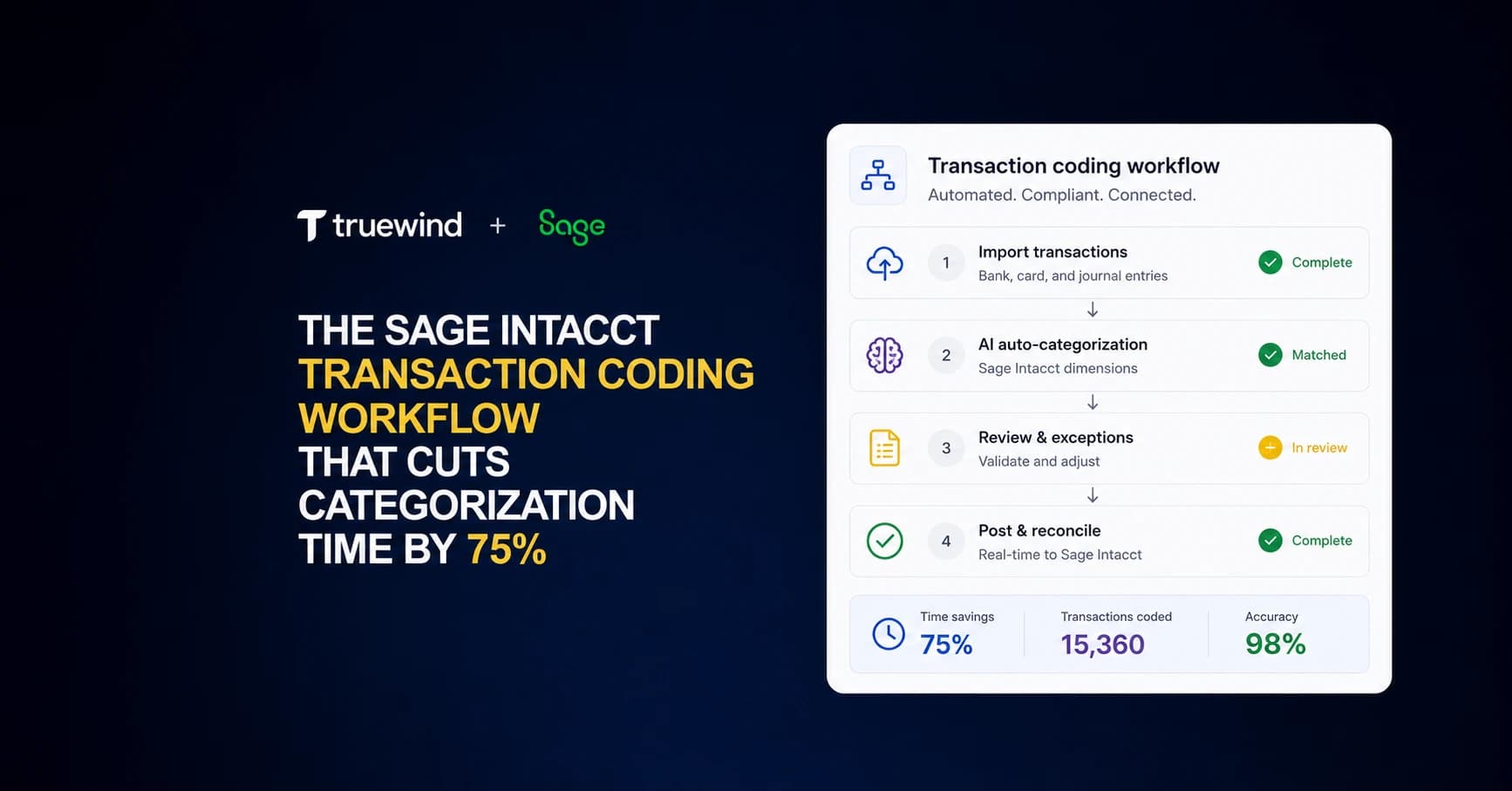
You code transactions in Sage Intacct the same way every month, but the system makes you do it manually every time. Vendors don't change. Department logic stays consistent. Project assignments follow clear patterns. Yet every transaction still requires you to open a dropdown, scroll through options, and click six different dimension fields before it posts to the GL. Teams processing 500+ monthly transactions spend entire days on this repetitive work. Cutting Sage Intacct categorization time means letting AI handle the pattern-based coding your team already knows by heart, so you can focus on the exceptions that actually need human judgment.
TLDR:
- Sage Intacct lacks native bank feeds for transaction coding, forcing manual imports and categorization.
- AI classification reads memo text, vendor history, and department context to code transactions across all dimensions.
- One accounting firm cut categorization time by 75% using automated transaction matching for Sage Intacct.
- Truewind provides AI-powered bank feeds, brokerage reconciliation, and duplicate prevention for Sage Intacct users.
Why Sage Intacct Users Spend More Time on Transaction Categorization Than They Should
Transaction categorization in Sage Intacct takes longer than it should for most teams. The system offers strong GL controls, but coding each transaction still requires manual selection of entity, department, project, and class dimensions. Multiply that across hundreds of monthly transactions and the time adds up fast. Finance teams consistently report that manual data entry and categorization consume a disproportionate share of their working hours each month.
The Hidden Cost of Manual Transaction Coding in Mid-Market Companies
The Ventana Research benchmark puts the average month-end close at 6-7 business days. Mid-market companies frequently miss that target, with many running 10-20+ day closes when coding is manual and transaction volume is high.
Transaction categorization sits near the beginning of the close. When it stalls, everything downstream stalls too. Reconciliation can't start. Variance analysis can't run. Financial reporting waits at the back of a long queue.
For a company closing 15 days late every month, that's two extra weeks of decisions made without current numbers. The real cost isn't the hours spent on data entry. It's the strategic lag.
How Sage Intacct's Rule Engine Falls Short of User Expectations
Sage Intacct's built-in rule engine lets you map recurring transactions to specific GL accounts, but it hits a ceiling fast. Rules are static, which means any transaction that deviates slightly from a stored pattern gets flagged for manual review instead of intelligent reclassification.
For growing companies, this creates a backlog. Vendors change invoice formats, new expense categories appear, and subsidiary structures shift. Each change breaks existing rules and sends transactions back into the manual queue.
The Three Transaction Coding Workflows Sage Intacct Teams Actually Use
Sage Intacct teams generally fall into one of three transaction coding approaches, each with a distinct tradeoff between speed and control.
The first is fully manual entry, where staff code each transaction by selecting dimensions, accounts, and classes line by line. It's the most controllable method but also the slowest.
The second uses Sage Intacct's built-in auto-categorization rules, which apply saved templates to recurring vendor transactions. Setup takes time, and exceptions still require manual review.
The third layers AI tooling on top of Sage Intacct to handle classification at scale, learning from historical coding patterns to suggest or apply codes across high transaction volumes with minimal staff input.
| Approach | Setup Time | Processing Speed | Dimensional Coding | Exception Handling | Best For |
|---|---|---|---|---|---|
| Manual Entry | None required | Slowest - each transaction requires individual selection of entity, department, project, class, and account dimensions | Full control over all dimensions but requires staff to recall or look up correct codes for every line | Every variance or new vendor requires manual research and coding decision | Low transaction volumes under 100 per month where control outweighs time cost |
| Sage Intacct Auto-Categorization Rules | 2-4 weeks to map recurring vendors and build rule library | Fast for exact matches, slow for exceptions - rules apply instantly when vendor and amount patterns match stored templates | Pre-set dimensional codes apply automatically but require separate rule creation for each vendor-department-project combination | Non-matching transactions route to manual queue - no learning from context or memo fields | Businesses with stable vendor relationships and minimal month-to-month transaction variance |
| AI Classification (Truewind) | 1 week - system learns from existing GL history during initial sync | Fastest - processes 500+ transactions in minutes with full dimensional coding across all fields | Reads memo text, vendor history, amount context, and department patterns to code all dimensions simultaneously | Adapts to new vendors and format changes without rule updates - flags low-confidence codes for human review | Growing companies processing 200+ monthly transactions with changing vendor mix or complex dimensional requirements |
Why AI-Powered Transaction Classification Works Where Rules Fail
Rule-based systems break down when transaction data gets ambiguous. A vendor name like "Amazon" could map to software subscriptions, office supplies, or cloud infrastructure depending on the context. Static rules cannot read context. They apply the same logic regardless of memo field content, department, or prior coding patterns.
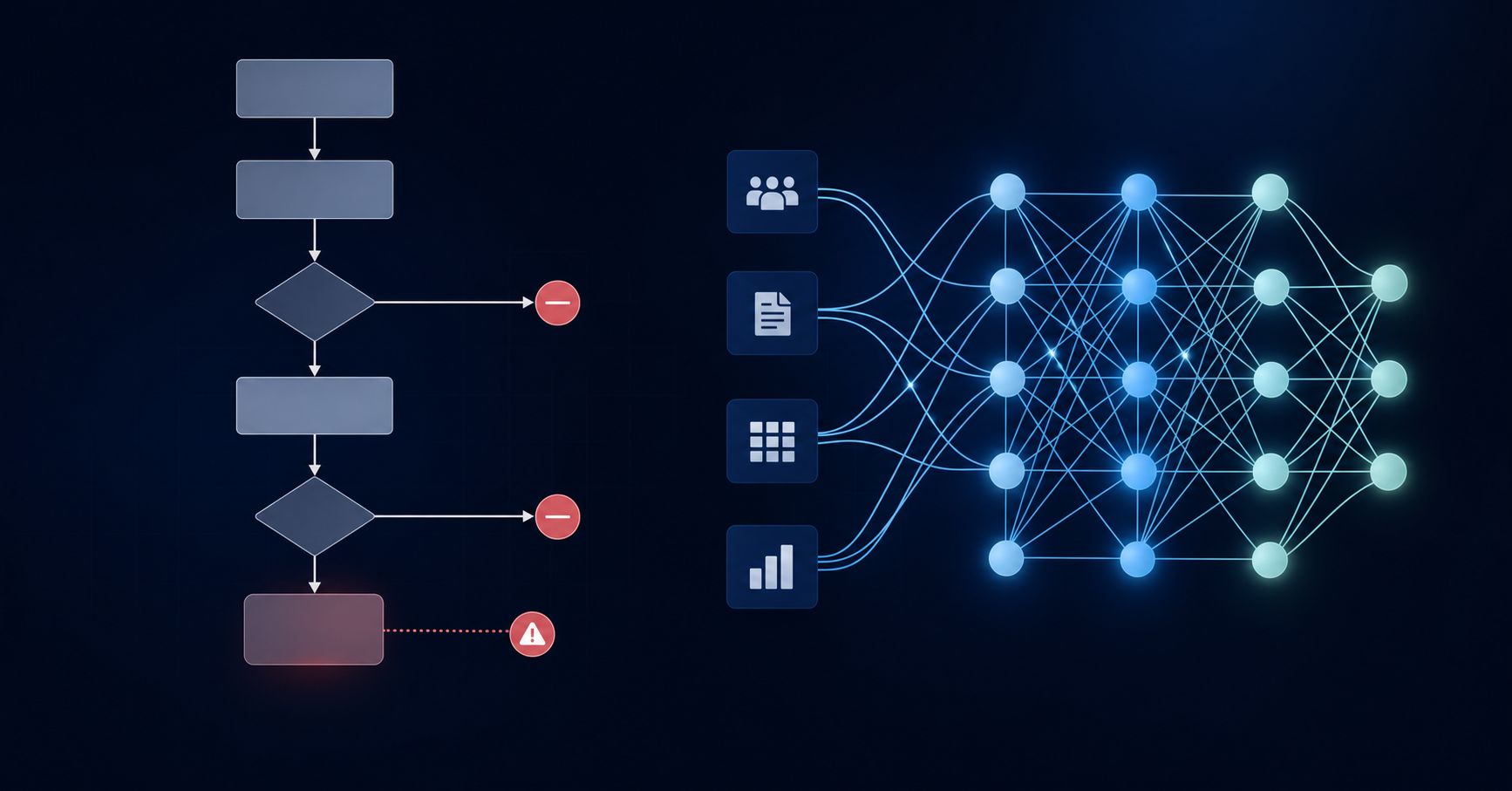
AI classification reads across all available fields simultaneously. Memo text, vendor history, amount ranges, and department context all factor into each coding decision, the same way an experienced accountant would reason through an unfamiliar transaction.
The Dimensional Complexity Challenge in Sage Intacct Transaction Coding
Sage Intacct's multi-dimensional structure is one of its biggest reporting strengths, but it multiplies the per-transaction coding burden considerably. Most GL systems require one decision per transaction. Sage Intacct routinely requires six or more, with account code, class, department, location, project, and any custom dimensions your team has configured all needing consistent population across every line item.
Manual coders feel this pressure at scale. One skipped dimension corrupts department-level P&L. Inconsistent project tagging makes profitability reports unreliable across periods.
From 20-Day Closes to 5-Day Closes: What Changes When Transaction Coding Accelerates
APQC benchmarking research consistently shows that top-performing finance teams close in under five calendar days, while the majority of mid-market teams run much longer cycles. Most teams running 20-day closes aren't slow everywhere. They're slow at the start, and every subsequent task absorbs that delay.
AI-handled classification moves coding from a multi-day effort to a same-day review queue. Reconciliation opens earlier. Variance analysis has more runway. The close compresses from start to finish.
The Bank Feed That Sage Intacct Should Have Built
QBO users get transactions delivered automatically every morning. Sage Intacct users don't. There's no native bank feed for transaction coding, which means manual imports, no AI assistance, and a categorization step that never gets faster no matter how long your team has been on the system.
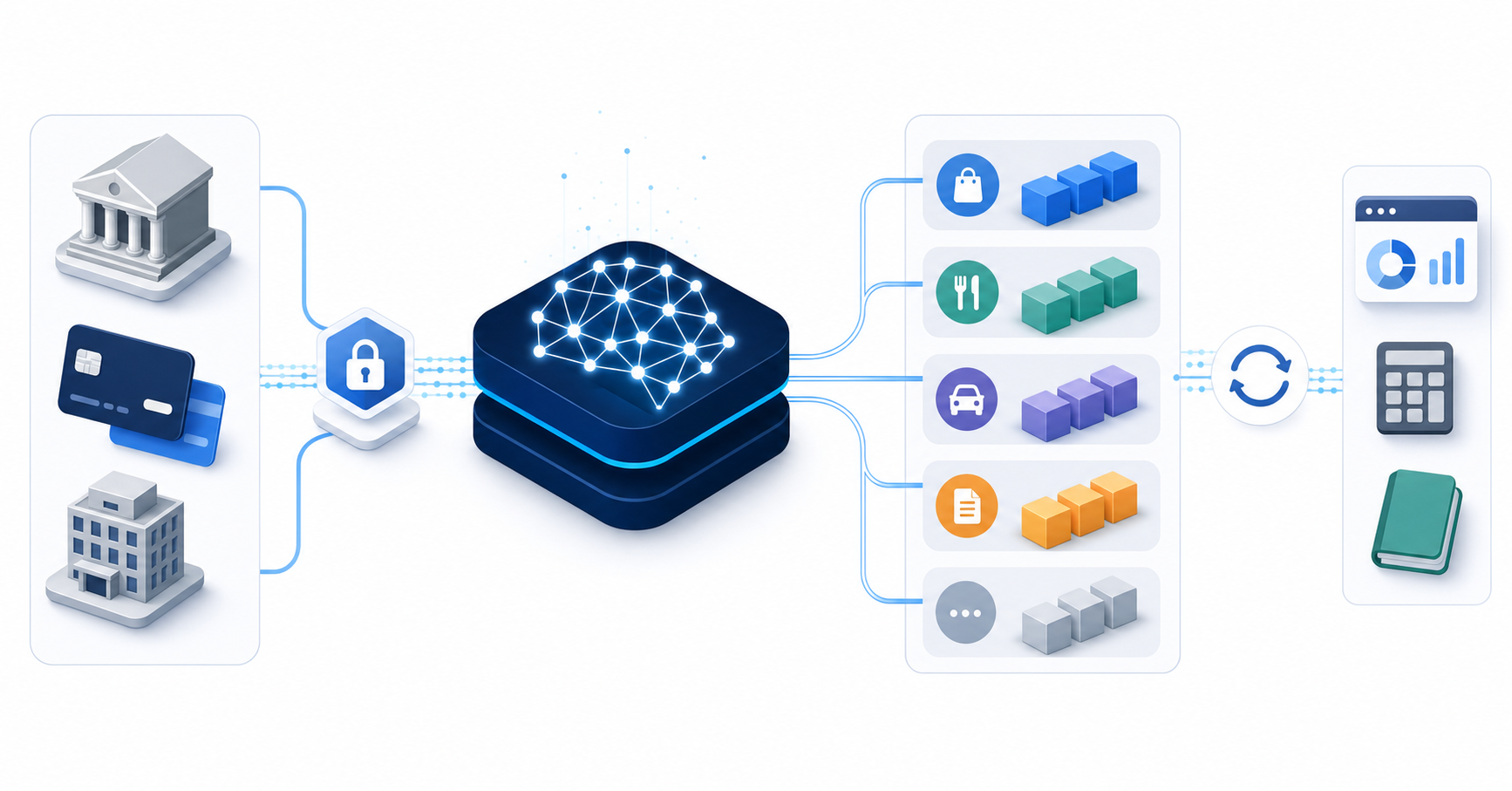
The workflow that should exist is straightforward:
- Bank and credit card accounts connect once via Plaid or Finicity, with no recurring manual exports required.
- Transactions pull in automatically across all connected accounts each day.
- AI assigns the full dimensional stack: account, class, department, location, payee, and project.
- Each classification surfaces with a confidence score and a plain-language explanation so reviewers know exactly why a transaction was coded a certain way.
- Approved transactions sync directly back to Sage Intacct without manual re-entry.
Truewind built this workflow for Sage Intacct users. For most teams, it's live and delivering results in week one.
How High-Volume Nonprofits Handle Donation Reconciliation on Sage Intacct
Many nonprofits processing thousands of donations monthly face a consistent bottleneck: matching incoming gifts to the correct fund, program, and restriction codes inside Sage Intacct. Manual coding across multiple dimensions slows close timelines and creates reconciliation backlogs. HHL Advisors reported 75% less categorization time on credit card transactions after layering automated transaction matching on top of Sage Intacct's dimensional accounting, freeing staff to focus on variance review and donor reporting instead of data entry.
Family Office Brokerage Reconciliation: The Limitation Sage Can't Solve
Brokerage accounts sit outside Sage Intacct's reconciliation module. Portfolio data from systems like Addepar may land on the server, but it won't display where reconciliation actually runs. There's no bank-to-book view for non-standard custodian feeds. For a family office managing 350+ brokerage accounts across 200+ entities, that gap compounds every month.
Truewind handles this reconciliation outside Sage entirely. Addepar exports or custodian statements come in as the bank side. GL entries already posted in Sage serve as the book side. Truewind matches the two, routes exceptions to reviewers, and posts clean journal entries back to Sage. The GL never touches the messy middle, and the system of record stays intact.
Duplicate Transaction Prevention Across Manual and Automated Workflows
When one person codes transactions directly in Sage while another works in Truewind, the risk of double-posting is real. Truewind resolves this through continuous monitoring of what's already been posted in Sage, matching on transaction IDs so nothing slips through.
Every transaction in Truewind sits in one of three states:
- Full review: awaiting classification and approval before anything moves to the GL
- Categorized: already pushed into Sage Intacct and reflected in your books
- Excluded: already posted in Sage by another workflow, held back to prevent a duplicate entry
Excluded transactions remain visible in Truewind for audit purposes. They won't post again.
How Truewind Delivers the Transaction Coding Experience Sage Intacct Users Want
Truewind connects directly to Sage Intacct and runs AI-powered transaction classification across your full transaction volume. Every incoming transaction gets matched against your existing chart of accounts, vendor history, and department coding rules before a human ever reviews it.
The result is a suggested coding set that your team can approve, adjust, or reject in bulk. No manual lookups. No toggling between tabs to check how a vendor was coded last quarter.
Where Sage Intacct gives you the infrastructure, Truewind gives you the classification layer on top of it.
Final Thoughts on Improving Sage Intacct Transaction Coding Speed
The bottleneck at the start of your close doesn't fix itself. Better Sage Intacct coding speed requires changing how transactions get classified before they reach your review queue. Truewind connects your bank accounts, applies AI across all dimensional fields, and syncs approved entries directly back to Sage. You can request a Truewind demo to see how it handles your transaction volume in week one.
FAQ
Sage Intacct categorization time vs manual entry?
AI classification cuts categorization time by 75% compared to manual entry for most Sage Intacct teams. Where manual coding requires selecting entity, department, project, and class dimensions for each transaction individually, AI reads across all fields simultaneously to suggest complete dimensional coding sets that reviewers can approve in bulk.
Can I connect bank accounts to Sage Intacct without manual exports?
Yes. Plaid and Finicity connections pull transactions automatically from bank and credit card accounts, delivering the bank feed experience that Sage Intacct lacks natively. Transactions arrive coded with your full dimensional stack: account, class, department, location, payee, and project, ready for review and sync back to your GL without manual re-entry.
What's the fastest way to handle brokerage reconciliation on Sage Intacct?
Pull brokerage data from portfolio management systems like Addepar, match it against GL entries already posted in Sage, and complete the matching outside the GL entirely. Sage Intacct's reconciliation module won't display non-standard custodian feeds, so the matching layer needs to sit between your portfolio system and your books.
How does duplicate transaction prevention work across Sage and Truewind?
Truewind monitors what's already posted in Sage Intacct and flags those transactions as "excluded" in the interface. Matching runs on transaction IDs so nothing posts twice even when team members code directly in Sage while others work in Truewind. Excluded transactions stay visible for audit purposes but won't sync again.
When should I automate transaction coding instead of building more Sage rules?
If your team spends more than 10 hours per week on manual categorization, or if your close runs longer than 10 days with coding delays at the start. Static rules break when vendors change formats or new expense categories appear, sending transactions back to manual review queues instead of learning from context the way AI classification does.
Turn this into a close-ready workpaper
Start with sample files or upload your own statements to see how Truewind prepares review-ready workpapers and journal entries.