

The bank feed in QuickBooks worked a specific way: transactions appeared, you assigned categories, approved them, and moved on. Sage Intacct doesn't replicate that workflow natively. Instead, it matches transactions against entries already sitting in your GL. Sage Intacct transaction categorization for raw charges before they hit the ledger falls on your team. There's no review queue where you code dimensions and approve in bulk. If your workflow relies on the bank feed to drive that initial coding step, you're working around a gap that slows down close prep and stretches your team thin.
TLDR:
- Sage Intacct lacks a native bank feed for transaction coding, only offering reconciliation.
- Rigid rule-based matching in Sage misses vendor description variations that AI handles easily.
- Uncoded transactions delay month-end close; top performers finish in 4.8 days vs 10+ for laggards.
- Truewind adds QBO-style transaction coding to Sage with full dimensional support and one-click sync.
Why Sage Intacct Users Want a QuickBooks-Style Bank Feed
Sage Intacct users who came up through QBO feel the gap right away. In QBO, transactions flow in, you pick a category, confirm, and move on. The whole workflow is built around speed and minimal friction, which is a big reason QBO became the default for small and mid-market accounting teams.
Sage Intacct is a more capable GL in many respects, but that experience isn't there natively. There's no transaction feed where you review and approve categorizations in a queue. As one practitioner put it: "A lot of folks in Sage Intacct come to us and say, we really like the bank feed in QBO... which you don't necessarily have in Sage." Across multiple entities or credit cards, that absence adds up fast.
What Sage Intacct's Native Bank Feed Actually Does (and Doesn't Do)
Sage Intacct pulls in bank transactions and can match them against existing GL entries using reconciliation rules. That process saves real time during month-end close. But it's a reconciliation tool, not a coding interface.
The distinction matters. Reconciliation assumes entries already exist in your GL waiting to be matched. Transaction categorization happens before that: raw bank charges come in and need to be assigned a GL account, class, department, payee, and any other relevant dimension from scratch. QBO handles both. Sage Intacct handles the former and largely leaves the latter to your team.
If every transaction is pre-coded before bank rec begins, Sage's native matching works fine. But if your team relies on the bank feed to drive that initial coding workflow, you're working around a gap.
CapabilitySage Intacct NativeTruewind on Sage IntacctTransaction coding workflowNo native transaction review queue. Reconciliation assumes GL entries already exist. Teams must code transactions elsewhere before bank rec begins.QBO-style transaction feed with review queue. Code raw bank charges directly with full dimensional support before posting to GL.Vendor matching logicExact match rules only. Variations like "UNITED AIRLINES 1234" vs "UNITED AIR 1234-5" require separate rules or fail to match entirely.LLM-based fuzzy matching recognizes vendor variations automatically without rule maintenance. Learns from historical GL data and user corrections.Dimensional assignmentManual entry required for account, class, department, location, project, and custom dimensions across multiple screens.Full dimensional assignment in one pass. All Sage dimensions including custom fields populated automatically based on transaction context.Duplicate preventionNo cross-system duplicate detection. Teams coding in multiple places risk posting same transaction twice.Continuous monitoring of posted Sage entries. Transaction ID matching prevents duplicates even when team members work simultaneously in different systems.Brokerage reconciliationBrokerage data from Addepar or custodians often won't surface in reconciliation module. Bank-to-book rec for brokerage activity cannot happen inside Sage.External reconciliation layer handles brokerage rollforwards. Matches custodian data against GL entries and syncs clean journal entries back to Sage.Prepaid schedulesLimited native functionality described as "not really a reconciliation." No automatic amortization schedules or rollforward reports. Teams maintain manual spreadsheets each period.Automated schedule generation from source invoices. Rollforward reports produced automatically with GL-ready journal entries mapped to chart of accounts.
The Rigid Rules Problem: Why Sage's Matching Rules Fall Short
Sage Intacct's rule engine works on exact match logic. You define a condition like a vendor name or description string, and when a transaction meets it precisely, the rule fires. When it doesn't, nothing happens.
Vendor descriptions rarely stay consistent. "UNITED AIRLINES 1234" becomes "UNITED AIR 1234-5" the next month. Same vendor, same expense category, but the rule misses entirely. Rigid matching fails to capture half the rules teams actually need.
Teams respond by building more rules to cover variations, then more to cover variations of those. The ruleset grows brittle and still misses transactions. Each gap either gets manually coded or surfaces at close as a reconciliation exception.
The maintenance burden compounds fast for an accountant managing multiple entities and several credit cards.
How AI Classification Solves the Variation Problem
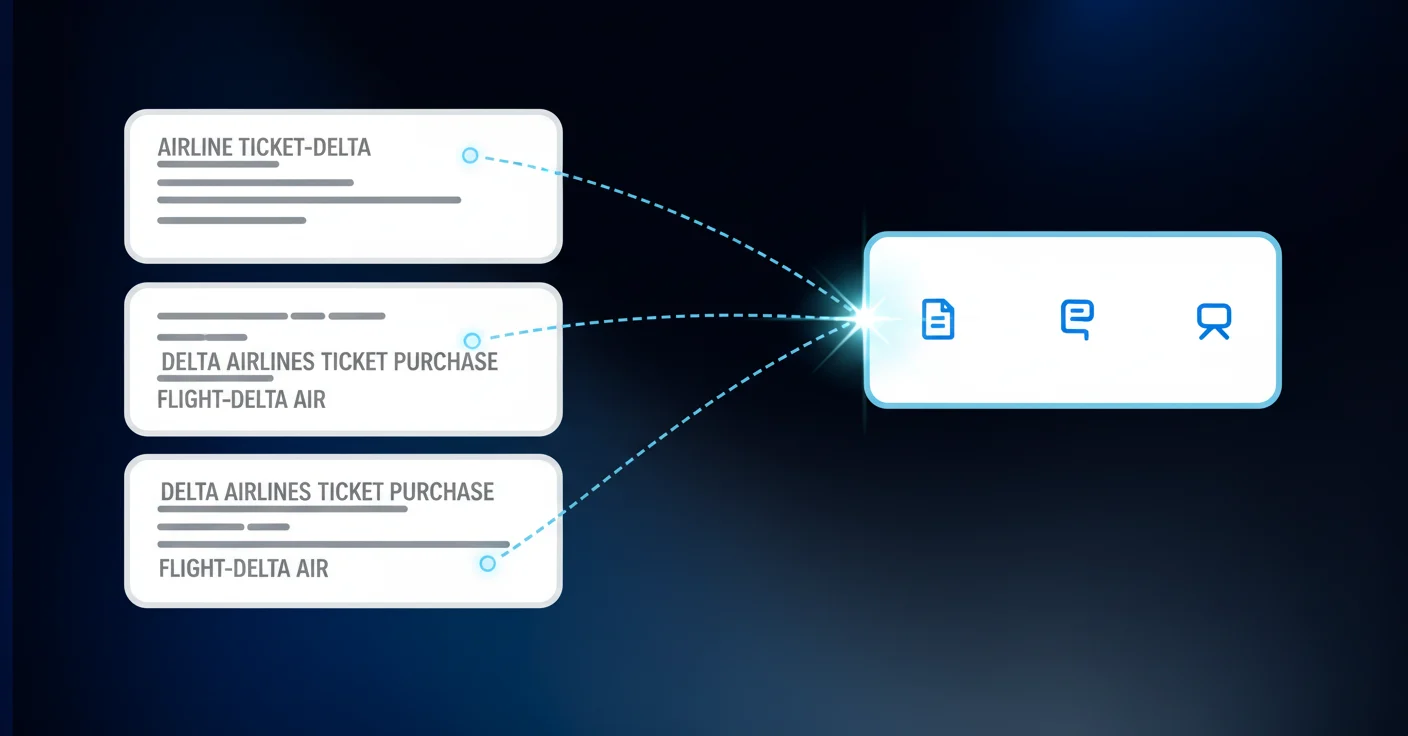
Where rules need exact matches, AI works on meaning. Transaction descriptions like "UNITED AIRLINES 1234" and "UNITED AIR 1234-5" aren't the same string, but they clearly point to the same vendor and expense category. LLM-based fuzzy matching catches that without any rule update required.
When connected to your Sage instance, the system reads your historical GL data first. That history becomes the training signal, factoring in vendor-to-account mappings, how charge amounts map to expense types, and how your dimensional structure gets applied across transactions.
Every classification includes a confidence score and a plain-language explanation of why the AI made that call. High confidence? Bulk approval takes seconds. Something looks off? You override it, and the model learns from that correction too.
Close Cycle Time Is At Stake
Transaction coding feels like a tactical task. It's actually a close bottleneck.
When uncoded transactions pile up, everything downstream waits. Bank rec can't close cleanly. Accruals get estimated on incomplete data. Review cycles stretch as the team chases categorization exceptions instead of signing off.
The data backs this up. Among 2,300 organizations surveyed, the bottom quartile takes 10 or more calendar days just for monthly close. Top performers finish in 4.8 days or less. That gap is driven largely by how much manual work sits in the prep phase, and transaction coding sits squarely there.
A QBO-style coding workflow on Sage Intacct moves categorization out of the critical path entirely. Controllers spend review time on exceptions. Senior accountants stop triaging vendor description mismatches. The close shrinks because the prep is already done.
Building a QBO-Style Workflow on Top of Sage Intacct
The architecture here is straightforward: Sage Intacct stays where it is, as your system of record. A separate automation layer sits alongside it, handling the work that Sage does not do natively.
An AI layer connects to your bank accounts and credit cards via Plaid or Finicity, pulling transactions in automatically. Learn everything about this integration. AI classifies each one against your chart of accounts and dimensions. You review, approve, and sync. The coded entries post directly to Sage via API, appearing as matched entries inside your GL, unlocking AI-native close automation.
Sage does not change. Your team just stops doing manual data entry between the bank and the ledger.
Dimensional Support: More Than Just Category and Payee
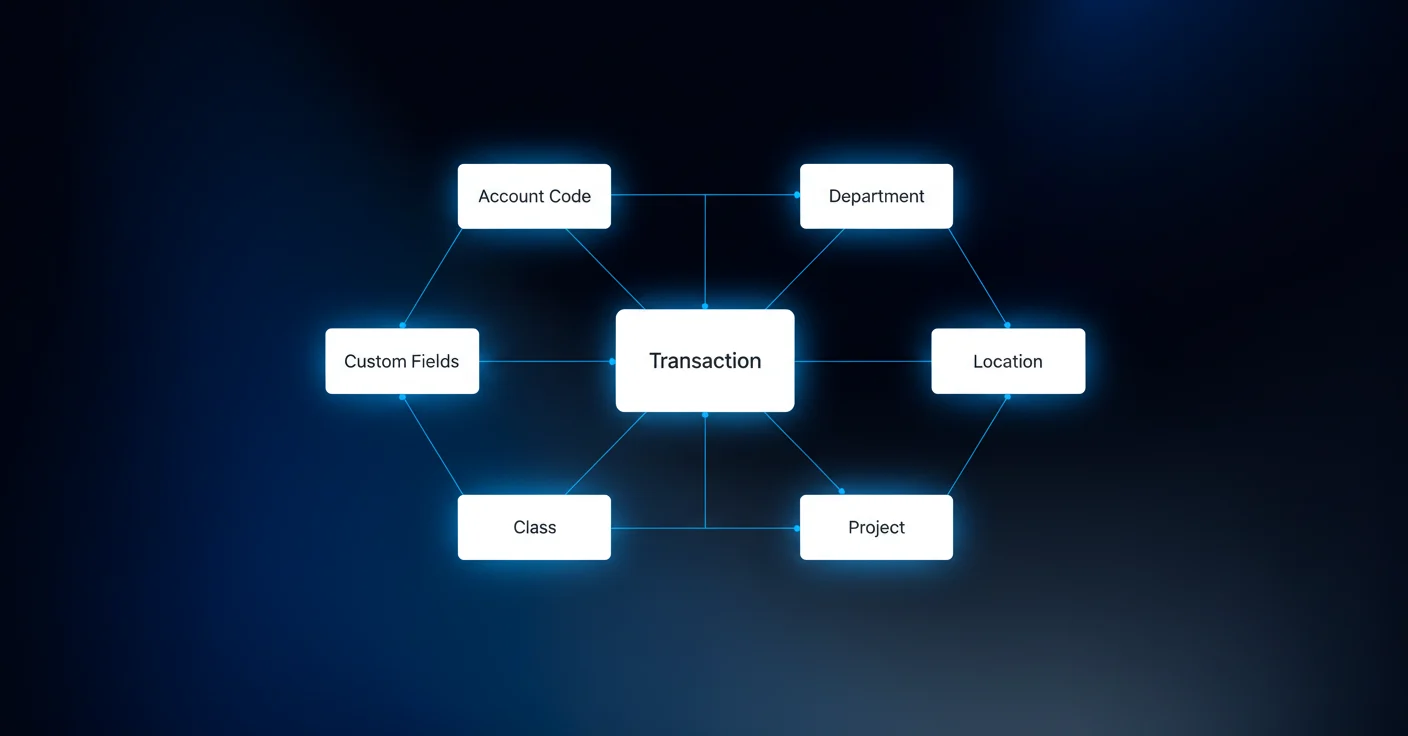
Sage Intacct's dimensional model goes well beyond what QBO requires. A single transaction might need an account code, department, location, class, project, and a custom dimension specific to your entity setup.
Any coding solution that only assigns GL account and payee leaves your team finishing the job manually. That is a partial answer, not a complete one.
The right approach pulls the full dimensional structure directly from your Sage instance, including any custom dimensions you have configured. When a transaction gets classified, every relevant dimension is assigned in one pass, ready to sync. Reviewers see the full breakdown before approving, so nothing gets posted with a gap.
Duplicate Transaction Prevention Between Sage and Bank Feeds
Not every transaction gets coded through an automation layer. Teams coding directly in Sage while others work in a separate interface create real duplicate risk. Without detection, the same charge posts twice.
Continuous monitoring of what's already been posted in Sage catches this before it becomes a problem. Transactions already coded there get flagged and excluded automatically. They stay visible in the review interface for transparency, but won't sync again. Matching happens on transaction IDs, catching duplicates even when two team members are working in different systems at the same time.
The Brokerage Account Reconciliation Gap
Family offices on Sage Intacct hit a specific wall with brokerage accounts. Sage can match bank transactions that flow through Plaid, but brokerage accounts fed through portfolio management systems like Addepar are a different story. Even when that data reaches Sage's backend, it often won't surface in the reconciliation module. Bank-to-book rec for brokerage activity simply cannot happen inside Sage.
The workaround is an external reconciliation layer that provides consistent brokerage rollforwards, without the manual work. Brokerage data from Addepar or custodian statements serves as the bank side. GL entries already posted in Sage serve as the book side. Matching happens outside Sage, exceptions route to reviewers, and only clean matched journal entries sync back to the ledger.
Prepaid and Deferred Revenue Schedule Automation
Sage Intacct's built-in prepaid and deferred revenue tools are limited. Prospects describe them as "not really a reconciliation," which is accurate. Native functionality won't build amortization schedules or produce rollforward reports automatically. That work lands on your team, usually in a spreadsheet maintained manually each period.
The automation path is straightforward: source invoices and schedules get ingested, rollforward reports generate automatically, and the corresponding journal entries get built and mapped to your Sage GL codes and dimensions. No spreadsheet maintenance. Prepaid schedules post directly to Sage, ready for review and sign-off before posting.
How Truewind Brings QBO-Style Transaction Coding to Sage Intacct
Truewind connects to your bank accounts and credit cards via Plaid and Finicity, classifies every transaction with full Sage Intacct dimensional support, and lets your team approve and sync directly to the GL in one click with AI bookkeeping for faster close. Sage stays your system of record. Duplicate detection keeps the ledger clean. Historical GL data seeds the classification model from day one.
Every pain point covered in this post has a direct answer in the workflow: rigid rules, missing bank feeds, brokerage reconciliation gaps, prepaid schedules. The engineering investment is narrow by design, two GL integrations done well, with a dedicated Sage team behind them.
Final Thoughts on Making Sage Intacct Work the Way Your Team Needs
Sage Intacct gives you a powerful GL, but Sage Intacct transaction categorization shouldn't require manual workarounds every month just to get bank transactions coded correctly. Truewind fills that gap with AI classification that respects your full dimensional model and syncs clean entries directly to your ledger. Your team can see a demo to walk through the exact workflow. Close prep becomes background work instead of a blocker.
FAQ
Can I get a QBO-style bank feed in Sage Intacct without switching ERPs?
Yes. Truewind connects to your bank accounts via Plaid and Finicity, classifies transactions with full dimensional support, and syncs coded entries directly to Sage Intacct via API. Sage remains your system of record while the automation layer handles the transaction coding workflow that Sage doesn't provide natively.
Sage Intacct transaction rules vs AI categorization: which actually saves time?
AI categorization handles vendor description variations automatically without creating dozens of brittle rules. Where Sage's rule engine misses "UNITED AIRLINES 1234" vs "UNITED AIR 1234-5," LLM-based matching recognizes both as the same vendor and expense category instantly. No rule maintenance required.
How does duplicate transaction prevention work when teams code in both Sage and an external system?
The system monitors what's already posted in Sage Intacct and automatically flags those transactions as excluded. Matching happens on transaction IDs, so even when team members work in different systems simultaneously, the same charge won't post twice. Excluded transactions stay visible for transparency but won't sync.
What dimensions does sage intacct coding automation support beyond GL account?
Full dimensional support includes account code, class, department, location, payee, project, and any custom dimensions configured in your Sage instance. Every transaction gets classified with all relevant dimensions in one pass, ready to sync without manual completion.
When should I automate prepaid and deferred revenue schedules instead of using spreadsheets?
If your team maintains manual amortization spreadsheets each period or if Sage Intacct's native prepaid tools don't produce the rollforward reports you need for review. Automation ingests source invoices, generates rollforwards automatically, and builds GL-ready journal entries mapped to your chart of accounts without spreadsheet maintenance.
Turn this into a close-ready workpaper
Start with sample files or upload your own statements to see how Truewind prepares review-ready workpapers and journal entries.