
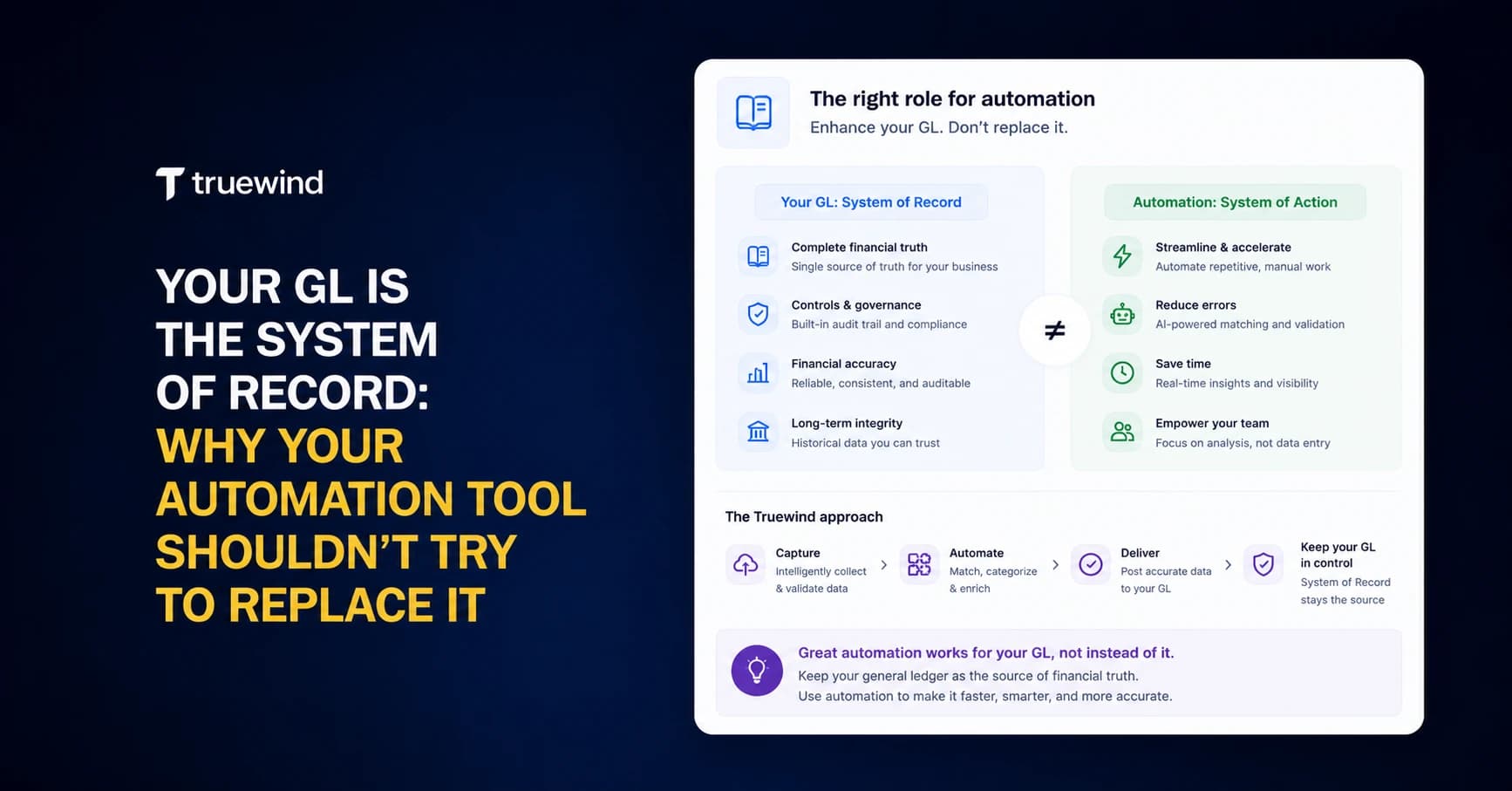
Every board report, every audit response, every investor question you field traces back to the general ledger. Not your bank feed, not your automation tool, not the spreadsheet someone built last quarter. If you're running Sage Intacct as your system of record, you chose it because you needed dimensional accounting, multi-entity consolidation, and audit-grade controls that simpler tools couldn't handle. But some automation vendors complicate that by building internal ledgers and reporting from their own databases instead of writing directly to Sage. When your GL and your automation tool hold competing records of the same transactions, reconciliation stops being a step in your close and starts being its own project. The question worth asking before connecting any tool to your GL: does it treat Sage as authoritative, or does it try to become a second source of truth?
TLDR:
- Your GL is the authoritative record auditors and investors trust - automation tools should write to it, not replace it.
- Sage Intacct's dimensional structure requires API-level integrations that preserve class, department, location, and custom fields on every write.
- Duplicate posting and dimension mapping failures are the most common integration risks that compromise GL integrity.
- Truewind operates as an execution layer that reads from Sage Intacct, automates categorization and reconciliation, then syncs clean entries back after human review.
Why the General Ledger Is Your Single Source of Truth
Every number your CFO cites, every audit your team survives, every board report you produce traces back to one place: the general ledger. Not your spreadsheets. Not your bank feed. Not your automation tool. The GL.
The GL holds the chart of accounts, the posted entries, and the dimensional structure your reporting depends on. When auditors arrive, they go straight to it. When investors question a number, you defend it with what's in the GL.
For Sage Intacct users, this is worth stating plainly. Sage Intacct earns its role as system of record because it enforces structure: dimensions, approval workflows, audit trails. Any tool you bring into your stack should work around that structure, not compete with it.
What Happens When Automation Tools Try to Become the Source of Truth
Some vendors store financial data in their own systems, building internal ledgers or producing reports from their own databases. Two competing records of the same transactions means matching them becomes its own project.
If your automation tool holds data your GL doesn't, you've introduced a second source of truth by accident. Auditors follow the GL. If entries live somewhere else first, the audit trail breaks before it starts.
The Difference Between a System of Record and a System of Execution
The GL stores what happened. An execution layer handles the work required to get there.
Sage Intacct owns the chart of accounts, the posted transactions, the final balances. What it does not do is classify your bank transactions, route exceptions to the right reviewer, or build your prepaid schedules automatically. That's where an execution layer comes in.
- System of record: holds authoritative data, enforces structure, produces reports
- System of execution: categorizes, matches, routes exceptions, then syncs clean entries back to the GL
Work happens in the execution layer. Results land in the GL.
Why Sage Intacct Users Should Protect GL Integrity Above All Else
Sage Intacct isn't a starter GL. Organizations choose it because they've outgrown simpler tools and need dimensional accounting, multi-entity consolidation, and audit-grade controls.
That complexity cuts both ways. The same dimensional structure that makes Sage Intacct powerful makes it fragile to outside interference. A transaction posted without the right class, department, or location breaks reporting across every entity and rollup that depends on it. This applies to complex schedules too, like prepaid expense amortization in Sage Intacct.
Sage users also face formal audits, grant compliance reviews, or investor scrutiny more often. Nonprofits managing restricted funds, family offices with complex ownership structures, and companies under external financial oversight all run Sage Intacct. In those environments, GL integrity is a compliance requirement.
Common Integration Pitfalls That Compromise Data Integrity
Every automation tool eventually writes to your GL. The risk isn't in the writing. It's in what gets written, and whether your GL can trust it.
- Duplicate posting occurs when two systems can write to the same GL simultaneously. GL reconciliation errors are among the most common causes of close delays and audit findings. Truewind's AI-native close automation solves this problem by design.
- Dimension mapping failures happen when shallow integrations drop Sage Intacct fields like class, department, or project entirely.
- Reconciliation gaps appear when a tool's internal records never match what actually posted to the GL.
| Integration Approach | How It Works | GL Integrity Risk | Dimensional Support | Duplicate Prevention |
|---|---|---|---|---|
| File-Based Upload | Tool generates CSV or Excel files that users manually import into Sage Intacct through the UI or batch upload process | High - no validation before import, manual reconciliation required, no audit trail of source system | Limited to fields included in file template, custom dimensions often dropped or require manual mapping | None - user responsible for checking if transactions already exist before each upload |
| Shallow API Integration | Tool uses Sage Intacct API to read and write data but maintains its own database as primary record, syncing periodically | Medium - competing sources of truth require constant reconciliation, discrepancies appear between systems | Partial - supports standard dimensions but custom fields and project structures often unsupported | Basic - timestamp checks or batch deduplication, but concurrent posting from multiple sources can create duplicates |
| Execution Layer Architecture | Tool reads GL structure and historical data via API, processes transactions in memory with human review, writes approved entries directly to Sage as single source of truth | Low - Sage Intacct maintains authoritative record at all times, no competing ledger exists | Complete - preserves class, department, location, project, payee, and all custom dimensions on every write | Continuous - monitors posted transactions in real-time via API, automatically excludes any transaction already in Sage from sync queue |
How to Assess Whether an Automation Tool Respects Your GL
Before trusting any vendor's claims about Sage Intacct compatibility, ask the right questions. Truewind's classification engine is built for this purpose.
- Does the integration use the API or file uploads? File-based connections are not real integrations.
- Does the tool preserve your full dimensional structure, including class, department, and project on write?
- How does it handle duplicate posting prevention across concurrent GL writes?
- Does the vendor explicitly name the GL as the system of record, or do they hedge?
The Right Architecture: Automation as an Execution Layer on Top of Sage Intacct
Sage Intacct sits at the center, and every other tool feeds into it. Automation handles the messy work upstream. Clean, reviewed entries land in the GL downstream.
- Bank transactions pull in via Plaid or Finicity
- AI classifies each transaction with the full dimensional structure your Sage instance expects, turning what used to take hours into automated transaction coding that takes minutes
- A reviewer approves or adjusts
- One sync pushes the result directly into Sage as a posted entry
Sage never loses custody of the data. The automation layer reads from Sage, works outside it, and writes back when a human approves. The two systems communicate via API, but neither modifies the other's interface.
Why Human Reviewers Still Own the Final Decision
AI classification is fast and consistent. It still gets things wrong.
A transaction description that looks like office supplies might be a capital purchase. A recurring charge that matches a known vendor might be a duplicate from a different account. These are common failure modes that surface when review is thin.
Automation can propose. Only the reviewer can confirm.
How Truewind Keeps Sage Intacct as Your System of Record
Truewind reads from Sage via API to seed classification models with your historical GL data and chart of accounts. It writes back only after a human approves. Sage never loses the authoritative record at any point in that loop.
"We spent a lot of effort investing in engineering to make sure no duplicate transactions appear. Your GL is your system of record."
Truewind reads from Sage via API to seed classification models with your historical GL data, chart of accounts, and full dimensional structure. It writes back only after a human approves. Sage holds the authoritative record at every point in that loop.
Full dimensional support means class, department, location, payee, project, and any custom dimensions your instance uses all carry through on write. This level of detail supports strategic accounting powered by AI. Duplicate prevention monitors what's already posted in Sage continuously, so a transaction coded directly in Sage gets flagged as excluded in Truewind automatically.
Two integrations. One dedicated engineering team per GL. That focus is what makes the difference between a real integration and an Excel upload dressed up as one.
Final Thoughts on Choosing Automation That Respects Sage Intacct
Your Sage Intacct system of record already enforces the structure your reporting depends on. The automation layer you add should work within that structure, not bypass it. That means full dimensional support on write, duplicate prevention across systems, and approval before any entry posts to the GL. If you're comparing tools and want to see what a real API integration looks like, request a demo and we'll show you how the sync works.
FAQ
What makes a tool safe to integrate with Sage Intacct without compromising GL integrity?
Look for API-level integration that reads from and writes to Sage Intacct while preserving your full dimensional structure (class, department, location, project, custom dimensions). The tool should prevent duplicate posting automatically and explicitly position your GL as the system of record, not create a second ledger in its own database.
How does an execution layer differ from what Sage Intacct already does?
Sage Intacct owns your chart of accounts, posted transactions, and final balances. An execution layer handles the classification, reconciliation, and exception routing work required before entries hit your GL. Work happens in the execution layer, results land in Sage.
Can automation tools safely write to Sage Intacct while someone codes transactions directly in the GL?
Yes, if the tool monitors what's already posted in Sage continuously. Transactions coded directly in Sage should get flagged as excluded in the automation tool automatically to prevent duplicate posting. This requires real-time API communication, not batch file uploads.
Why do Sage Intacct users need bank feed automation when other GLs have it built in?
Sage Intacct lacks the native bank feed transaction coding experience that QuickBooks Online provides. An execution layer brings that capability to Sage users: automated categorization with full dimension support, fuzzy matching that handles transaction description variations, and one-click sync to your GL.
What should reviewers actually control when using AI classification?
Reviewers approve or adjust every proposed categorization before it posts to Sage. AI proposes the GL code, class, department, location, and payee. The reviewer confirms or corrects. Final posting decisions stay with the human, and audit trails capture who approved what.
Turn this into a close-ready workpaper
Start with sample files or upload your own statements to see how Truewind prepares review-ready workpapers and journal entries.