

Most sage intacct duplicate transactions come from webhook retries, overlapping sync jobs, or someone manually entering a record that already came through automation. Your team catches them during reconciliation, deletes one copy, and moves on. But the real problem isn't the duplicate itself. It's that your automation stack writes to Sage without checking what's already posted. That's an architecture issue, not a sync issue.
TLDR:
- Duplicate transactions cost finance teams up to 0.5% of invoice volume annually in wasted effort
- Sage Intacct's native duplicate checks don't account for concurrent API calls or parallel manual entry
- API-level integrations prevent duplicates by checking the GL in real time before posting new entries
- Truewind monitors what's already posted in Sage and auto-excludes coded transactions to prevent double-posting
- Truewind uses an AI-powered digital staff accountant that automates Sage Intacct transaction coding with human reviewers maintaining final control
Why Duplicate Transactions Happen in Sage Intacct
Duplicate transactions in Sage Intacct rarely come from a single point of failure. They tend to accumulate across the handoff between your ERP and whatever automation layer sits on top of it.
The most common source is webhook retry logic. When an automation tool like Zapier, Make, or a custom integration fires a webhook and doesn't receive a confirmed response from Sage Intacct within its timeout window, it retries. If the original request actually succeeded, you now have two identical journal entries or bills sitting in the same period.
A second source is manual re-entry. When syncs fail silently, someone on the team notices a missing transaction and enters it by hand, unaware the automated record eventually came through.
Third, poorly scoped triggers can fire on record updates in addition to creation events, pushing the same transaction into Sage Intacct multiple times across a single workflow.
The Hidden Cost of Double-Coding Between Systems
When your automation tool sends a transaction to Sage Intacct and the same entry already exists, you get a duplicate posting. It happens quietly. A webhook fires twice, a retry loop runs after a timeout, or a sync job overlaps with a manual entry. The result lands in your GL without warning.
The cost compounds fast. Your team spends time hunting down which entry is real, reconciliation takes longer, and auditors flag the discrepancy anyway. Research shows that duplicate payments alone cost finance teams between 0.1% and 0.5% of total invoice volume annually. For a company processing $10M in payables, that is up to $50,000 in preventable errors per year.
Most teams treat this as an inevitable side effect of automation. It is not.
How Sage Intacct's Native Reconciliation Tools Handle Duplicates
Sage Intacct includes basic built-in safeguards. Bank transaction imports check against existing records using date, amount, and reference ID fields before posting. The reconciliation module surfaces conflicts between imported statement lines and open GL entries in a similar way.
Creation rules add another layer. Teams can configure Sage to reject transactions with identical reference numbers within a given period, which catches simple re-imports cleanly.
Sage also recommends importing only delta files, meaning net-new transactions since the last import, instead of re-uploading full statement history. That practice keeps the import layer clean, assuming someone follows it consistently every cycle.
The gap appears when automation tools enter the picture. Sage's duplicate checks work on what's already inside the GL. They don't account for in-flight API calls, webhook retry logic in external tools, or manual entries made while automation is running simultaneously. Native safeguards were built for manual import workflows, not for the concurrent, bidirectional data flows that come with connected automation layers.
When Automation Tools Introduce New Duplicate Risks
The irony of adding automation is that each connected tool introduces a new surface for duplicate postings. Not because the tools are broken, but because they aren't built to coordinate with each other.
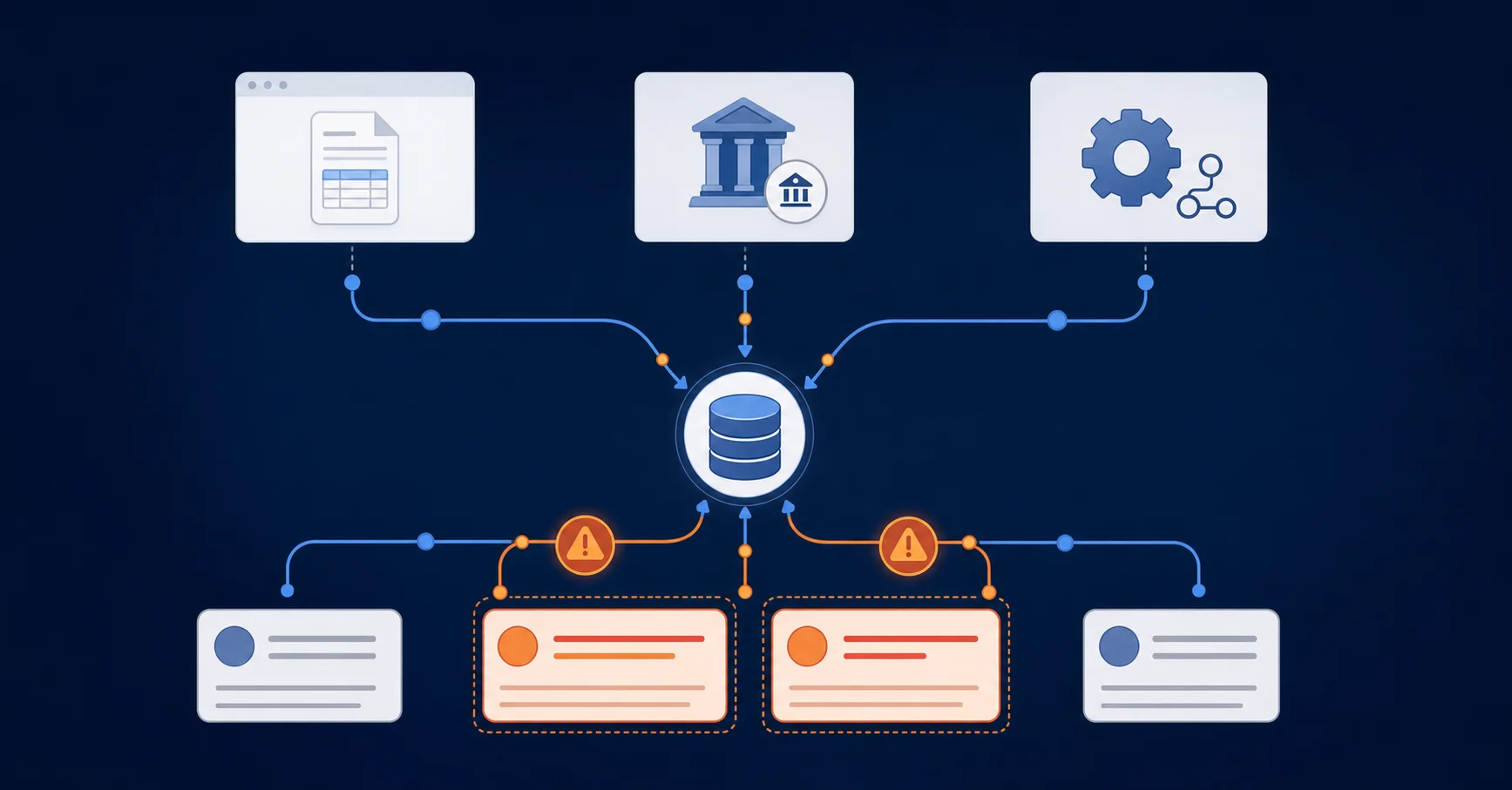
Consider a common setup: Bill.com handling AP, a bank feed pulling ACH transactions, both writing to the same Sage Intacct instance. When Bill.com syncs a vendor payment and the bank feed independently imports the same ACH debit, Sage receives two entries for one transaction. Neither system flags the conflict. Both believe they acted correctly.
This is where sage intacct duplicate transactions typically originate: at the seams between tools, not within any single one. The more integrations your stack includes, the more seams exist. Zapier triggers, middleware like Workato, native sync connectors, and manual CSV imports all create independent write paths into the same GL with no built-in awareness of each other.
Transaction State Visibility and Duplicate Prevention Architecture
Preventing sage intacct double posting at the architectural level requires continuous, real-time visibility into what's already in the GL before deciding whether to write anything new. Standard ERP duplicate controls often fail because they check only what's inside the system, not what's in-flight across connected tools.
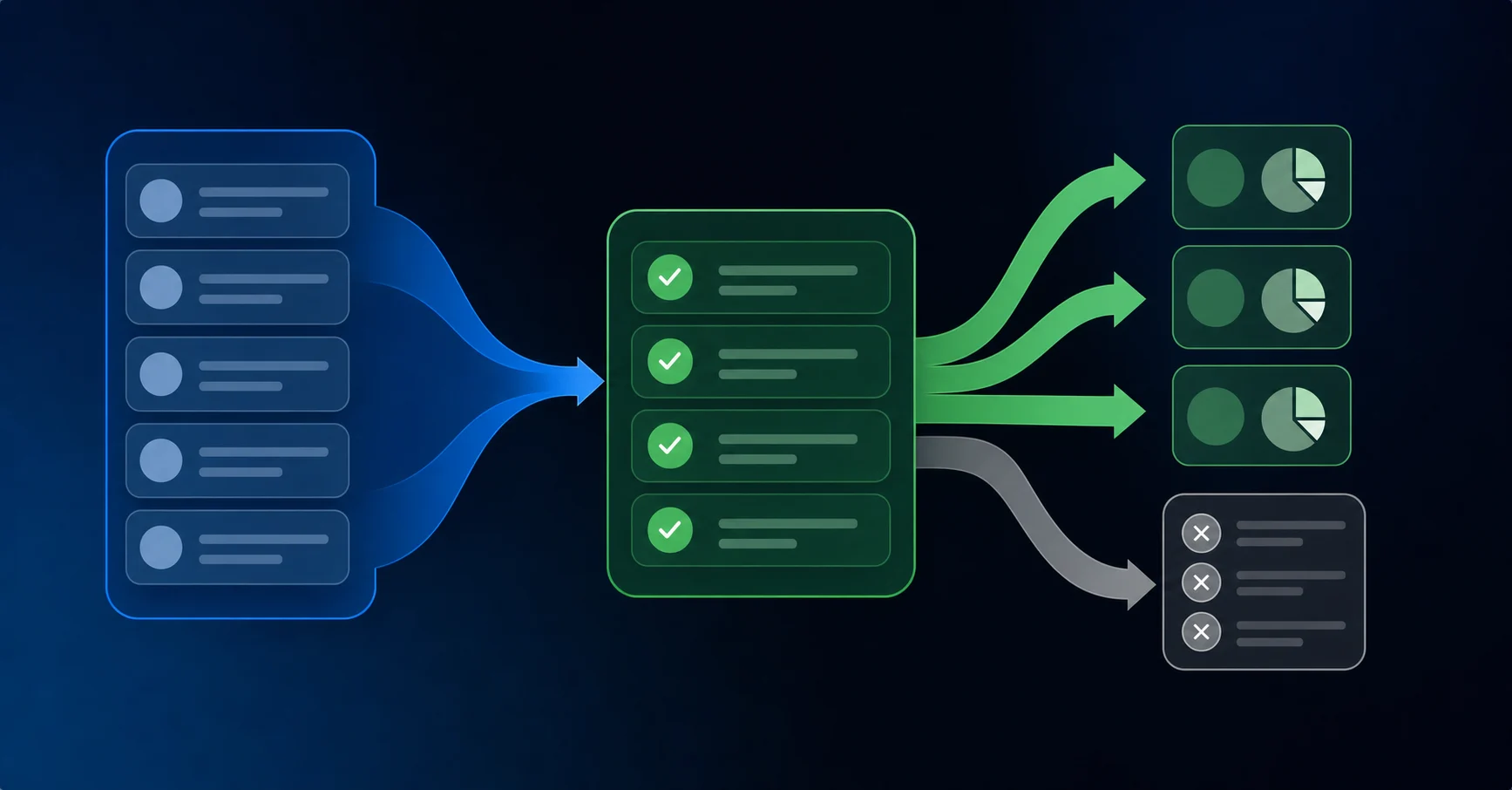
Every transaction in the workflow needs to carry one of three states:
- Awaiting review: new transactions pulled from bank feeds, not yet posted anywhere
- Categorized: transactions already pushed into Sage by the automation layer
- Excluded: transactions that were coded directly in Sage by a team member, flagged to prevent re-posting
The excluded state is where most duplicate prevention systems fall short. When two people work in parallel, one inside Sage and one inside an automation tool, neither system inherently knows what the other just did. Continuous GL monitoring closes that gap. By reading what's currently posted in Sage on an ongoing basis and matching against transaction IDs, the automation layer can hold back any entry that's already landed, regardless of which system posted it first.
Why a Bank Feed-Style Interface Reduces Double Entry
Sage Intacct lacks a native bank feed, so teams build workarounds: coding some transactions directly in Sage, routing others through Bill.com, uploading the rest via spreadsheet. Each method is a separate write path into the same GL with no awareness of the others. Cloud ERP consolidation studies found that 77% of organizations eliminated data silos by reducing these parallel entry points, making duplicate data entry elimination a key productivity gain.
A bank feed-style interface collapses those paths into one. Transactions flow in from connected accounts, get reviewed in a single queue, and sync to Sage once. Because it continuously reads what's already posted in Sage, it holds back anything that already landed before writing anything new. One entry point. One check against the existing GL. The parallel paths that create duplicate risk simply stop existing.
API-Level Integration vs. File Upload: What It Means for Duplicate Prevention
The method your automation tool uses to connect with Sage Intacct determines how much duplicate risk you carry by default.
File-based integrations (CSV exports, scheduled uploads, batch syncs) introduce timing gaps where the same transaction can be processed twice before either system reflects the update. There is no real-time feedback loop, so your deduplication logic only runs after the fact.
API-level integrations write directly to Sage Intacct's GL layer in real time. Each request receives an immediate response, including error codes for duplicate detection. Your automation tool can check for existing entries before posting, not after.
The practical difference shows up at close. Teams running file-based sync spend time hunting duplicate postings manually, while best-in-class AP teams with AI-powered platforms reached touchless rates above 70% in 2025, up from 47.2% the year before.
Teams on API-native connections catch conflicts at the transaction level before they land in the ledger.
Integration MethodDuplicate Detection TimingTransaction State VisibilityConcurrent Write HandlingCSV/File UploadPost-import only, during manual reconciliationBatch snapshots with timing gaps between exports and importsNo coordination between overlapping uploads or manual entriesScheduled Batch Sync (Zapier, Make)After sync completes, relies on webhook confirmationPeriodic polling with delays between sync cyclesWebhook retries can create duplicates if timeout occurs before confirmationNative Sage Import ToolsChecks reference number and date matches within same periodReads existing GL entries at time of importWorks for manual imports but unaware of external automation tool writesBill.com + Bank FeedEach tool checks independently, no cross-system awarenessSeparate state tracking per system, both writing to same GLAP sync and bank ACH import for same payment create two entriesAPI-Native Integration (Truewind)Pre-write validation with real-time GL reads before postingContinuous monitoring of posted transactions with three-state tracking (awaiting, categorized, excluded)Idempotent writes prevent duplicate posting even if API call retries or runs twice
How Truewind's Sage Intacct Integration Prevents Double-Coding
Truewind's Sage Intacct integration is built to cut out the manual reconciliation work that creates duplicate transactions in the first place. It runs deduplication logic at the point of entry, before anything touches your GL, instead of syncing raw data and hoping your team catches overlaps.
A few ways this works in practice:
- Transaction fingerprinting flags records with matching vendor, amount, date, and reference number before they post, giving your team a chance to review before cleanup becomes necessary.
- Sync state tracking keeps a persistent record of which transactions have already been written to Sage Intacct, so re-triggered automations don't create second entries.
- Idempotent write operations mean that even if a sync job runs twice due to a timeout or API retry, the same transaction won't post more than once.
The result is fewer surprise duplicates surfacing during close and less time spent tracing back through automation logs to find where a double-posting originated.
Final Thoughts on Stopping Duplicate Entries in Sage Intacct
If you're still manually hunting sage intacct duplicate transactions each close, your automation layer doesn't know what's already posted before it writes. While Gartner's 2026 finance research shows nearly 60% of finance teams are piloting AI projects, only 7% of CFOs report strong impact, highlighting why architectural approaches to duplicate prevention matter more than simply adding AI tools.
The answer isn't adding more checks after entries land. It's preventing the second write from happening at all. Book a demo to see how continuous GL reads work with your existing Sage setup. Your close should close, not turn into a duplicate detection project.
FAQ
Can I prevent Sage Intacct duplicate transactions without changing my entire workflow?
Yes. The key is implementing continuous GL monitoring at your automation layer. This checks what's already posted in Sage before writing new entries, flagging duplicates before they land in your GL instead of requiring manual cleanup during close.
Sage Intacct duplicate prevention: API integration vs CSV uploads?
API-level integration writes directly to Sage's GL layer with real-time feedback, catching conflicts at the transaction level before posting. File uploads introduce timing gaps where the same transaction can process twice before either system reflects the update, pushing deduplication work to after-the-fact cleanup.
What causes sage intacct double posting between automation tools?
Double posting happens at the seams between systems writing to the same GL. When Bill.com syncs a vendor payment and your bank feed independently imports the same ACH debit, Sage receives two entries for one transaction because neither tool knows what the other just did.
How do I know if a transaction is already coded in Sage before my automation tool posts it?
Your automation layer needs to maintain three transaction states: awaiting review (new from bank feeds), categorized (already pushed by automation), and excluded (coded directly in Sage). The excluded state requires continuous reading of what's currently in Sage to hold back entries that already landed, regardless of which system posted them.
When should I worry about webhook retry logic creating duplicates?
When your automation tool fires a webhook and doesn't receive a confirmed response from Sage Intacct within its timeout window, it retries. If the original request succeeded, you get two identical entries. Look for this pattern if you see duplicate journal entries or bills appearing in the same period without manual intervention.
Turn this into a close-ready workpaper
Start with sample files or upload your own statements to see how Truewind prepares review-ready workpapers and journal entries.