

Your payment processors don't care about your AR close cycle. They batch transactions on their own schedule, net out fees before remitting, and hand you a payout statement that requires manual translation into Sage Intacct entries. Accounts receivable reconciliation for Sage Intacct turns into a monthly bottleneck where your team cross-references processor reports against open invoices, applies fee adjustments, and chases timing differences between when payments clear and when they post. The manual queue grows faster than it gets resolved. Automating deposit-to-statement matching cuts that cycle down to exception review only.
TLDR:
- Finance teams spend 20 to 50 hours monthly managing AR across systems, with manual processes taking 67% longer to manage overdue payments.
- Payment processors batch transactions and deduct fees before remitting, breaking Sage Intacct's one-to-one matching logic and creating reconciliation gaps.
- Sage Intacct's native bank feed tools handle basic matching but fail when deposits aggregate multiple invoices or include netted processor fees.
- Truewind connects to Sage Intacct and automates deposit-to-payout matching across processors, surfacing exceptions that need review while auto-posting high-confidence matches.
What AR Reconciliation Is and Why It Matters for Sage Intacct Users
AR reconciliation in Sage Intacct means verifying that every customer payment recorded in your accounts receivable subledger matches what actually landed in your bank account. For most teams, that process involves cross-referencing deposit totals against payout statements from payment processors, identifying timing gaps, and chasing down discrepancies before the books can close.
The friction compounds quickly. Payment processors batch transactions differently than invoices are issued, fees get netted out of deposits, and partial payments split across multiple periods. Each of these variables creates a mismatch that someone has to manually trace.
For growing companies running Sage Intacct, this becomes a real bottleneck at month-end. Finance teams report spending hours each close cycle on deposit matching alone, and unresolved AR discrepancies are among the most common reasons close timelines slip. Getting this right matters for both speed and the integrity of your revenue reporting and audit readiness.
Common AR Reconciliation Challenges That Delay Month-End Close
AR reconciliation problems tend to follow predictable patterns, and recognizing them by name helps your team catch issues before they compound at month-end.
The most common culprits:
- Timing differences: payments clear in a different period than they were applied in the subledger, creating open items that require manual research to resolve.
- Missing transactions: processor fees get netted out of payouts without line-item detail, leaving deposits that don't match invoice totals.
- Duplicate entries: payments arriving through multiple channels get recorded twice, distorting your aging report and inflating open receivables.
- Payment application errors: partial payments or credits land on the wrong invoice or open period, requiring manual correction before the books can close.
Each issue alone is manageable. Together, across dozens of customers and multiple payment processors, they stack into a real bottleneck. Finance teams typically spend 20 to 50 hours a month closing out accounts across systems. Manual AR processes also take 67% longer to manage overdue payments compared to automated workflows. Common AR reconciliation challenges like duplicate entries and timing mismatches require systematic processes to resolve consistently. That gap represents time not spent on close review, variance analysis, or anything else that requires human judgment.
How Payment Processor Deposits Create Reconciliation Complexity
When a customer pays via Stripe, PayPal, or Square, the funds rarely arrive in your bank account as a clean one-to-one match against an invoice. Processors batch multiple transactions into a single deposit, deduct fees before remitting, and operate on settlement cycles that differ from your billing periods. The result is a deposit amount that almost never matches any single AR record in Sage Intacct.
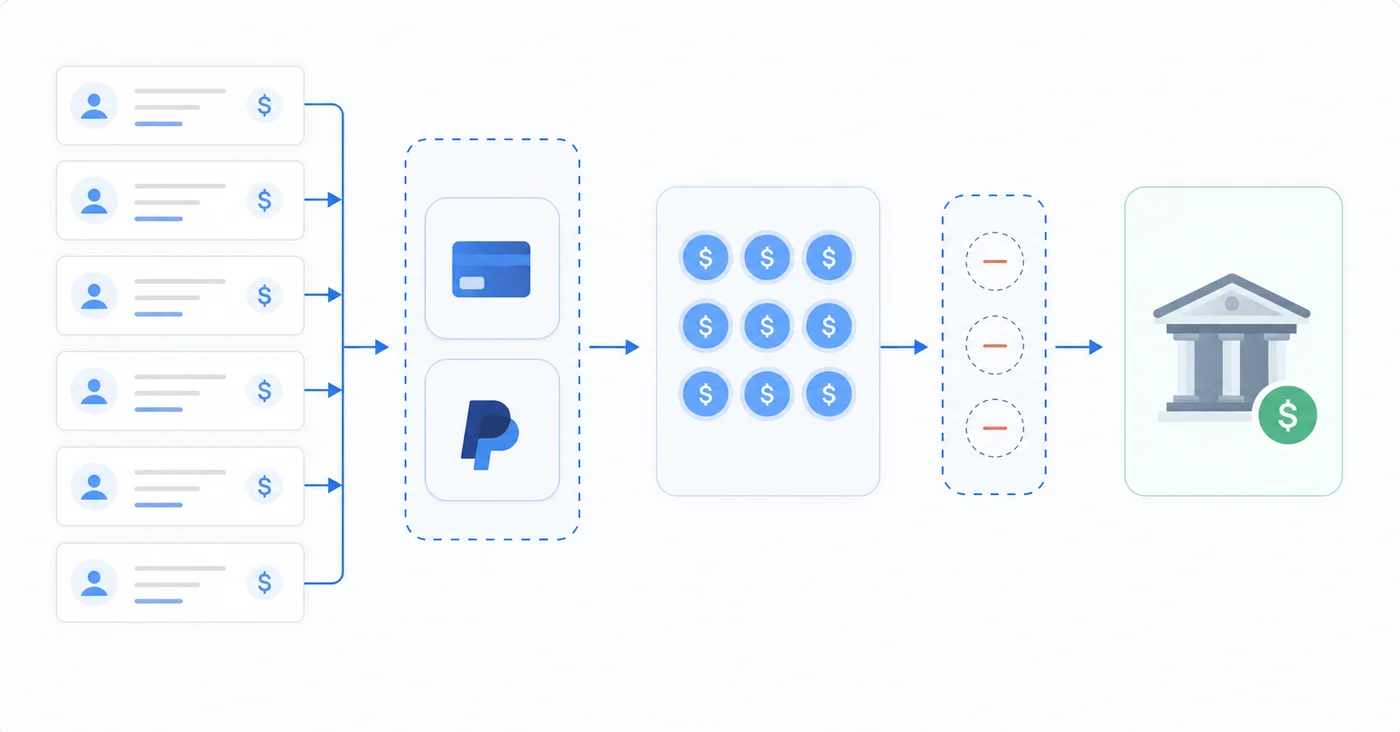
For finance teams closing monthly books, this creates a layered problem. You receive a payout statement showing gross transactions, fees, refunds, and chargebacks. Your bank feed shows one net deposit figure. Sage Intacct holds individual open invoices. Connecting those three data sources manually requires exporting reports, building lookup tables, and applying fee adjustments line by line.
The volume compounds the difficulty. A mid-size SaaS company processing a few hundred transactions per month can generate dozens of payout events across multiple processors, each requiring its own reconciliation pass before AR can be cleared and the period closed.
| Reconciliation Scenario | Manual Process in Sage Intacct | Native Bank Feed | Automated Matching Software |
|---|---|---|---|
| Single Stripe deposit covering 15 invoices with netted fees | Export payout report, build spreadsheet to map each transaction to invoice, manually calculate fee allocation, create journal entries for fee expense | Fails to match due to amount mismatch between gross invoices and net deposit, flags as exception requiring manual resolution | Pulls Stripe payout data via API, matches all 15 invoices to deposit automatically, posts fee expense to correct GL account, surfaces only true exceptions |
| PayPal batch with partial payments and refunds in same period | Download PayPal report, cross-reference each line against open AR, identify which partial payments apply to which invoices, manually adjust for refunds that offset new payments | Matches deposit amount but cannot split across multiple invoices or account for netted refunds without manual intervention | Splits deposit across correct invoice applications, nets refunds automatically, flags only items where customer reference is ambiguous |
| Timing gap where payment clears Friday but posts Monday in different month | Research transaction in both periods, create manual accrual entry, reverse in following period, document for audit workpapers | Transaction appears as open in both periods until manual journal entry resolves the timing difference | Detects timing pattern from historical data, suggests appropriate period assignment, auto-posts with audit trail for period-end review |
| ACH payment with missing remittance detail | Contact customer for payment application instructions, manually apply to oldest invoice or best guess, adjust if customer later disputes application | Matches deposit amount if it equals single open invoice, otherwise requires manual research and application | Suggests likely invoice matches based on amount and customer payment history, flags low-confidence matches for review before posting |
| Multi-entity deposit where processor aggregates subsidiaries | Export consolidated payout, manually split by entity using transaction detail, create intercompany entries if needed, close out each entity separately | Cannot handle multi-entity splits without extensive manual GL entry work to allocate deposit across subsidiaries | Splits deposit by entity automatically using processor metadata, posts to correct subsidiary AR accounts, handles intercompany clearing if required |
The Deposit-to-Statement Matching Process: Step by Step
The deposit matching workflow in Sage Intacct follows a predictable sequence, and understanding each step helps your team spot where manual effort accumulates.
Your bank feed or imported statement lands in Sage Intacct first. From there, the system attempts to match each deposit line against open AR transactions using amount, date, and customer reference fields.
Where the Process Gets Complicated
Standard matching works well for clean, one-to-one deposits. The friction appears when:
- A single deposit covers multiple invoices from one customer, requiring the system to split the payment across open AR line items correctly
- Partial payments arrive without remittance detail, leaving your team to manually hunt down which invoice the customer intended to pay for month-end close
- Processor fees reduce the deposited amount below the invoice total, creating a small variance that breaks exact-match logic
- Timing gaps between when a payment clears the bank and when it posts in AR cause transactions to fall outside standard matching windows, requiring month-end close automation to handle period-end cutoffs consistently
Each exception that falls through automated matching enters a manual review queue. For teams closing monthly, that queue grows faster than it gets resolved.
Sage Intacct's Native Bank Feed Capabilities and Limitations
Sage Intacct includes built-in bank reconciliation tools that handle basic transaction matching between your general ledger and bank statements. For straightforward cash accounts with predictable transaction patterns, these native tools work reasonably well.
The limitations surface quickly in AR workflows. Sage Intacct's bank feed matching is designed for one-to-one transaction alignment, where a single deposit corresponds to a single invoice. Stripe, PayPal, and other payment processors routinely batch multiple customer payments into a single net deposit after deducting fees, which breaks that assumption entirely.
Where native reconciliation tends to fall short:
- Fee deductions create automatic mismatches because the gross payment amount recorded in AR rarely equals the net deposit amount hitting your bank account.
- Batch deposits from processors like Stripe aggregate dozens of customer payments, making it impossible to trace individual invoices without manual intervention.
- Timing differences between payment capture and payout settlement introduce gaps that require manual journal entries to resolve.
These gaps become more disruptive as transaction volume grows, and they are among the core reasons finance teams look beyond Sage Intacct's built-in tools for AR reconciliation.
Automated Deposit Matching: How AI and Reconciliation Software Work
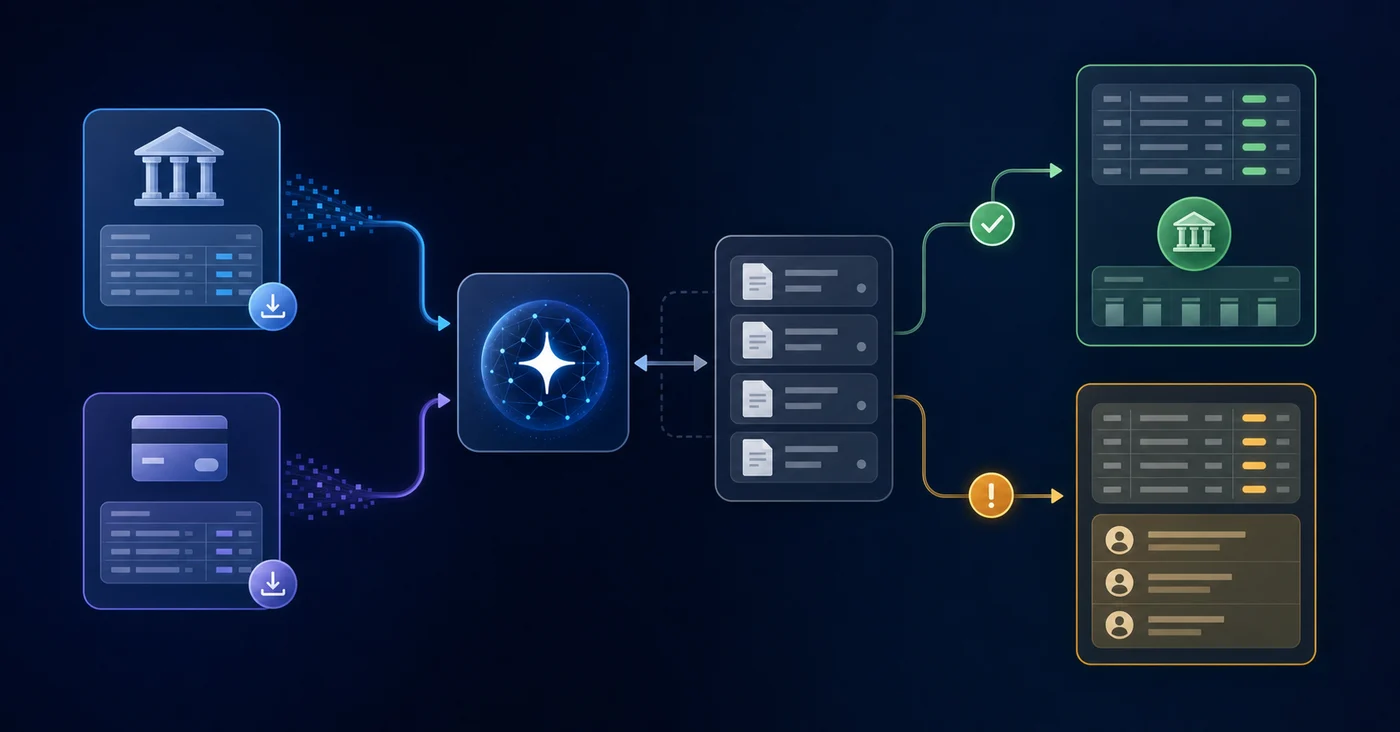
Reconciliation software built for Sage Intacct approaches deposit matching through a combination of rule-based logic and AI that learns from your historical transaction patterns. Instead of waiting for a human to manually compare each bank deposit against open AR invoices, the system ingests payout statements from processors like Stripe, PayPal, and ACH networks, then maps each deposit line to the corresponding customer invoice in Sage Intacct.
What the Matching Engine Actually Does
The core workflow follows a few distinct steps:
- The software pulls bank and processor statements via direct API connections or file import, normalizing date formats, amounts, and reference IDs across sources.
- Matching rules fire against open AR invoices using amount, date range, customer name, and memo fields as matching criteria.
- Confidence scores get assigned to each match, with high-confidence matches auto-posted and lower-confidence items flagged for review.
- Exceptions surface in a dedicated queue so your team spends time only where judgment is actually needed.
Truewind's AR Reconciliation for Sage Intacct Users
Truewind connects directly to Sage Intacct and automates the matching of deposits to payout statements, removing the manual work that slows down AR close cycles. Instead of your team cross-referencing bank feeds against processor reports line by line, Truewind's AI engine does the heavy lifting across payment processors, bank accounts, and GL entries simultaneously.
For teams running Sage Intacct, Truewind handles:
- Stripe, PayPal, and other processor payout reconciliation against your Sage Intacct AR ledger, flagging mismatches before they reach the close
- Multi-entity deposit matching, so teams running consolidated books across subsidiaries don't have to clear each entity manually
- Exception surfacing that isolates unresolved transactions and routes them to the right reviewer instead of burying them in a spreadsheet queue
The result is a tighter close cycle with fewer open items carried forward and a cleaner audit trail in Sage Intacct. Your team spends time on exceptions that actually need judgment, not on confirming matches that were always going to clear.
Final Thoughts on Fixing Deposit Matching Bottlenecks in Sage Intacct
The deposit matching problems covered here slow down every close cycle until you remove the manual steps. Sage Intacct AR reconciliation works better when payment processor batches, fee deductions, and timing gaps get handled before your team even opens the queue. You get faster closes and better audit trails without adding headcount to the reconciliation process. See how this works in practice for teams running Sage Intacct across multiple entities and payment processors.
FAQ
What's the fastest way to clear Stripe deposits in Sage Intacct without manual matching?
Connect your payment processor directly to reconciliation software that auto-matches deposits to payout statements using AI. The system pulls processor data, maps batched transactions to open invoices, and flags exceptions for review, eliminating the manual cross-referencing work.
Sage Intacct bank feed vs automated deposit matching software?
Sage Intacct's native bank feed handles one-to-one transaction matching well but breaks down when payment processors batch multiple invoices into a single net deposit. Automated matching software accounts for fee deductions, timing differences, and multi-invoice payouts that Sage alone cannot resolve without manual intervention.
How long does AR reconciliation typically take with manual deposit matching?
Finance teams spend 20 to 50 hours per month on manual accounts receivable reconciliation across systems. Most of that time goes toward matching batched processor deposits against individual invoices and resolving fee discrepancies that automated matching would catch immediately.
Can I automate deposit matching for Sage Intacct across multiple payment processors?
Yes. Reconciliation platforms built for Sage Intacct connect to Stripe, PayPal, ACH networks, and other processors simultaneously, pulling payout statements and matching them against your AR ledger in one workflow. The system handles multi-processor environments without requiring separate reconciliation passes for each source.
Why do processor fees always create mismatches in Sage Intacct AR reconciliation?
Processors deduct fees before remitting payment, so the net deposit hitting your bank account never equals the gross invoice amount recorded in Sage Intacct. Without fee-aware matching logic, every transaction with a processing fee becomes an exception requiring manual adjustment to close.
Turn this into a close-ready workpaper
Start with sample files or upload your own statements to see how Truewind prepares review-ready workpapers and journal entries.