
By the third business day, your best accountant is not making accounting judgments. They're chasing a processor report, cleaning a donor export, checking whether a custodian statement ties to last month's workpaper, and rebuilding the same preparation trail the reviewer will unpack again in forty-eight hours. That is what accountants waste time on, and it happens two weeks before a single journal entry is ready to sign.
Most AI conversations skip that middle layer entirely. The work is not just extraction. It is source, mapping, coding, reconciliation, exception review, workpaper preparation, and sign-off, all before anything should touch Sage Intacct or QuickBooks Online.
Key Takeaways:
- Accountants waste time on preparation work that happens upstream of the GL, not on judgment itself.
- Source-file inconsistency is the real close bottleneck: PDFs, exports, statements, and spreadsheets rarely arrive in the same shape twice.
- A reviewable workpaper is the interface between AI preparation and accountant judgment.
- The right AI workflow follows the team's existing process, flags exceptions, and keeps the reviewer in control.
- Sage Intacct and QuickBooks Online should remain the system of record. The preparation layer belongs above them.
Why Accountants Lose Time Before Review Starts
Accountants lose time before review because source files arrive in forms the ledger cannot understand. Bank feeds may be clean, but processor exports, donor reports, custodian PDFs, and prior workpapers still need interpretation. The close slows down in that middle layer, where preparation has to become repeatable.
Source-file work is accounting work
Ask a controller what accountants waste time on during close, and "thinking through accounting treatment" is not the first answer. You'll hear about reformatting files, tying totals, matching deposits, copying support into workpapers, and checking whether the current-period file behaves like the prior-period file. That work is not glamorous. It is still accounting work.
Picture a nonprofit finance manager on the second Tuesday of the month. Her donor platform emailed a CSV at 6:47 AM with fifteen columns in a new order. Her payment processor dropped a settlement PDF that lists gross receipts, fees, and refunds on three separate pages. The bank feed shows one net deposit for $84,320. All three files describe the same cash movement. None of them agree on how. Before she can code a single entry, she has to decide which file explains the variance and how the activity should split across funds, programs, and restrictions.
The mistake is treating that work as OCR. OCR reads characters. Accounting preparation decides whether a PDF, CSV, or portal download is complete, whether the totals make sense, and whether the classification matches the way the team handled similar activity last period. Automate only extraction, and you leave the hardest part for the accountant anyway.
Familiar manual control can hide weak control
Manual close work feels controlled because someone touches every file. We get why teams trust it. A spreadsheet with tabs, formulas, reviewer notes, and highlighted exceptions looks safer than an AI-prepared output that no one can trace.
Manual touch is not the same as reviewable control. When work is split across inboxes, downloads, spreadsheet copies, and Slack questions, the team may know who did the work, but not always why a number landed where it did. By the time the reviewer opens the workpaper, they're reconstructing the preparer's logic instead of reviewing the accounting treatment.
Here is a red-flag checklist worth running against your own close. If two or more of these describe your team, the preparation trail is the bottleneck, not the ledger: the reviewer opens files that are not linked from the workpaper; the same classification correction was made last month and again this month; the preparer's rationale lives in a Slack thread instead of the workpaper; a reviewer re-performs a reconciliation because the source tie-out is missing; a monthly variance explanation cites "same as last period" without the prior evidence attached. For teams trying to move that trail into a reviewable workflow, See Truewind in action.
The ledger cannot fix messy upstream work
Sage Intacct and QuickBooks Online are systems of record. They are not designed to decide what a scanned custodian statement represents, how a donor export maps to restricted funds, or whether a processor settlement changed format since last month. They record the approved result. They do not prepare the messy evidence that leads to it.
That distinction matters. If accountants waste time on upstream preparation, replacing the GL or adding another dashboard will not solve the problem. The work between source documents and the ledger needs its own operating layer, with source, calculation, treatment, exceptions, and reviewer sign-off in one place. The ledger records the answer; the layer above it has to earn the answer.
How to Stop Wasting Accountant Time on Preparation
The way to stop wasting accountant time on preparation is to make recurring close work reviewable before it reaches the ledger. That means standardizing source intake, applying prior-period logic, surfacing exceptions, and preparing the exact workpaper a reviewer expects. The accountant still owns the judgment.
Start by separating preparation from judgment
Preparation and judgment often live in the same spreadsheet, which makes the process harder to improve. Preparation is the repeatable work: gather source files, normalize activity, apply mappings, roll forward schedules, reconcile totals, and draft the entry. Judgment is the reviewer's decision on treatment, exceptions, policy, and sign-off. Mixing them makes everything feel important in the same way.
Here is the diagnostic. Take one recurring workflow and mark each task as either preparation or judgment. If the task follows a prior-period rule and produces support for review, it is preparation. If the task requires a decision about accounting treatment, materiality, classification change, or exception handling, it is judgment. A useful threshold: if more than 60% of the hours on a recurring workflow fall in the preparation bucket, you have room to redesign the workflow before you have room to redesign the treatment.
Run the test on a donation reconciliation, brokerage rollforward, prepaid schedule, or processor settlement entry. You'll usually find the same sequence:
- Source collection: Which files arrived, which are missing, and which version is current.
- Mapping: Which accounts, dimensions, funds, or entities apply.
- Tie-out: Which totals agree across systems and which don't.
- Exception routing: Which items need reviewer attention.
- Sign-off: Which prepared output is approved for the GL.
The point is not to remove the accountant from the workflow. Frankly, that story has always felt wrong for close work. The point is to stop asking accountants to spend the first part of every close rebuilding the same preparation surface before judgment can begin.
Use prior workpapers as operating context
Prior workpapers are not just audit support. They are the clearest record of how your team actually does the work. A prior-period reconciliation shows account mappings, cutoff logic, classification choices, reviewer notes, and the exceptions that mattered. A prior journal entry shows the dimensions and splits the team trusted enough to post.
A good preparation workflow should learn from that history instead of forcing the team into a generic template. If last month's processor fees were allocated by location, and the reviewer corrected two edge cases, those decisions should inform the next period. If a family office treats similar custodian activity differently by entity, the workflow has to preserve that difference. Otherwise, the accountant is stuck correcting the same "standard" output every month.
Use a simple rule: if the team has corrected the same classification twice, capture it as workflow context before the next close. Do not leave it buried in a spreadsheet comment. Do not rely on one preparer remembering it. Put the decision where the next preparation cycle can use it, and make sure the reviewer can still see what changed.
Not every workflow is ready for that. A brand-new process with no prior workpapers, no stable source files, and no reviewer convention is a poor candidate for automation, and it should stay in a manual spreadsheet until the team has run it three or four times. Start where the history is rich. Recurring work with known answers is where preparation can become repeatable without pretending accounting judgment is generic.
Design workpapers reviewers can re-perform
A workpaper is not a report. It is source, calculation, accounting treatment, exceptions, and reviewer sign-off in one place, in that order. When that structure is missing, the reviewer has to become a detective. They open the output, trace numbers back to downloaded files, ask why an account was selected, and decide whether the preparer followed the same rule as last month.
The standard should be stricter than "does the answer look right?" Ask whether the reviewer can re-perform the key steps without leaving the artifact. Can they click back to the source file? Can they see the calculation? Can they understand the treatment applied? Can they see which items were exceptions and which were prepared under the learned process? If any answer is no, the workpaper is not review-ready.
For recurring workflows, the review surface should show four things before sign-off:
- Source evidence: The file, statement, export, or prior workpaper behind each line.
- Calculation path: How the number was derived, tied, allocated, or rolled forward.
- Accounting treatment: The account, dimension, fund, entity, or classification applied.
- Reviewer action: Approval, correction, comment, or return to preparation.
A small example makes the difference obvious. A processor settlement entry that only shows a net deposit is not enough. The reviewer needs gross receipts, fees, refunds, timing differences, source reports, bank match, coding, and any unreconciled items. Without that, the GL entry may be clean, but the review is weak.
Treat exceptions as part of the workflow
Exceptions are not a failure of accounting automation. They are the point where judgment belongs. Missing statements, unexpected balance changes, mixed personal and business activity, changed export layouts, and inconsistent classifications should be routed to the accountant, not buried inside a forced tie-out.
The decision rule is direct: if an item changes the accounting treatment, affects completeness, or breaks the learned pattern, it belongs in the exception queue. If an item follows the same mapped rule as prior periods and ties to source, it belongs in prepared work. That split keeps reviewers focused on judgment items instead of rechecking everything.
There is a real tradeoff here. Exception-based review requires discipline. The team has to define what counts as an exception, capture reviewer corrections, and resist the urge to treat every small variance as a full restart. Some controllers prefer full manual review for every line, and for high-risk or first-time workflows, that can be the right call.
For recurring work, the better pattern is controlled escalation. Let repeatable preparation happen under known rules, then put the breaks in front of the reviewer. The reviewer should see what does not fit, why it was flagged, and which source files support the issue. That is how accountant time moves from clerical checking to actual review.
Keep the GL as the system of record
The preparation layer should not become the ledger. Sage Intacct and QuickBooks Online already own the books, financial statements, reporting structure, and downstream accounting record. The preparation layer should produce reviewed workpapers, reconciliations, schedules, and journal-entry drafts that the accountant approves before anything moves downstream.
That boundary prevents a lot of confusion. If an AI workflow posts on its own, the team has to trust a decision it did not review. If the workflow prepares without a clear handoff, the accountant still has to rebuild the bridge into the GL. The useful middle ground is prepared output with source support, dimensional coding, exceptions, and reviewer sign-off, then a push to the ledger only after approval.
Use one more test before adopting any workflow: can your reviewer explain exactly what will enter the GL, what source produced it, which exceptions were held back, and where approval was captured? If not, the workflow is not ready. No amount of AI language changes that.
Accounting teams do not need a system that sounds confident. They need one that prepares work in a form a reviewer can accept, correct, and sign off. If your team is already running a recurring close with prior workpapers and reviewer conventions, Book a Truewind demo around one workflow where the preparation trail is already known.
How Truewind Prepares Work for Accountant Review
Truewind prepares recurring accounting work by turning source files into review-ready workpapers, reconciliations, schedules, and journal-entry drafts. It sits upstream of Sage Intacct and QuickBooks Online, applies the team's existing process, and routes exceptions to the accountant. The product prepares; the reviewer decides.
From messy source files to reviewable workpapers
Truewind starts where accountants waste time on close work: the pile of files before the ledger. The platform ingests recurring inputs such as bank activity, credit-card statements, processor and donor-platform exports, custodian statements, prior workpapers, and operational exports. It structures those inputs so they can feed coding, reconciliation, schedule creation, exception review, and workpaper preparation.
The mechanism matters. Multi-Source Reconciliation matches activity across systems that describe the same event differently, like a donor platform, a processor, and the bank. Workpaper Generation and Rollforward brings the prior workpaper, current-period source documents, and ERP balances into a familiar review surface. AI-Powered Transaction Coding proposes classifications using the team's rules and prior corrections, but the accountant confirms the treatment.
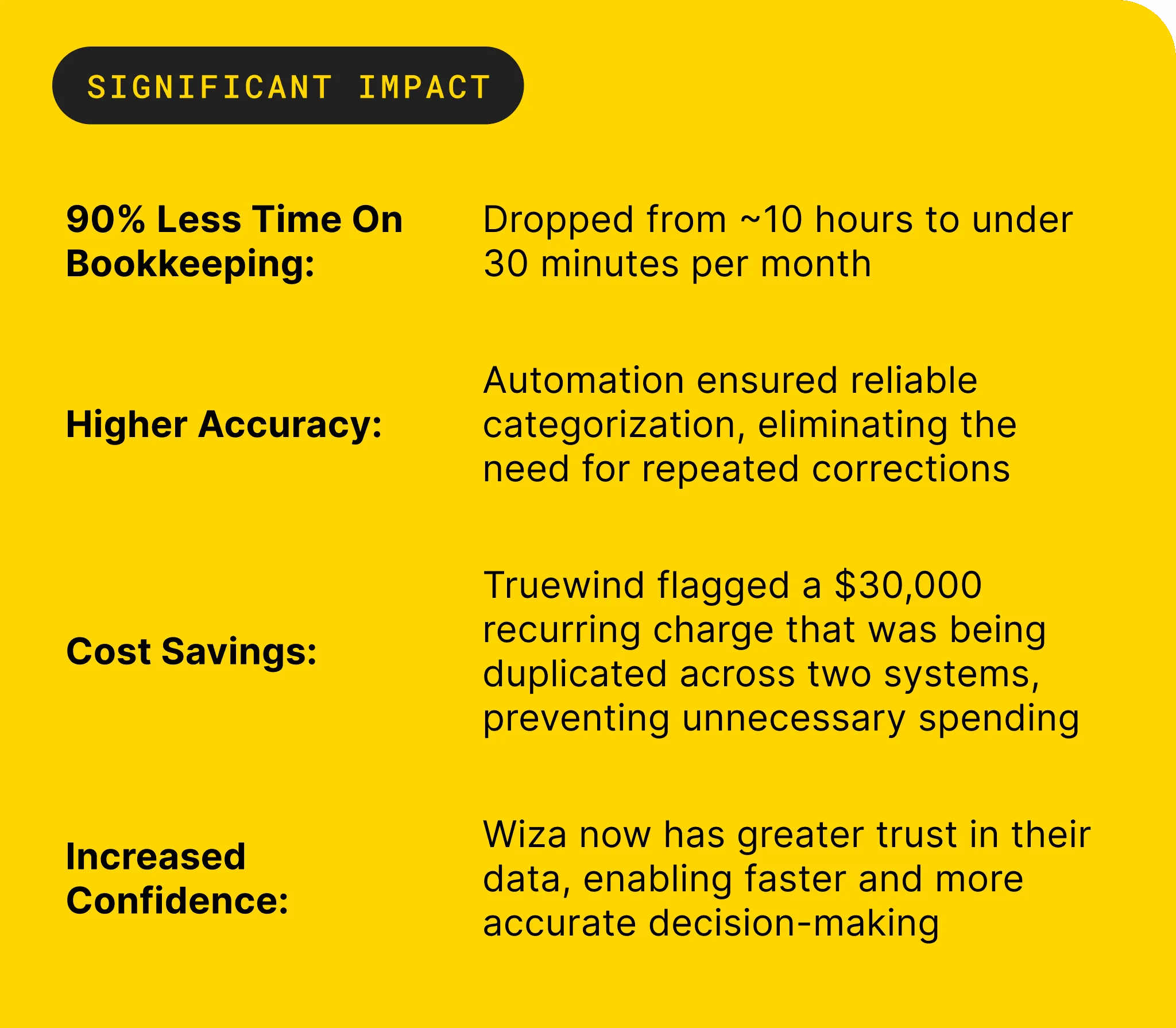
One buyer described the practical change plainly: "Truewind automates a huge chunk of that busywork." Another put the categorization shift even more directly: "Categorization is accurate, and we stopped having to double-check everything." Those statements matter because they point to the work itself, not a vague promise. The files are read, the process is applied, and the output becomes something an accountant can review.
Exceptions, sign-off, and the push to the ledger
Truewind does not resolve exceptions on its own. Proactive Anomaly Detection compares current-period preparation against the learned process and prior workpapers, then flags missing statements, unexpected balance changes, mixed activity, or inconsistent classifications for reviewer judgment. Human-in-the-Loop Review Workflow gives accountants the place to confirm, adjust, or send work back before anything is used downstream.
The Audit Trail preserves the trace from each prepared workpaper, schedule, reconciliation, and journal-entry draft back to source files and reviewer decisions. Native ERP Integration then pushes approved output to Sage Intacct or QuickBooks Online after reviewer confirmation, with coding, dimensions, and source context preserved where documented. Keep Sage or QBO as your source of truth. Let the preparation layer handle the work between files and the GL.
That is also why Truewind is not a fit for teams looking for unsupervised autonomous posting. It is built for accounting teams with a close process, recurring source flow, prior examples, and reviewers who own the result. One customer summed up the capacity angle well: "It's not just about making bookkeeping simpler; it's about freeing up teams, and helping them focus on higher-value projects."
What Changes When Preparation Becomes Reviewable
The real shift is not that AI "does accounting." The shift is that preparation becomes structured enough for accountants to review without starting over. Source files, calculations, treatments, exceptions, and sign-off sit together, and the GL remains the record after approval.
That changes what accountants waste time on. They spend less effort assembling the same support, chasing the same files, and rechecking the same mappings. They spend more time on exceptions, judgment, controls, and the questions the business actually needs answered.
One customer said, "If I had to describe Truewind in one word: Lifechanging." Another said, "Truewind has been amazing." We would not make that the whole argument. The stronger argument is simpler: when the workpaper becomes the interface between automation and judgment, AI-prepared work becomes something accountants can actually use.
Frequently Asked Questions
How do I handle edge cases effectively?
To handle edge cases effectively, start by documenting the unique scenarios your team encounters during reconciliations. Use Truewind's Proactive Anomaly Detection feature to flag any discrepancies or unexpected changes in your data. This allows your accountants to focus on judgment items rather than rechecking everything. Ensure that any exceptions are routed to the appropriate team member for review, so they can make informed decisions based on the source context provided.
What if my source files are consistently messy?
If your source files are consistently messy, consider using Truewind's Automated Data Ingestion feature. This will help you organize and structure the incoming data, making it easier to prepare for accounting tasks. You can also set up a standard intake process to ensure that all files are formatted similarly before they reach your accountants. This reduces variability and speeds up the preparation phase, allowing your team to focus on higher-value work.
Can I improve my team's workflow with Truewind?
Absolutely! You can improve your team's workflow by utilizing Truewind's Workpaper Generation and Rollforward feature. This allows you to create repeatable workflows based on prior workpapers and current-period source documents. By maintaining consistency in how workpapers are prepared, your team can save time and reduce errors. Additionally, make sure to capture any corrections or decisions made during the review process to enhance future workflows.
When should I use historical workpapers for new tasks?
You should use historical workpapers when you have recurring tasks that follow similar patterns. Truewind's Historical-Example Learning feature can help apply past decisions to current periods, ensuring consistency in your accounting practices. If you're starting a new task that resembles previous work, refer to past workpapers for guidance on mappings and classifications. This will help your team avoid reinventing the wheel and streamline the preparation process.
Turn this into a close-ready workpaper
Start with sample files or upload your own statements to see how Truewind prepares review-ready workpapers and journal entries.