

Your first decision comes before any AI accounting feature checklist: will the software replace your general ledger or prepare accounting work for the ledger you already trust? Puzzle takes the first path, presenting an AI-native platform for automated bookkeeping and current financial visibility (Puzzle). That choice determines what you migrate and where accountants review the work before an entry reaches the books.
One model replaces the ledger and builds bookkeeping, reporting, and startup metrics inside a new system. The other keeps the existing ledger while preparing the reconciliations, schedules, workpapers, and journal entries that feed it. Comparing them without settling that question is like choosing workpaper tabs before deciding whether the file is the ledger or its supporting schedule. The details may look similar, but the control purpose isn't.
Quick Reference for Choosing an AI Accounting Platform
| Evaluation Area | Questions to Ask | Why It Matters |
|---|---|---|
| Accounting architecture | Are you replacing the GL or improving the work entering it? | This determines migration scope, control design, and system ownership. |
| Primary source data | Does work begin with bank feeds, processor exports, PDFs, spreadsheets, or prior workpapers? | The starting material determines how much preparation still sits outside the software. |
| Reconciliation complexity | Are you matching transactions or applying entity, fund, class, cutoff, and account logic? | Similar-looking reconciliations may require very different accounting treatment. |
| Human review and posting control | Who reviews exceptions, approves entries, and releases output to the ledger? | Accountants need a clear sign-off point and visible support. |
| Reporting priorities | Do you need startup metrics or close workpapers tied to source evidence? | Reporting requirements often reveal which product model fits first. |
Key Takeaways:
- Choose between general ledger replacement and upstream close preparation before comparing individual automation features.
- Test each product with one closed period, including the original source files, reviewer notes, and approved journal entries.
- Require the demo to show exceptions, source support, corrections, and posting control rather than only polished output.
- Compare 12-month implementation effort alongside subscription pricing, especially when migration or workflow redesign is required.
Choose the Accounting Model Before Comparing Features
The first decision is whether you want to replace the general ledger or improve the accounting work that reaches it. Those models change migration scope, review ownership, reporting, and the role of existing systems. A startup seeking live burn metrics faces a different decision from a controller preserving Sage Intacct or QuickBooks Online.
The Core Buying Decision
Start with the system of record. If the finance team is willing to move its chart of accounts, opening balances, reporting logic, and operating workflows into a new accounting system, a general ledger replacement belongs on the shortlist. That route can consolidate bookkeeping and reporting, which is a fair reason to consider it.
Keeping the current GL changes the requirement. Now the buyer needs software to handle the work between operational sources and the ledger: combining files, applying mappings and dimensions, checking totals, preparing support, and routing uncertain items to an accountant. Those aren't two versions of the same purchase.
Before reviewing a demo, answer four questions:
- Must the existing GL remain the official system of record?
- Does close work begin with inconsistent files rather than clean ledger data?
- Do reviewers need to trace calculations back to individual sources?
- Must every entry receive human approval before downstream use?
If three or four answers are yes, evaluate a preparation layer first. If the team wants a new ledger and integrated startup reporting, evaluate the replacement model first.
Quick Reference for Finance Teams
A useful scorecard separates accounting requirements from software preferences. Give each requirement a score from zero to two: zero means unnecessary, one means useful, and two means required. Score GL continuity, raw-document handling, dimensional treatment, exception review, source traceability, startup KPI reporting, and SaaS revenue workflows.
The pattern matters more than the total. High scores for GL continuity, source traceability, and exception review point toward upstream accounting workflow automation. High scores for a new ledger, live startup metrics, and native bookkeeping point toward an integrated accounting system. Frankly, this exercise prevents polished demos from settling an architectural decision they weren't designed to answer.
A Closed-Period Test Exposes the Difference
Use a month that has already been reviewed and approved. Give each vendor the same source package, prior workpapers, reviewer corrections, and expected final entries. A known answer lets the accounting team inspect differences without guessing whether the output is right.
Don't test only clean transactions. Include a missing statement, an unexpected balance change, one classification requiring judgment, and a source file whose columns differ from the prior month. Ask the vendor to show what the system prepares, what it escalates, what the reviewer changes, and whether that correction persists. Once architecture is clear, the next question is whether the workflow can survive your actual source data and controls.
Why Workflow Fit Matters More Than Automation Claims
Workflow fit matters because automation percentages hide the accounting steps, exceptions, and controls behind the claim. Two products may both categorize transactions, yet one writes inside a new ledger while another prepares source-linked work for approval. The useful comparison starts with inputs, reviewer actions, and downstream posting.
Replacing the General Ledger Versus Improving Its Inputs
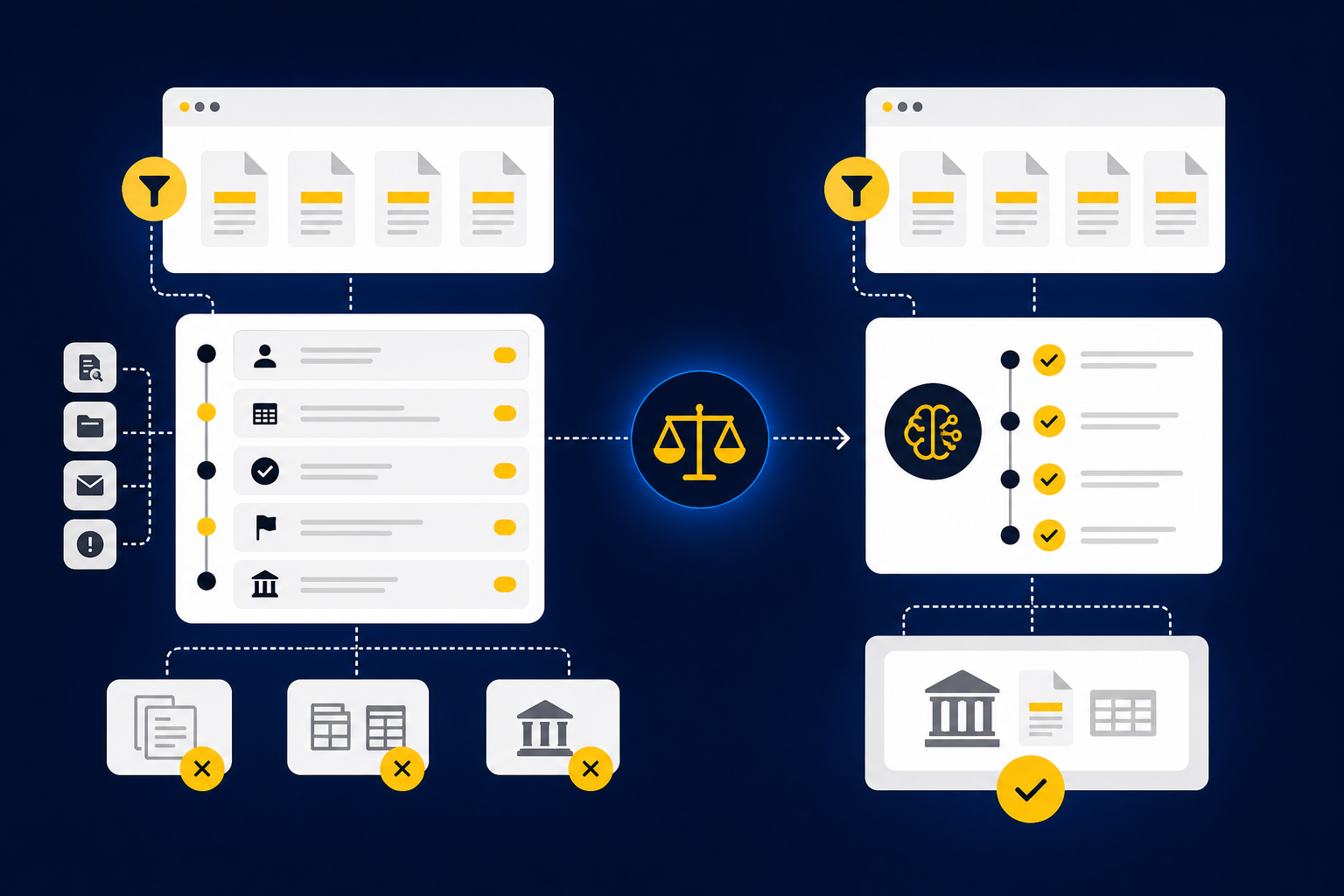
A general ledger replacement moves accounting activity into the new product. Migration, chart-of-accounts design, integrations, reporting, permissions, opening balances, and historical access become part of the buying decision. For an early-stage company building its finance stack, that may be entirely reasonable.
An upstream preparation layer has a narrower architectural role. Sage Intacct or QuickBooks Online stays authoritative, while the preparation system works through the source material and produces accounting artifacts for review. If your GL already supports consolidation, reporting, permissions, and audit requirements, preserving it can avoid turning workflow improvement into an accounting-system migration.
Ask vendors to draw the workflow on one page. It should show the source, preparation steps, reviewer, approval point, and final ledger destination. Any unexplained gap becomes work your staff will still own.
The Operational Cost of Fragmented Source Data
Picture a nonprofit controller opening the close folder at 8:15 a.m. The bank statement is a PDF, the donation-platform payout is a spreadsheet, and the restricted-fund detail sits in a separate export with different naming. Before reconciliation begins, someone has to identify each file, combine the records, apply dimensions, check completeness, and explain the differences from last month.
This is where source document automation is often misunderstood. Reading cells or extracting text is only the first step. The accounting work lies in determining what each document represents, how it maps to the GL, which cutoff applies, and whether the current-period treatment agrees with the team's approved process.
Run a source audit before selecting software:
- Collect 20 representative files from two closed periods.
- Mark every manual combination, mapping, dimension, and completeness check.
- Identify which decisions came from an SOP, prior workpaper, or reviewer correction.
- Flag each point where missing or inconsistent data required escalation.
The audit reveals whether your bottleneck is transaction capture, accounting preparation, or review. Same files, different problem.
Controls, Review Ownership, and Auditability
Reviewability is the control surface for AI-assisted accounting. A clean journal entry should make a controller more cautious if the system can't show the source, calculation, accounting treatment, exception, and approval history behind it. Presentation quality doesn't replace evidence.
The chain of custody matters here. A reconciliation moves from source material to accounting logic, then to reviewer approval and finally to the GL. If one link disappears inside a black box, the reviewer may see the number without being able to re-perform the work that produced it.
Use five questions during control review:
- Can the reviewer open the source record from the prepared workpaper?
- Are mappings, dimensions, cutoffs, and calculations visible?
- Does the system distinguish prepared, reviewed, approved, and posted states?
- Are corrections and controlled edits retained in visible history?
- Can an unapproved item reach the ledger?
If the last answer is yes, stop the evaluation until the posting boundary is clear. That lens makes a startup-focused product much easier to assess on its own terms.
Where Puzzle Fits Startup Accounting Workflows
Puzzle fits startups that want an AI-native accounting system with automated bookkeeping and current financial visibility. Its public presentation focuses on startup finance teams and accountants serving them, with accounting workflows and reporting inside the product (Puzzle product demonstration). That model is compelling when replacing the ledger is part of the plan.
Startup Bookkeeping and SaaS Reporting Strengths
Puzzle accounting software brings categorization, reconciliation, and financial reporting into a startup-oriented product (Comparateur IA overview). That focus can suit founders and lean finance teams that want bookkeeping and management visibility in one environment rather than preserving an established mid-market GL.
Connections to common financial systems are another part of the model. Puzzle describes direct banking integrations as a way to bring transaction activity into its accounting workflow (Puzzle banking integration overview). During evaluation, ask which systems provide native data, how frequently they refresh, and what happens when source records don't match.
The fit is strongest when:
- Replacing the current ledger is acceptable.
- Startup reporting is a primary requirement.
- Bookkeeping automation matters more than preserving established close workpapers.
- The team is prepared to validate metric definitions, recognition policies, and reconciliation behavior.
Customization, Setup, and Workflow Tradeoffs
The status quo has real merits. A new ledger can reduce fragmentation for a young company whose accounting design is still taking shape, and migration may be manageable when history, entities, and approval chains remain limited. That advantage weakens once the existing GL contains mature dimensions, reporting structures, and control ownership.
An independent review describes startup fit while raising setup and customization points that buyers should test directly (Tofu review). Public G2 reviews can add useful questions about usability, but individual comments shouldn't be treated as a universal customer pattern.
Use two closed periods during the trial. The first tests setup and migration assumptions. The second tests whether classifications, reconciliation logic, and reviewer corrections carry forward without creating another layer of manual maintenance.
Pricing and Overall Value
Published entry pricing can make an initial Puzzle evaluation easier to budget. A third-party directory lists a free option and paid plans beginning at $25, subject to transaction volume and current plan terms (BookkeepDIY listing). Buyers should verify the current limit, included workflows, support, and any custom-priced requirements directly before approval.
Subscription price is only one line in the model. Add migration work, chart-of-accounts changes, integration setup, historical access, reviewer training, and parallel close effort. Then compare the 12-month cost against the specific accounting work removed or redesigned.
How Truewind Is Different: The architectural contrast is preserving the existing GL rather than replacing it. The preparation layer sits upstream, where source files become reviewable accounting work before an accountant approves what moves downstream.
Comprehensive Accounting Model Comparison
| Comparison Criterion | Truewind | Puzzle | Buyer Consideration |
|---|---|---|---|
| Core product model | Upstream accounting preparation layer | AI-native accounting system (product walkthrough) | Decide whether the purchase changes the ledger or its inputs. |
| Primary target customer | Mid-market controllers, nonprofit teams, family offices, and CAS practices | Startup-oriented finance teams and accounting firms (month-end close guidance) | Match the product to entity complexity and reporting needs. |
| General-ledger approach | Keeps Sage Intacct or QBO as system of record | Evaluate as a new-ledger architecture (Quoining comparison) | Include migration and historical access in scope. |
| Raw source-document intake | PDFs, spreadsheets, processor exports, portal downloads, and statements | Validate exact supported formats in a representative trial | Test inconsistent files, not only bank transactions. |
| Transaction categorization | Applies the team's mappings and prior corrections | AI-assisted categorization (Today Testing review) | Test edge cases and dimensional requirements. |
| Multi-source reconciliation | Compares operational sources with the GL and surfaces exceptions | Validate source coverage and exception behavior | Use one complex reconciliation as the proof. |
| Prepaid schedule creation | Available as a prepared support schedule | Validate current scope | Confirm the output format and reviewer controls. |
| Fixed-asset schedule creation | Available as a prepared support schedule | Validate current scope | Include additions, disposals, and corrections. |
| Exception handling | Routes missing or inconsistent items to the accountant | Validate how unmatched items are presented | Inspect the queue and supporting evidence. |
| Human approval before downstream use | Explicit review and approval before ledger output | Validate roles, approval states, and posting permissions | Require a clear control boundary. |
| Audit trail and source traceability | Source, calculation, treatment, changes, and sign-off remain reviewable | Validate source-to-entry traceability | Ask a reviewer to re-perform one item. |
| Startup KPI reporting | Not the primary product model | Startup financial visibility is a central use case (The CFO Club review) | Confirm definitions for burn, runway, ARR, and MRR. |
| SaaS revenue recognition | Validate workflow requirements during scoping | Validate policy configuration and contract coverage | Test one real contract and modification. |
| Integration approach | Approved work flows into Sage Intacct or QBO | Confirm every banking and operating connection required | Map source, refresh frequency, and failure handling. |
| Pricing transparency | Quote-based | Public entry pricing, with terms to confirm | Compare total implementation and operating cost. |
If you want to see the preparation-layer model against one of your recurring close workflows, See Truewind in action.
How Truewind Is Different for Complex Close Preparation
A preparation layer fits complex close work when the accounting team wants to keep its ledger while changing how workpapers, reconciliations, schedules, and entries are prepared. It reads recurring source material, applies the team's process, and presents exceptions for review. The accountant still owns treatment, correction, approval, and posting.
Source Documents Become Reviewable Accounting Workflows
Source files aren't treated as attachments waiting for manual interpretation. Truewind reads what each document represents, applies account mappings, cutoffs, classifications, dimensions, and prior-period logic, then prepares the artifact the reviewer expects. That artifact may be a reconciliation, support schedule, workpaper, or journal entry.
The mechanism comes before the outcome. Prior workpapers, approved entries, SOPs, and reviewer corrections provide operating context. New-period files move through the same defined accounting process, while the prepared output retains its relationship to the underlying support.
A sensible starting workflow has three properties: it recurs monthly, it has two approved prior periods, and the expected result is known. Without those examples, implementation becomes an exercise in reconstructing undocumented accounting policy.
Exceptions and Human Approval Stay Central
Exceptions aren't a defect to hide. Missing statements, unusual balance changes, mixed activity, and inconsistent classifications belong in front of an accountant because they require context or judgment. Silent automation would weaken the review process precisely where scrutiny matters most.
Prepared work remains separate from approved work. Reviewers inspect sources, calculations, treatment, changes, and open items before approving downstream use. The platform doesn't remove the accountant from the close; it moves the accountant's attention from assembling every line to reviewing the lines that need judgment.
Test that boundary with three deliberate exceptions:
- Remove a required statement.
- Change a mapping from the prior period.
- Introduce an unexpected balance movement.
The system should surface each issue, preserve the support, and wait for an accountable reviewer. To inspect that workflow with your own examples, Book a Truewind demo.
Workflows That Fit and Evaluation Next Steps
The strongest fit is a finance team with recurring, example-rich close work and an established reviewer. Nonprofit controllers may start with donation-platform reconciliations or restricted-fund schedules. Family offices may choose custodian statements across entities, while CAS teams may select one client workflow whose conventions are already documented.
There is a real limitation to this approach. Keeping the existing GL won't satisfy a company that specifically wants to replace its accounting system and centralize startup metrics inside a new ledger. Quote-based pricing also requires a scoped conversation before the buyer can compare costs. Those tradeoffs sharpen the decision rather than weaken it.
Run the evaluation in this order:
- Select one recurring workflow with approved prior-period output.
- Supply the actual source files, SOP, workpaper, and reviewer notes.
- Compare the prepared result with the known answer.
- Record every correction and repeat the workflow for a second period.
- Expand only after reviewers can trace and re-perform the work.
Which Accounting Model Matches Your Finance Team?
The choice comes down to architecture and buyer type, not who uses the broadest automation language. Puzzle fits startup teams seeking a new AI-native ledger with startup-oriented reporting, while the preparation-layer model fits teams preserving their GL and strengthening source-to-review work. Run one representative workflow before committing.
Choose Puzzle when the company is comfortable adopting a new accounting system and wants startup bookkeeping and management reporting inside that environment. Its model can make sense for founders, startup finance teams, and firms serving technology companies. The evaluation should focus on migration, metric definitions, customization, and control permissions.
Choose Truewind when fragmented statements, payout reports, PDFs, spreadsheets, and prior workpapers create the preparation burden. The fit is strongest when the accounting team already owns the treatment, wants Sage Intacct or QBO to remain authoritative, and needs source-linked review with visible exceptions.
Before making the final decision, ask a senior reviewer to inspect one completed workflow without assistance from the vendor. If that reviewer can trace the source, understand the accounting logic, identify what changed, and confirm who approved it, the product has passed a meaningful test. If the workflow disappears behind a polished output, keep evaluating.
To test a recurring reconciliation, schedule, or journal-entry workflow with your team, Get a Truewind demo.
The stronger purchase isn't the product with the longer feature list. It's the accounting model that fits your source data, preserves the right controls, and gives the reviewer enough evidence to own the result.
Frequently Asked Questions
How do I manage multiple source documents in Truewind?
To manage multiple source documents effectively in Truewind, follow these steps: 1) Use the Automated Data Ingestion feature to upload various formats like PDFs, spreadsheets, and bank statements. This feature organizes messy data into structured workflows. 2) Ensure you apply AI-Powered Transaction Coding to categorize transactions based on your established rules. This helps maintain consistency across different documents. 3) Utilize the Multi-Source Reconciliation capability to align activity across different sources, ensuring discrepancies are surfaced for review rather than automatically corrected.
What if I encounter exceptions during reconciliation?
If you encounter exceptions during reconciliation, Truewind's Proactive Anomaly Detection feature can help. It identifies items that don't fit the expected patterns, such as missing statements or unexpected balance changes. You can then review these exceptions directly in the Human-in-the-Loop Review Workflow, where you can trace back to the source documents and make informed decisions. Remember, Truewind surfaces these exceptions for your judgment rather than resolving them autonomously, ensuring you maintain control over the process.
Can I integrate Truewind with my existing accounting system?
Yes, you can integrate Truewind with your existing accounting systems like Sage Intacct or QuickBooks Online. This integration allows Truewind-prepared outputs, such as journal-entry drafts and reconciliations, to be handed off to your chosen system while preserving dimensional coding and source links. Just ensure that your team reviews the prepared outputs in Truewind before they are posted to the general ledger, as Truewind does not post entries autonomously.
When should I consider using Truewind for complex close preparation?
Consider using Truewind for complex close preparation when your finance team is dealing with fragmented source data, such as multiple bank statements, PDFs, and spreadsheets. If you need to keep your existing general ledger while improving how workpapers and reconciliations are prepared, Truewind's preparation layer is ideal. It can help streamline your workflow by organizing inputs and ensuring that exceptions are reviewed by accountants before moving downstream.
Turn this into a close-ready workpaper
Start with sample files or upload your own statements to see how Truewind prepares review-ready workpapers and journal entries.