
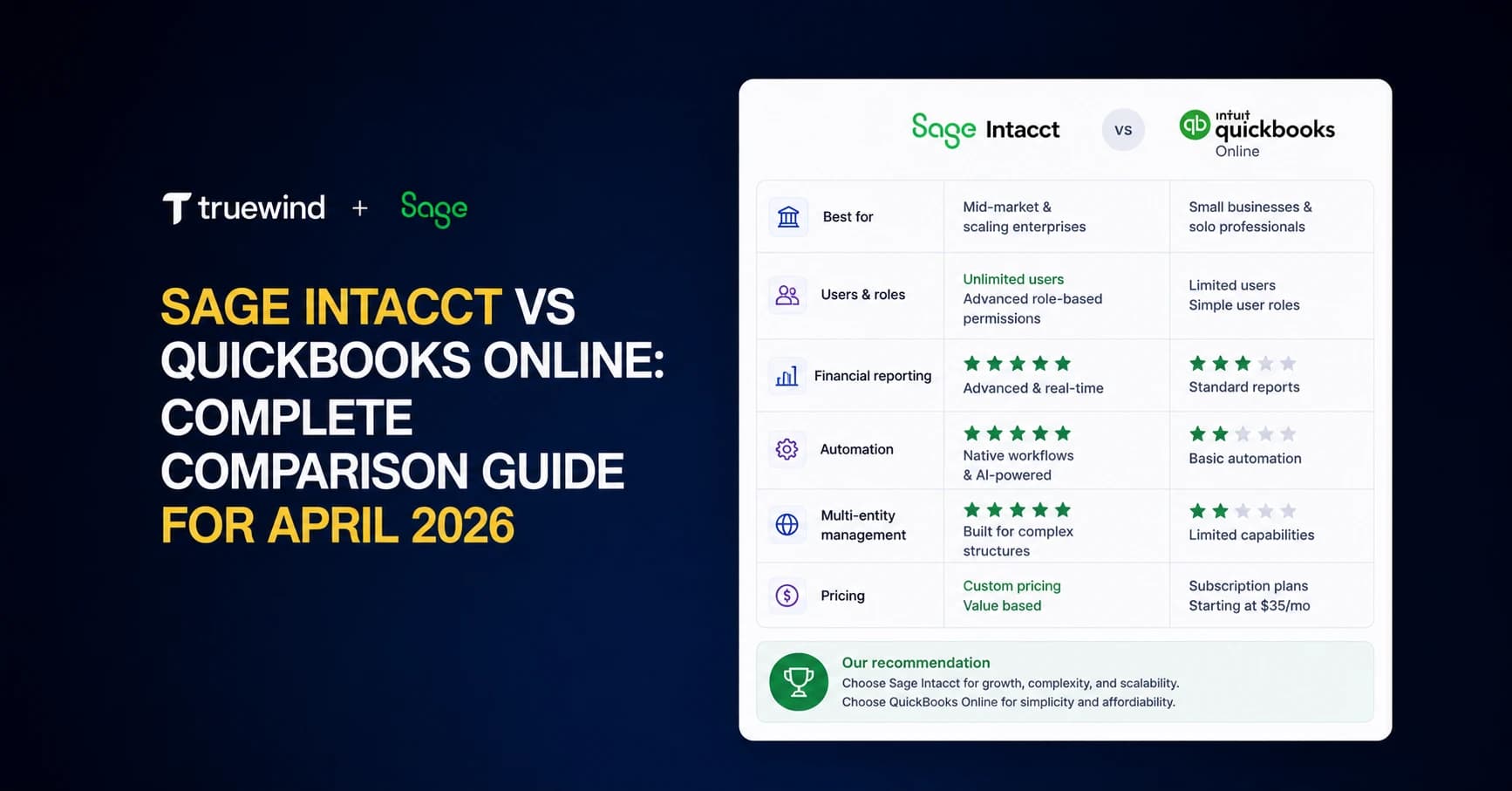
The moment you start managing multiple entities in QuickBooks Online, you're managing multiple subscriptions with no consolidation path except Excel. That's when the Sage Intacct vs QuickBooks Online conversation stops being theoretical and starts being about whether you're willing to pay for architecture that removes the manual assembly work entirely. We'll cover the cost gap, multi-entity capabilities, automation limitations on both sides, and what neither system actually automates for you.
TLDR:
- Sage Intacct handles multi-entity consolidation natively; QBO Advanced requires manual Excel assembly
- QBO Advanced costs $275/month; Sage Intacct runs $25,000-$35,000/year plus implementation fees
- Sage Intacct supports dimensional reporting across entities, departments, and custom fields
- QBO Advanced hits limits at 25 users, single entity, and basic revenue recognition
- Truewind automates transaction coding and reconciliation for both Sage Intacct and QBO Advanced
QuickBooks Online Advanced Overview: Features and Core Capabilities
QuickBooks Online Advanced sits at the top of Intuit's cloud accounting suite, built for growing small to mid-sized businesses that have outgrown the lower QBO tiers. It supports up to 25 users and adds workflow automation, custom reporting via Fathom, and batch invoicing to the standard QBO feature set.
The core capabilities are well-suited for what the product is designed to do:
- Custom chart of accounts and class tracking for basic segmentation across departments or cost centers
- Automated approval workflows for bills and invoices to reduce manual routing
- Advanced reporting with custom fields through the Fathom integration
- Fixed asset management built into the core product
- Priority customer support and on-demand training included at this tier
Where it performs well is exactly where you would expect: lean teams running a single entity with moderate transaction volume. It is not built for multi-entity consolidation, complex revenue recognition, or the dimensional reporting that larger organizations require.
Sage Intacct Overview: Enterprise Financial Management Built for Scale
Sage Intacct is a cloud-native system built for organizations that have grown past what small business accounting software can handle. The AICPA has endorsed it as its preferred financial management solution, which tells you something about where it sits in the market: it's the accountant's choice, not the startup founder's.
The core module set covers what mid-market finance teams actually need:
- General ledger with multi-dimensional reporting across entities, departments, locations, projects, and custom dimensions
- AP, AR, and cash management with configurable workflows
- Multi-entity consolidation with intercompany eliminations
- Revenue recognition compliant with ASC 606
- Role-based permissions and audit trails built into the workflow
Sage Intacct positions itself as best-of-breed financial management, not a full ERP. That's a deliberate choice. It handles the financial layer deeply and integrates outward to payroll, CRM, and other systems. For businesses at $10M+ in revenue carrying real reporting complexity, that depth is what makes it worth the implementation investment.
Pricing Comparison: QuickBooks Online Advanced vs Sage Intacct
The price gap between these two products is not subtle. QuickBooks Online Advanced runs $275/month. Sage Intacct customers typically spend $25,000 to $35,000 annually on subscription costs alone, before implementation.
The difference comes down to a fundamentally different pricing model:
- QBO Advanced is a flat monthly fee covering up to 25 users
- Sage Intacct prices by module and user count, so costs climb as you add functionality or seats
- Sage Intacct implementations typically require a reseller or consultant, adding $5,000 to $20,000+ in setup costs depending on complexity
- Ongoing maintenance, training through Sage University, and customizations are separate line items
| Cost Factor | QBO Advanced | Sage Intacct |
|---|---|---|
| Base subscription | $275/month | $25,000 to $35,000/year |
| Implementation | Minimal | $5,000 to $20,000+ |
| User model | Up to 25 users included | Per-user pricing |
| Module pricing | Flat tier | Add-on per module |
The total cost of ownership math changes depending on what you actually need. For a single-entity business with straightforward reporting, QBO Advanced wins on cost. For a multi-entity organization with complex revenue recognition, fund accounting, or dimensional reporting requirements, Sage Intacct's price reflects capabilities QBO Advanced cannot replicate.
Multi-Entity Management and Consolidation Capabilities

The gap here is architectural, not a missing feature checkbox.
QuickBooks Online operates on a one-company-per-subscription model. If you run three legal entities, you maintain three separate QBO accounts. Consolidating financials across them means exporting data from each, mapping accounts manually, and building a combined view in Excel. There is no native consolidation inside QBO itself, no automated intercompany eliminations, and no real-time consolidated reporting. For two entities with simple structures, teams make it work. Beyond that, it becomes a spreadsheet management problem.
Sage Intacct is built around the opposite assumption. Multi-entity is a native capability, not a workaround.
What Sage Intacct Handles Natively
- Consolidated financial statements across all entities in real time, with no manual export or assembly required
- Automated intercompany eliminations that remove the need for manual journal entries at close
- Multi-currency support with configurable translation rates per entity
- Dimensional reporting across entity, department, location, project, and custom dimensions simultaneously
- Role-based access controls so each entity can be appropriately walled off from others
For a family office managing 200+ entities or a nonprofit with regional chapters, this is what makes month-end close feasible without a team dedicated purely to consolidation. Multi-entity consolidation architecture determines whether your close process scales linearly or exponentially with entity count.
The Real Cost of Workarounds
When organizations outgrow QBO Advanced's single-entity model but haven't moved to Sage Intacct, they typically build manual consolidation processes in Excel. Those processes introduce version control risk, human error, and a close cycle that stretches longer every quarter as entity count grows. Sage Intacct removes that layer entirely.
When Businesses Outgrow QuickBooks Online Advanced

Sixty-eight percent of SMBs outgrow their accounting software within five years. The tipping point rarely announces itself cleanly. It shows up as friction.
The signals tend to cluster around the same practical bottlenecks:
- Consolidation lives in a spreadsheet, not the GL, which means every close requires a manual assembly step that grows more error-prone as entity count rises.
- Month-end close keeps stretching as transaction volume grows and your team spends more time matching than reviewing.
- The 25-user seat limit becomes a real constraint when finance, ops, and department managers all need concurrent access.
- Multi-currency transactions require manual rate conversion and entry instead of automatic application at the transaction level.
- Approval workflows for complex bills or contracts get routed through email chains because the system has no native routing logic.
- Audit requests trigger a document hunt instead of a structured log export.
None of these are catastrophic in isolation. Together, they signal that the software is generating overhead instead of removing it.
The honest question is whether your team is building workarounds on top of workarounds. A second spreadsheet to consolidate the first. A manual journal entry to fix what the rules engine missed. An email to route what the system cannot automate. Each one is a small tax on close quality and team capacity. At some point, the workaround stack costs more than a migration.
Automation and AI Capabilities Compared
Both QBO Advanced and Sage Intacct offer automation, but they target different scales of complexity.
QBO Advanced gives you scheduled transaction imports, basic categorization rules, and automated approval routing for bills and invoices. For a single-entity business with predictable transaction patterns, that covers a lot of ground. The rules engine is intuitive to set up. Where it breaks down is flexibility: one variation in a vendor name can cause a rule to miss entirely, with no native mechanism to handle the fuzzy matching that real transaction data requires.
Sage Intacct goes further with automated allocations, revenue recognition scheduling, and configurable close workflows. Multi-entity environments benefit most here, where consistent GL coding across departments and locations would otherwise require manual oversight at every cycle.
What neither system does natively is automate the execution layer: the actual coding, reconciliation, and schedule preparation that accountants still do by hand even after setting up rules. Sage users in particular flag the native rules engine as a persistent frustration, particularly around description variations that cause consistent misses.
Integration Ecosystem and Third-Party Connectivity
QBO Advanced connects to over 300 apps through the QuickBooks app marketplace. For most small business stacks, that breadth is sufficient: payroll via Gusto or ADP, expense management through Expensify, and payment processing through Stripe or Square all connect without friction. These integrations tend to be shallow by design, moving data in one direction and surfacing it inside QBO's interface.
Sage Intacct takes a different approach. Open APIs and a purpose-built partner ecosystem mean integrations go deeper, particularly with specialized tools like Salesforce for revenue recognition, Adaptive Insights for planning, and Addepar for portfolio management. For family offices and mid-market firms, that API depth matters because the data flowing between systems is complex enough that a surface-level sync creates more reconciliation work than it eliminates.
The practical difference shows up at close time. A shallow integration dumps data you still have to massage. A deep one delivers data in the structure your GL expects.
How AI Accounting Solutions Complement Traditional Software
Both Sage Intacct and QBO Advanced are built to store financial data. Neither is built to process it for you.
The execution layer, where accountants actually code transactions, prepare reconciliations, build schedules, and manage close tasks, stays manual regardless of which GL you're on. That's the gap AI accounting agents fill.
Truewind sits alongside either system as the automation layer on top of the GL. For Sage Intacct users, that means a bank feed experience Sage doesn't natively provide, AI-powered classification that handles description variations Sage's rule engine misses, and brokerage reconciliation that Sage's own module can't perform. For QBO Advanced users, it means the same automated coding and reconciliation workflows, syncing directly back to QBO as the system of record.
The GL stores the data. Truewind does the work.
Final Thoughts on the Right Accounting System for Your Business
Most finance teams debating QuickBooks Online vs Sage Intacct focus on the wrong question. The real constraint isn't which system stores your data, it's how much time your team spends preparing it. QBO Advanced gives single-entity businesses everything they need at a fraction of Sage Intacct's cost. Multi-entity organizations with complex reporting save enough close time with Sage Intacct to cover the investment. Both systems still require your team to code transactions and prep reconciliations manually, which is where AI accounting picks up what traditional software leaves behind. See how it works on top of your current GL.
FAQ
QuickBooks Online Advanced vs Sage Intacct for multi-entity consolidation?
Sage Intacct handles multi-entity consolidation natively with automated intercompany eliminations and real-time consolidated reporting across all entities. QuickBooks Online Advanced requires separate subscriptions per entity and manual consolidation in Excel, which introduces version control risk and extends close cycles as entity count grows.
Can I use Sage Intacct without writing journal entries for brokerage accounts?
Yes, but Sage Intacct's native brokerage reconciliation module has limitations that often require workarounds. Truewind pulls brokerage data from portfolio management systems like Addepar, matches it against GL entries in Sage, and produces matched journal entries automatically, eliminating the manual matching process that Sage's module cannot perform.
What's the real total cost difference between QuickBooks Online Advanced and Sage Intacct?
QuickBooks Online Advanced costs $275/month flat. Sage Intacct typically runs $25,000-$35,000 annually for subscription plus $5,000-$20,000+ for implementation, with per-user and per-module pricing that increases as you scale. The cost gap reflects architectural differences: Sage Intacct is built for multi-entity, dimensional reporting, and complex revenue recognition that QBO Advanced cannot replicate.
How do I know when my team has outgrown QuickBooks Online Advanced?
Watch for consolidation living in spreadsheets instead of your GL, month-end close stretching longer each quarter despite consistent transaction volume, the 25-user seat limit blocking department access, and workarounds stacking on workarounds (manual journal entries fixing what rules missed, emails routing what the system cannot automate). Each workaround is a tax on close quality and team capacity.
Why doesn't Sage Intacct's transaction rule engine catch vendor name variations?
Sage Intacct's built-in rule engine uses rigid matching logic that breaks when transaction descriptions vary even slightly. A $300 United Airlines charge might match your rule, but "United Air" or "UA 1234" won't, requiring manual coding or constant rule maintenance that never fully solves the problem.
Turn this into a close-ready workpaper
Start with sample files or upload your own statements to see how Truewind prepares review-ready workpapers and journal entries.