

You can choose Sage Intacct or QuickBooks Online and still spend the first three days of close rebuilding the accounting behind a single processor deposit. The ledger records the approved entry, but the donor export, restriction detail, fees, refunds, and reviewer support all have to be combined before that entry is ready. The choice between Sage Intacct and QuickBooks matters; it just doesn't remove the source-file work your accountant has to trace and approve.
QuickBooks Online and Sage Intacct record approved accounting and remain the system of record. The harder question is whether your chosen setup can hold the fund, restriction, grant, class or dimension, entity, approval, and reporting structure your reviewers need. Then you have to inspect what happens before an entry reaches the ledger. A fair comparison separates ledger requirements from preparation work.
Key Takeaways:
- Keep QuickBooks Online if your current configuration represents the required accounting structure without recurring off-system workarounds.
- Evaluate Sage Intacct when multi-entity, dimensional, approval, or reporting requirements no longer fit the current ledger setup.
- Don’t migrate because donor files are inconsistent. A new ERP won’t create accounting context that never reached the ledger.
- Test both systems with one approved period, including source files, workpapers, reviewer notes, and final entries.
- Treat traceability as a requirement. Reviewers should be able to follow each material amount from source through treatment and approval.
- Verify every feature against the current edition, modules, and implementation scope before signing a contract.
Why Nonprofit Accounting Software Comparisons Start Too Late
Most software comparisons between Sage Intacct and QuickBooks start too late because they examine ledger screens after the accounting has already been prepared. The harder work sits upstream: combining donor, processor, bank, grant, and prior-period records while preserving restrictions and dimensions through review. A ledger can record the answer. It can’t create missing context from a deposit total.
A Bank Deposit Is Not Donor Accounting
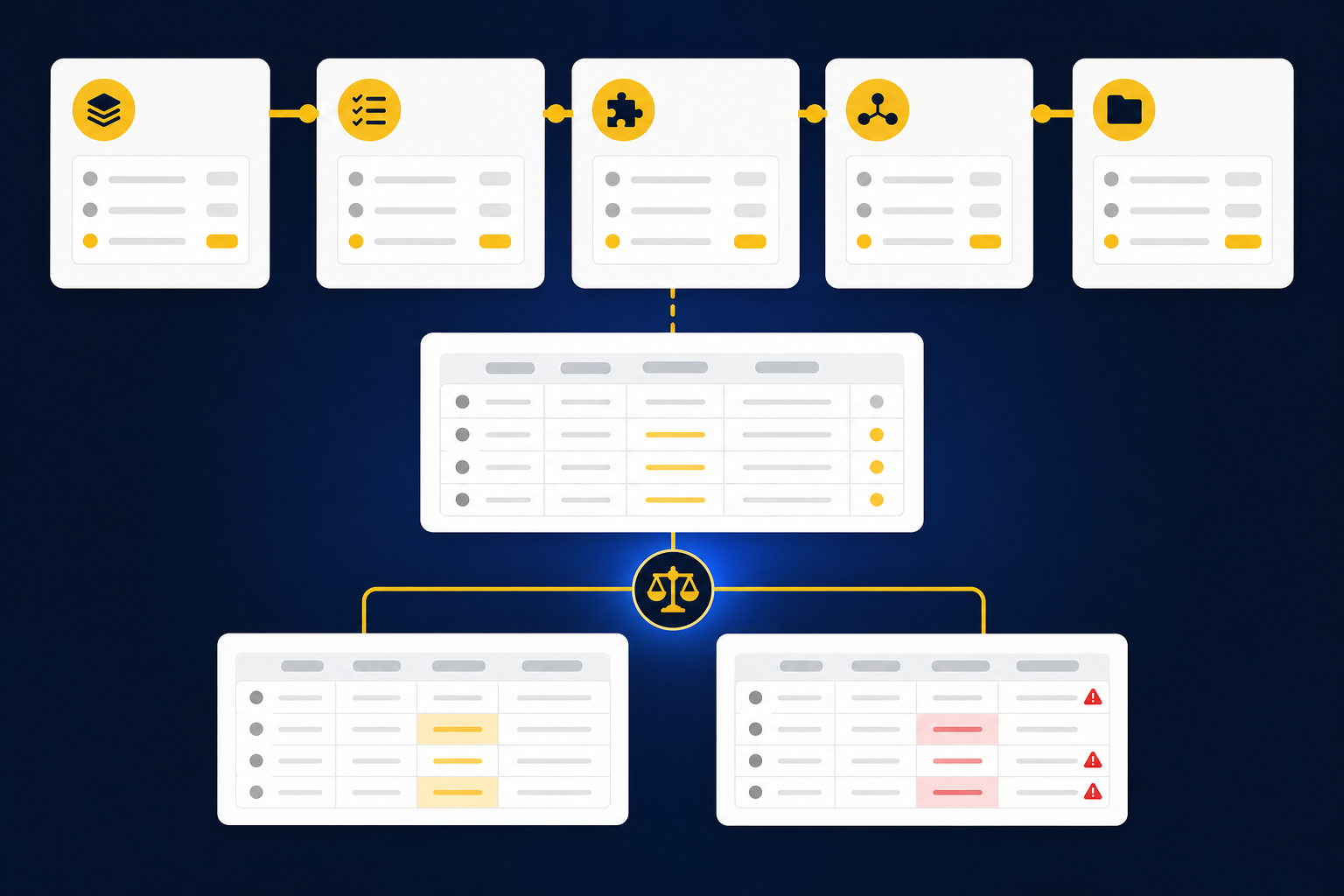
At 7:40 on the second morning of close, a nonprofit staff accountant opens three files side by side: the donor export, the processor settlement report, and the bank activity for the same period. The bank shows one deposit of $84,200. The other two sources carry the donor, campaign, restriction, refund, fee, and timing information needed to prepare the accounting behind that number. None of that work disappears because the deposit synced into QuickBooks Online or Sage Intacct.
Treating the bank amount as complete donor accounting is like filing a support schedule with the labels stripped off. The total may be correct, but the meaning has disappeared. Someone still has to determine which records belong together, test completeness, apply the organization’s mappings, preserve the required dimensions, and explain any difference. That determination is the accounting; the deposit is only the receipt.
Source-file work isn’t OCR. Extraction can identify fields, but the accountant still has to decide what the document represents, how it maps to the ledger, whether the package is complete, and what changed from the prior period. That distinction matters because changing nonprofit accounting software won’t repair an upstream process that never produced review-ready support.
Clean Output Can Carry Hidden Review Risk
A polished journal-entry draft can create more concern than an obvious error, because the reviewer can’t see how it was prepared. The reviewer needs the source, calculation, accounting treatment, exceptions, and approval history in one place. Without that trail, a clean entry is only an answer someone has to rebuild from scratch.
One anonymized Sage Intacct team made that requirement concrete during evaluation. The team broke its close down by entity, account, workflow, available sources, preparer, reviewer, and rollout order. It wasn’t looking for a system that would make accounting policy on its own. It wanted to separate work that could be prepared consistently from exceptions that required judgment.
Manual review has real merits. Accountants keep close contact with the work, and familiar spreadsheets can adapt quickly when a grant or donor file changes format. The weakness appears when review means recreating every calculation because the preparation process didn’t preserve its evidence. Seeing that boundary in a real source-to-workpaper flow makes the difference easier to judge, so see Truewind in action with one recurring reconciliation in mind.
The software decision should begin with the close you need to defend, not the product demo you happened to see first.
How to Evaluate Sage Intacct and QuickBooks for Nonprofits
Evaluate Sage Intacct and QuickBooks Online by testing how each proposed configuration supports your actual accounting model, review process, and reporting needs. Start with required outputs, then work backward through approvals, dimensions, source systems, and workpapers. If a requirement can’t be shown with your data, treat it as unproven.
August 2026 TL;DR by Scenario
Staying on QuickBooks Online and evaluating Sage Intacct are both defensible decisions. The deciding factor isn’t organization size by itself. It’s whether the current ledger can represent the accounting your reviewers need without pushing essential context into spreadsheets, email, and undocumented reclasses.
A practical recommendation looks like this:
- Stay on QuickBooks Online if the current configuration holds the required fund, restriction, grant, entity, approval, and reporting structure, and reviewers can trace the final accounting without recurring workarounds.
- Evaluate Sage Intacct first if the current setup can’t represent required entity or dimensional structures, approval paths, or reporting outputs. Verify the exact configuration before selecting it.
- Keep the existing ledger and fix preparation if the real problem is collecting source files, matching deposits, applying mappings, rolling workpapers forward, or routing exceptions.
- Pause the decision if neither vendor can demonstrate the workflow with your own source package and an approved prior-period result.
Staying put avoids migration work, retraining, and rebuilding established controls. That’s a valid advantage, and for many teams it’s the right call for another year. Once the current setup forces material accounting context outside the ledger every period, though, familiarity stops being a sufficient reason to keep it.
Start With the Required Accounting Model
Can your current chart and reporting structure represent the way management, the board, and reviewers need to see activity? Answer that before comparing interface preferences. A nonprofit may need to preserve restrictions, grants, programs, departments, locations, entities, or other reporting dimensions across the same transaction.
Write down the required accounting treatment without naming either product. Then ask each vendor or implementation partner to reproduce it in the exact edition, modules, and configuration under consideration. Don’t accept a slide that says “fund accounting” or “advanced reporting” without seeing the source transaction, resulting entry, report output, and approval trail.
Your requirements document should answer five questions:
- Which restrictions, funds, grants, programs, and entities must remain visible after posting?
- Which dimensions or classes can overlap on one transaction?
- Which allocations require a documented rule, and which require reviewer judgment?
- Which reports must come directly from the ledger rather than a spreadsheet?
- Which source details must stay attached or traceable to the posted accounting?
If your current QuickBooks Online configuration can answer those questions, migration needs a different justification. If it can’t, the gap is specific enough to test in Sage Intacct.
Prove the Workflow With One Closed Period
A demo isn’t proof. Take one closed period where your team already trusts the final workpaper and use it as the expected answer. Include the original donor exports, processor reports, bank activity, grant support, prior workpaper, reviewer comments, and approved journal entries.
The comparison should reveal where each system ends and where preparation begins. Frankly, that boundary is more useful than a long feature checklist. You want to know which accounting context reaches the ledger, which support remains outside it, and what the reviewer has to reconstruct.
Run the proof in this order:
- Rebuild the source package: Use the files your accountant actually received, including revised exports and supporting PDFs.
- Prepare the accounting: Apply the existing mappings, cutoffs, dimensions, allocations, and review conventions.
- Compare with the approved result: Inspect differences in coding, totals, treatment, and supporting detail.
- Test the review path: Confirm that a reviewer can trace each material amount and identify unresolved items.
- Record configuration gaps: Separate missing ledger capability from missing preparation, training, or process discipline.
A failed proof doesn’t always mean the product is wrong. Configuration and implementation matter. It does mean the requirement remains unproven until the team can reproduce the known answer in a form the reviewer will accept.
Use a Side-by-Side Evidence Table
One anonymized finance team evaluated its close account by account rather than asking whether one ERP was generally more capable. That approach kept the decision grounded. Each requirement had to map to a source, accounting treatment, review action, and final output.
Because product availability can change by edition, module, contract, and configuration, the table below is a due diligence script rather than a feature inventory. Require current documentation and a working demonstration before treating any box as confirmed.
| Evaluation area | QuickBooks Online proof required | Sage Intacct proof required | Decision signal |
|---|---|---|---|
| Fund and restriction tracking | Show how required restrictions or fund views are represented in the chosen configuration | Show how the proposed configuration preserves the same structure through entry and reporting | Prefer the setup that produces required reports without recurring reconstruction |
| Grant accounting | Demonstrate grant coding, allocation, reporting, and support through a full period | Demonstrate the same grant workflow using the proposed dimensions and modules | Reject any design that loses grant context between source and report |
| Dimensions or classes | Confirm the exact class, location, or equivalent structure available in the selected edition | Confirm the exact dimensions included in the proposed scope | Test overlapping dimensions on a real transaction |
| Multi-entity needs | Show entity separation, intercompany treatment, and consolidated reporting required by the team | Show the proposed entity and consolidation workflow | Evaluate migration when the current design relies on repeated off-system consolidation |
| Approvals | Demonstrate preparer, reviewer, correction, and final approval evidence | Demonstrate the same actions in the proposed workflow | Require visible ownership before posting |
| Reporting | Produce the management, board, grant, and audit support reports the team actually uses | Produce the same outputs from the proposed configuration | Don’t accept a report that requires material spreadsheet rebuilding |
| Integrations | Show what each donor, processor, bank, payroll, or expense connection sends to the ledger | Show the field and dimensional detail preserved by each proposed connection | A synced total isn’t enough when the accounting depends on source detail |
| Audit trail | Trace a selected amount from source through correction, approval, and ledger entry | Re-perform the same trace in the proposed setup | Choose the design the reviewer can inspect without searching multiple inboxes |
| Implementation | Document data cleanup, mapping, report rebuilding, control testing, and owner responsibilities | Document the same work for the proposed migration | Compare implementation scope, not sales timelines |
For a closer look at how source-linked preparation fits around Sage, the Sage Intacct workpaper automation guide walks through the upstream work that still exists before approved accounting reaches the GL.
Read Outgrowing Signals in the Workarounds
A workaround used once is ordinary close work. A workaround repeated every period is part of the accounting system, even when it lives in Excel. The question is whether those workarounds carry convenience or essential accounting context.
QuickBooks Online may remain the right ledger longer than a generic maturity model suggests. If disciplined workpapers and a clear review process preserve the needed detail, changing systems can add work without solving a defined problem. Migration becomes easier to justify when the current setup repeatedly fails the accounting model itself.
Look for observable signals:
- Restriction, grant, or program detail has to be rebuilt after posting.
- Entity or intercompany work depends on recurring manual consolidation outside the ledger.
- Required reports need material spreadsheet changes before reviewers can use them.
- Approval evidence is separated from the workpaper and final entry.
- Integrations deliver totals but omit the dimensions needed for accounting.
- The same reclasses recur because the original posting structure can’t hold the required treatment.
- Reviewers spend their time recreating support instead of investigating exceptions.
If the ledger holds the required model but preparation remains fragmented, replacing it is the wrong first move. If your proof period exposes that distinction, book a Truewind demo around the exact source-to-workpaper gap rather than a generic product tour.
Follow the Migration Decision Tree
Should you migrate now, improve the current process, or test another configuration first? Start with the accounting model, then separate ledger limitations from preparation failures. That order prevents an expensive ERP project from becoming a substitute for fixing how source evidence reaches review.
Use the following migration decision tree:
-
Can the current ledger represent every required fund, restriction, grant, entity, and reporting dimension? If yes, continue to the review question. If no, evaluate Sage Intacct or another ledger configuration against the missing requirement.
-
Can the reviewer trace material amounts from source through treatment and approval? If yes, document the control and continue. If no, determine whether the missing trail belongs in the ledger or the workpaper process.
-
Are recurring failures caused by the ledger model or upstream preparation? If donor files, mappings, reconciliations, and support schedules are the issue, fix preparation first. If the approved accounting can’t be represented after preparation, continue the migration evaluation.
-
Has the proposed Sage Intacct or QuickBooks Online configuration reproduced one approved period? If no, don’t approve the migration. If yes, document differences, reviewer corrections, and remaining manual work.
-
Can the team operate the new process with clear preparer and reviewer ownership? If no, narrow the first workflow and test again. If yes, sequence implementation around bounded workflows rather than changing every process at once.
The direct recommendation is simple. Keep QuickBooks Online when it can represent and report the approved accounting. Evaluate Sage Intacct when the current ledger structure is the proven constraint. Keep either ledger when the real bottleneck is the work between source files and review.
FAQs About Nonprofit Accounting Software
The common questions become easier once ledger capability and preparation work are separated. Product names alone don’t answer whether a finance team can preserve restriction detail, reconcile donor activity, review exceptions, and produce the reports its stakeholders expect.
Feature availability should be confirmed against current vendor documentation and the exact configuration being purchased. With that guardrail, the scenario rules are clear:
-
Is Sage Intacct always a better fit for nonprofits than QuickBooks Online? No. If the current QuickBooks Online setup represents the required accounting model and supports the review process, migration needs a separate, proven reason.
-
When should a nonprofit evaluate Sage Intacct? Start the evaluation when the current ledger can’t represent required entity, dimensional, approval, or reporting needs without recurring off-system reconstruction.
-
Can a bank feed preserve donor restrictions? Only if the required donor context reaches the accounting workflow from another source. A bank deposit by itself doesn’t contain the restriction, campaign, fee, or donor detail needed for classification.
-
Should the team migrate before automating close preparation? Migrate first when the ledger model is the confirmed constraint. Fix preparation first when the ledger can hold the final accounting but the source-to-workpaper process remains manual.
-
How should current feature claims be verified in August 2026? Require an edition-specific demonstration using your source files, approved workpaper, reporting requirements, and reviewer actions. A generic feature label isn’t enough.
Once the ledger decision is separated from preparation, one gap remains: who turns the source package into work the reviewer can actually approve?
How Truewind Prepares Nonprofit Close Work
Truewind sits between nonprofit source files and the ledger the finance team already uses. It reads the source material, applies the team’s historical accounting treatment, prepares reconciliations and workpapers tied to that source, and routes exceptions through accountant review. Sage Intacct or QuickBooks Online remains the system of record, and nothing moves downstream without reviewer confirmation.
Historical Examples Become Operating Context
Recurring nonprofit accounting isn’t generic. Two organizations may receive nearly identical processor and donor exports while using different fund mappings, restriction treatment, cutoffs, allocation rules, and review conventions. A fixed template misses that difference, which is why the same donor file coded two ways at two organizations can both be correct.
Historical-example learning uses prior workpapers, confirmed treatment, and reviewer corrections when preparing the next period. Multi-source ingestion brings donor exports, processor files, bank activity, prior workpapers, and other supported inputs into the same workflow. Dimensional and allocation preparation then applies explicit rules while surfacing changes or edge cases for review.
The accountant still owns policy. Novel items, changed rules, and inconsistent classifications don’t get resolved without human judgment. Controlled iteration starts with one recurring workflow, compares the prepared output with a known answer, captures corrections, and expands only after the reviewer can inspect the process.
Review Happens Before the ERP Handoff
Multi-source reconciliation aligns records that describe the same activity differently. Fees, refunds, timing differences, and unresolved items stay visible in the reconciliation and supporting schedule rather than being forced into agreement. Anomaly detection surfaces missing statements, unexpected balance changes, and classifications that fall outside the learned process.
The human review workflow places prepared work beside source links, exceptions, and reviewer actions. Accountants can confirm, adjust, or return an item before anything reaches the ledger. After sign-off, the native ERP integrations hand structured output to Sage Intacct or QuickBooks Online while preserving the supported coding, dimensions, and source references.
That structure won’t make an inadequate ledger model adequate, and it isn’t meant to. It addresses the preparation gap that often gets mistaken for an ERP problem. If you want to test one approved donation reconciliation against that review surface, get a Truewind demo and bring the prior workpaper, source package, and reviewer notes.
Choose Nonprofit Accounting Software Your Review Can Defend
Choose nonprofit accounting software by proving that it can represent your required accounting model and produce the reports your reviewers use. Keep QuickBooks Online when it passes that test. Evaluate Sage Intacct when the current ledger structure is the documented constraint, not simply because the close still contains spreadsheets.
No ledger removes the work between a donor platform, processor, bank, workpaper, and approved entry. Separate that preparation problem from the system-of-record decision. Then test one known period, inspect the exceptions, and choose the setup your accountant can trace, correct, and sign off.
Frequently Asked Questions
How do I handle edge cases effectively?
To manage edge cases effectively, start by documenting how your team has treated similar situations in the past. This historical-example learning helps maintain consistency. Next, use Truewind's multi-source reconciliation feature to align data from various sources, ensuring that any discrepancies are surfaced for review. Finally, involve your accountants in the review process to apply judgment on these edge cases, preserving the context needed for accurate accounting.
What if I need to adjust my coding rules frequently?
If you need to adjust coding rules often, Truewind's AI-powered transaction coding can help. It learns from your team's past corrections, allowing it to adapt to changes in your accounting practices over time. You can define user-specific rules that align with your chart of accounts, making it easier to maintain consistency. Just ensure that any new rules are documented and communicated to your team to avoid confusion.
Can I integrate Truewind with my existing accounting software?
Yes, Truewind can integrate seamlessly with both Sage Intacct and QuickBooks Online. This means you can prepare reconciliations and workpapers in Truewind, and then transfer the reviewed outputs directly to your accounting software. This integration preserves dimensional coding and source links, ensuring that your accounting records remain accurate and traceable.
When should I consider automating my accounting processes?
Consider automating your accounting processes when you notice recurring bottlenecks during month-end close, such as time spent on data collection or manual reconciliations. Truewind can streamline these tasks by ingesting raw financial data and organizing it into structured workflows. If your team spends significant time on repetitive tasks, automation can free them up for higher-value activities, improving overall efficiency.
Why does my team need a review workflow for accounting?
A review workflow is essential because it ensures that all prepared workpapers and reconciliations are thoroughly inspected before reaching the ledger. Truewind's human-in-the-loop review workflow allows accountants to trace prepared outputs back to the source documents, capturing corrections and confirmations along the way. This process enhances accuracy and accountability, making your financial reporting more reliable.
Turn this into a close-ready workpaper
Start with sample files or upload your own statements to see how Truewind prepares review-ready workpapers and journal entries.