

Your team builds depreciation schedules in Excel each month, ties them back to the GL manually, and watches error risk climb as asset counts grow. Switching to Sage Intacct for fixed asset management means moving that workflow inside your GL where depreciation posts automatically, dimensional tags attach at the asset level, and the rollforward report introduced in 2026 R1 matches the subledger to GL without jumping between screens. What changes: multi-book depreciation runs independently on the same asset record and audit trails connect every disposal back to cost basis and accumulated depreciation without manual assembly.
TLDR:
- Sage Intacct Fixed Assets automates depreciation, supports multi-book tracking, and posts directly to GL
- The 2026 R1 roll forward report ties subledger-to-GL automatically without manual tracing
- Multi-book depreciation runs GAAP and tax schedules simultaneously from one asset record
- Dimensional tagging at the asset level gives you cost reporting by department, location, or entity
- Truewind automates fixed asset schedule prep and produces GL-ready journal entries for Sage Intacct
What Is Sage Intacct Fixed Asset Management
Sage Intacct Fixed Asset Management is a native, cloud-based module built directly into the Sage Intacct financial management system. It handles the full asset lifecycle from acquisition through depreciation, adjustment, and eventual disposal, all within the same GL environment where your books already live.
For most accounting teams, fixed assets are a spreadsheet problem. Depreciation schedules get built in Excel, updated manually each month, and tied back to the GL by hand. As asset counts grow, so does error risk. Sage Intacct's fixed asset module replaces that workflow by keeping asset tracking, depreciation calculation, and GL posting inside one system.
The module connects directly to Sage Intacct's general ledger, so depreciation entries post automatically to the right accounts without manual journal entry creation. It supports multiple depreciation books simultaneously, which matters for organizations tracking assets differently for GAAP reporting versus tax purposes. Asset records carry all relevant Sage dimensions, including department, location, and class, so cost allocation happens at the asset level.
Fixed asset management stops being a parallel workflow. It becomes part of the books themselves, with audit-ready records, consistent depreciation logic, and rollforward reporting generated from the same data your team is already working with.
Core Features That Drive Asset Visibility
Sage Intacct's fixed asset module earns its place in mid-market finance stacks through specific capabilities that solve where spreadsheet-based tracking breaks down.
Dimensional Tagging at the Asset Level
Every asset record inherits Sage Intacct's full dimensional structure. Department, location, class, project, and any custom dimensions you've configured all attach directly to the asset itself and every related transaction. Cost allocation reports then slice by entity, department, or location without manual crosswalking after the fact.
Automated Depreciation Posting
Depreciation runs on a defined schedule and posts directly to the GL based on the method, useful life, and book settings defined per asset. No manual journal entries, no period-end scramble.
Multi-Book Depreciation
A single asset can depreciate under straight-line for GAAP and MACRS for tax simultaneously, with each book posting independently to the appropriate accounts. No separate spreadsheet per book required.
Real-Time GL Drill-Down
Any posted depreciation entry links back to the originating asset record. Reviewers move from a GL balance directly to cost basis, acquisition date, and full depreciation history, which makes audit preparation faster.
Multi-Book Depreciation for Financial and Tax Compliance
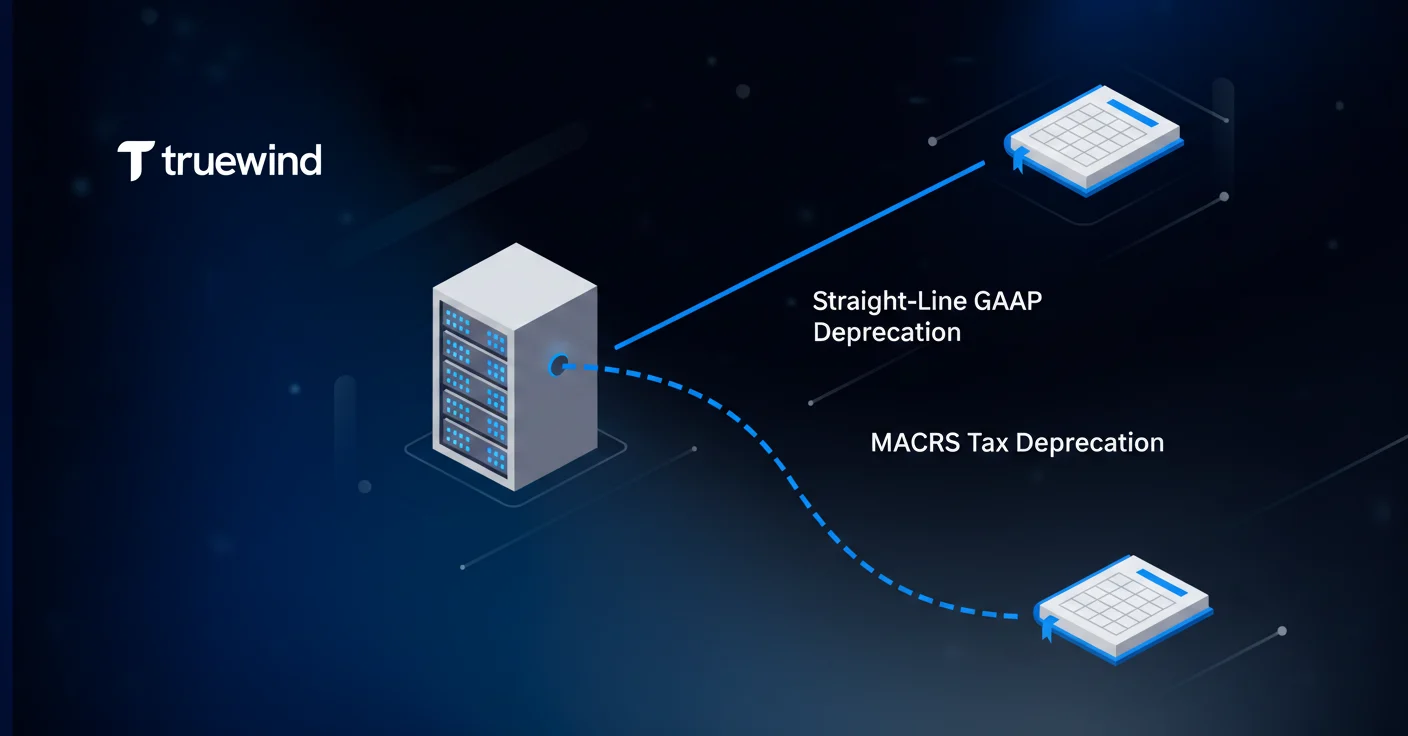
Most organizations maintain at least two sets of depreciation records: one for financial reporting under GAAP or IFRS, and one for tax purposes under IRS rules like MACRS. Keeping those in sync manually invites errors that only surface when the tax return doesn't tie to the books.
Sage Intacct handles this by running each book independently on the same asset record. You configure the method, useful life, and posting accounts per book, and the system calculates and posts each separately. A piece of equipment might depreciate straight-line over five years for GAAP while simultaneously running a 200% declining balance MACRS schedule for federal tax. Both post to their respective accounts without any manual calculation between them.
The practical payoff is cleaner book-to-tax reconciliation. Because both depreciation streams originate from the same asset record, variance reports between books are generated from a single source of truth, not two disconnected spreadsheets. That removes a common source of reconciliation errors at year-end and gives tax preparers a cleaner handoff from the accounting team.
Asset Acquisition and Recognition Workflow
Assets enter Sage Intacct's fixed asset module through the same transaction flows your team already uses. When a vendor invoice hits AP, you can convert it directly into an asset record without re-entering cost, vendor, or date information. The same applies to purchasing and cash management transactions. The acquisition source stays linked to the asset record, so there is a traceable line from the originating invoice to the depreciation schedule.
Construction-in-Progress (CIP) Tracking
Projects that span multiple periods before an asset is ready for use get held in a CIP account. Sage Intacct lets you accumulate costs from multiple invoices, labor entries, or purchase orders under a single CIP project. Once the asset reaches its in-service date, you convert it to a fixed asset with a defined useful life and depreciation method. Costs staged across weeks or months consolidate into one asset record at that point.
Dimensional Assignment at Acquisition
When an asset is created, all relevant Sage dimensions attach at that moment. Department, location, class, and project get assigned during setup, not retroactively. Cost allocation and reporting are accurate from day one, without a cleanup pass at period-end.
Capitalization Policy Enforcement
You can configure thresholds so items below a defined cost basis route to expense automatically, while qualifying purchases route to asset creation. That keeps capitalization policy consistent across the team, regardless of who processes the invoice.
Depreciation Methods and Calculation Logic
Sage Intacct supports the depreciation methods accounting teams actually use without forcing workarounds for anything outside straight-line.
Available Methods
- Straight-line (SL): Cost minus salvage value spread evenly across useful life
- Declining balance (DB): Accelerated method applying a fixed percentage to book value each period
- Double declining balance (DDB): 200% declining balance, commonly used for tax acceleration
- Sum-of-the-years' digits (SYD): Front-loaded depreciation that declines each year
- MACRS: IRS-prescribed schedules for federal tax purposes, including half-year and mid-quarter conventions
- Units of production: Depreciation tied to actual usage or output instead of time
Depreciation MethodCalculation ApproachPrimary Use CaseFirst-Year ImpactStraight-Line (SL)Cost minus salvage value divided evenly across useful lifeGAAP financial reporting for most asset classesConsistent expense across all periodsDouble Declining Balance (DDB)200% of straight-line rate applied to declining book value each periodTax acceleration and assets with rapid obsolescenceFront-loaded depreciation creates larger deductions earlyMACRSIRS-prescribed percentages based on asset class and recovery periodFederal tax compliance for most business assetsHalf-year or mid-quarter convention determines first-year percentageSum-of-the-Years' Digits (SYD)Declining fraction based on remaining life divided by sum of all yearsAssets with higher utility in early yearsAccelerated depreciation with predictable annual declineUnits of ProductionDepreciation tied to actual usage metrics or output volumeManufacturing equipment and extraction assetsVariable expense based on first-year production levels
Convention and Timing Logic
Depreciation starts based on the in-service date and the convention you configure per book. Half-year, mid-month, and full-month conventions each produce different first-year calculations, and Sage Intacct handles that math automatically. You define the convention once at the book level; the system applies it consistently across every asset in that book.
For monthly close, this matters. Teams that previously ran depreciation calculations in Excel often had convention errors baked into their schedules for years without realizing it. When the system owns the calculation logic, consistency is enforced by design.
Catch-Up and Retroactive Adjustments
If an asset's useful life or cost basis changes after depreciation has already run, Sage Intacct recalculates the remaining schedule and posts a catch-up entry to bring the books current. That adjustment ties back to the asset record, keeping the audit trail intact instead of burying a correction in a manual journal entry.
Fixed Asset Roll Forward Reporting
The fixed asset roll forward report, introduced in Sage Intacct 2026 R1, gives accounting teams a period-by-period view of every movement in the asset subledger: additions, disposals, transfers, depreciation charges, and net book value changes, all in one place.
Before this report existed, tying the fixed asset subledger to the GL meant pulling depreciation postings, cross-referencing asset records, and manually tracing disposals to make sure nothing slipped through. Now that work happens in the report itself.
Subledger-to-GL reconciliation tightens considerably when the roll forward already accounts for every transaction type in sequence. Reviewers can confirm the opening balance, trace each movement, and arrive at the closing balance without jumping between screens or exporting to Excel. Discrepancies surface during the process instead of afterward.
For auditors, this report does a lot of the prep work automatically. Additions tie to acquisition dates and source transactions. Disposals show gain or loss treatment. Depreciation charges map back to the method and book configuration on each asset record. That documentation trail exists by default, not because someone assembled it the night before fieldwork started.
Asset Disposal and Retirement Process
When an asset reaches the end of its useful life or gets sold, Sage Intacct calculates gain or loss automatically based on net book value at the disposal date. Accumulated depreciation clears from the subledger, and the system posts the resulting entries to the configured disposal accounts without manual calculation.
Full disposals close the asset record entirely. Partial disposals, such as selling a component of a larger asset, let you retire a portion of the cost basis while the remaining asset continues depreciating on its original schedule.
Asset transfers between locations or entities update the dimensional assignment on the record and maintain the depreciation history intact. The asset carries its accumulated depreciation and remaining useful life into the new assignment without restarting its schedule.
Every disposal creates a traceable entry: cost basis, accumulated depreciation at retirement, proceeds received, and the resulting gain or loss. That chain matters for auditors reviewing asset activity and for anyone tying the roll forward to the GL balance sheet.
Dimensional Tagging for Asset Cost Analysis
Depreciation is only part of the fixed asset cost picture. Maintenance contracts, repairs, and capital improvements accumulate against assets over time, and without dimensional tagging, those costs sit in GL accounts with no visibility into which location, department, or project they belong to.
Sage Intacct carries the full dimensional structure through every transaction tied to an asset. A roof repair on a property routes to the correct location dimension. An equipment overhaul charges to the right department. Custom dimensions already configured in your Sage instance attach to asset-related costs the same way they attach to any other transaction.
The payoff shows up in cost reporting. You can pull total occupancy costs by location, equipment spend by department, or project-level capital activity without manual aggregation. That kind of visibility typically requires a separate fixed asset tracking tool or significant spreadsheet work assembled from raw GL exports.
For organizations running multiple entities, this matters even more. Cost allocation across subsidiaries or locations stays traceable at the asset level and at the account level.
Common Fixed Asset Management Challenges Sage Intacct Solves
The global fixed asset management market was estimated at USD 264.68 billion in 2023 and is projected to grow at a CAGR of 28.3% through 2030. That growth reflects how many organizations are still running asset tracking on spreadsheets and finally replacing them.
The problems that drive that shift are consistent across industries:
- Spreadsheet-based schedules drift from the GL over time, especially after adjustments or partial disposals get handled inconsistently across team members
- Manual depreciation calculations introduce convention errors that compound quietly across years before anyone catches them
- Asset location and ownership changes don't always make it back to the schedule, so the subledger and the physical asset inventory stop matching
- Subledger-to-GL reconciliation at period-end requires pulling multiple reports, exporting data, and manually tracing transactions that should already connect
Sage Intacct solves each of these by keeping asset records, depreciation logic, and GL posting inside the same system. Calculations run on defined rules, not formulas in a cell someone might overwrite. Dimensional assignment travels with the asset through transfers and adjustments. The roll forward report matches the subledger to GL automatically without requiring a manual assembly job at close.
Integration with Sage Intacct Core Modules
Fixed assets don't live in isolation from the rest of the books, and Sage Intacct doesn't treat them that way. The module connects directly to GL, AP, Purchasing, and Cash Management so asset-related transactions flow through existing workflows without duplicate entry.
AP and Purchasing
Vendor invoices processed in AP can convert to asset records in one step. Cost, vendor, date, and dimensional data carry over from the invoice without re-entry. Purchase orders flow the same way. The originating transaction stays linked to the asset record throughout its life.
General Ledger
Depreciation entries post directly to configured GL accounts on schedule. No manual journal entries needed. Drill-down from any GL balance links back to the source asset record, so reconciliation works in both directions.
Cash Management
Proceeds from asset disposals route back through Cash Management, keeping the full disposal transaction tied to the correct accounts and period without offline tracking.
Consistent Dimensions Across Modules
Because every Sage Intacct module shares the same dimensional structure, asset-related costs carry the same department, location, and class tags whether they originate in AP, Purchasing, or a direct GL entry. Nothing requires manual alignment after the fact.
Standalone fixed asset systems force a regular export-import cycle to keep the subledger in sync with the GL. Every export is a chance for data to diverge. Keeping asset management inside Sage Intacct eliminates that cycle entirely.
Implementation Considerations and Best Practices
Getting the setup right upfront saves significant rework later. A few decisions made during implementation shape how accurate and maintainable your asset records will be over time.
Capitalization Thresholds
Set a clear dollar threshold before any assets enter the system. Items below the threshold should route to expense automatically. This keeps the subledger clean and prevents low-value purchases from inflating asset counts.
Book Configuration
Map out every depreciation book you need before importing asset records. Adding books retroactively requires recalculating historical depreciation, which is painful at scale. Get GAAP and tax books configured and tested first.
Data Migration
Legacy spreadsheet data rarely maps cleanly to Sage's asset record structure. Audit your existing schedules before migration: confirm cost basis, acquisition dates, accumulated depreciation, and remaining useful life on every record. Importing bad data moves the problem into a more complex system.
Ongoing Maintenance
Assign clear ownership for new asset additions. When invoices arrive in AP, someone needs responsibility for converting them to asset records within that same period. Letting additions lag creates reconciliation gaps that compound fast.
Automating Fixed Asset Workflows with AI and Integration
Sage Intacct handles the fixed asset register well. What it doesn't handle is the surrounding close work: building the prepaid and fixed asset rollforward schedules, generating the corresponding journal entries, routing exceptions to reviewers, and tracking sign-offs across the checklist.
That's where AI-powered close automation fits in. Tools built to sit alongside Sage Intacct act as the execution layer for close workflows, automating fixed asset and prepaid schedule preparation from source invoices, producing GL-ready entries mapped to Sage dimensions, and routing exceptions to reviewers without dumping everything in a queue.
Sage stays the system of record. The close orchestration and workpaper assembly happen on top of it.
Final Thoughts on Running Fixed Assets in Sage Intacct
You get the most from Sage Intacct fixed asset management when you treat it as your single source for cost basis, depreciation, and disposal activity instead of running parallel spreadsheets. The module posts directly to your GL with full dimensional tags, so your close process has one less reconciliation step. See how Truewind builds automated rollforward schedules and journal entries on top of your Sage asset data. Your fixed asset subledger becomes a close asset instead of a close burden.
FAQ
Can I build fixed asset schedules in Sage Intacct without manual depreciation spreadsheets?
Yes. Sage Intacct calculates depreciation automatically based on the method, useful life, and book settings you define per asset, then posts entries directly to your GL without manual journal entry creation. The system handles straight-line, declining balance, MACRS, and other methods, including half-year and mid-quarter conventions, so your team reviews results instead of building formulas.
Sage Intacct fixed asset management vs spreadsheet tracking for depreciation?
Sage Intacct runs depreciation calculations inside the same system where your GL lives, so schedules stay in sync with posted balances and dimensional assignments carry through automatically. Spreadsheets drift from the GL over time, especially after partial disposals or adjustments, and require manual reconciliation at every close. The roll forward report in Sage Intacct ties the subledger automatically, which removes the export-and-trace work spreadsheets create.
How does multi-book depreciation work for GAAP and tax reporting?
Sage Intacct runs each depreciation book independently on the same asset record, so one piece of equipment can depreciate straight-line for GAAP while simultaneously running MACRS for federal tax. Each book posts to its own GL accounts, and variance reports between books generate from a single source of truth instead of two separate schedules.
What happens to dimensional tags when an asset transfers between locations?
The asset record updates to reflect the new location, department, or entity dimension, and the depreciation history carries forward intact. The system maintains accumulated depreciation and remaining useful life under the new assignment without restarting the schedule, so cost allocation reports reflect the transfer without manual adjustment.
How does Sage Intacct handle partial asset disposals and gain-loss calculations?
Partial disposals retire a portion of the cost basis while the remaining asset continues depreciating on its original schedule. The system calculates gain or loss automatically based on net book value at the disposal date, posts accumulated depreciation for the retired portion, and routes proceeds to the configured disposal accounts without manual calculation.
Turn this into a close-ready workpaper
Start with sample files or upload your own statements to see how Truewind prepares review-ready workpapers and journal entries.