

The board packet is due, but the restricted-fund schedule does not agree with the donor export. Program expenses are coded in the GL, yet the functional view still depends on an allocation workpaper. Cash is visible by bank account, but not by the restrictions and entities the finance committee needs to understand. None of those failures begins with report formatting. They begin upstream, where source files, dimensions, allocation rules, and reviewer decisions have to become one approved accounting record.
Nonprofit accounting software should be evaluated by what the finance team has to produce. That includes board reporting, grantor schedules, restricted-fund activity, budget versus actuals, program and functional expense views, cash visibility, consolidated entity reporting, and audit support. A report is reliable only when the team can trace its balances to the GL, its dimensions to the source activity, and its exceptions to a reviewer decision.
TL;DR: Reliable reporting starts upstream
- Start with the reports your board, grantors, program leaders, and auditors expect. Work backward to the source files and dimensions each report requires.
- Keep Sage Intacct or QuickBooks Online as the system of record. Use a preparation layer for the work that happens before approved entries reach the ledger.
- Require review-ready workpapers that show source, calculation, accounting treatment, exceptions, and reviewer sign-off.
- Preserve fund, grant, program, department, purpose, and entity dimensions from source through posting.
- Treat unreconciled activity and inconsistent classifications as review items. A report should not look complete by hiding what still needs judgment.
- Adopt through controlled iteration. Begin with a recurring workflow that has known inputs, a prior approved result, and a reviewer who owns the treatment.
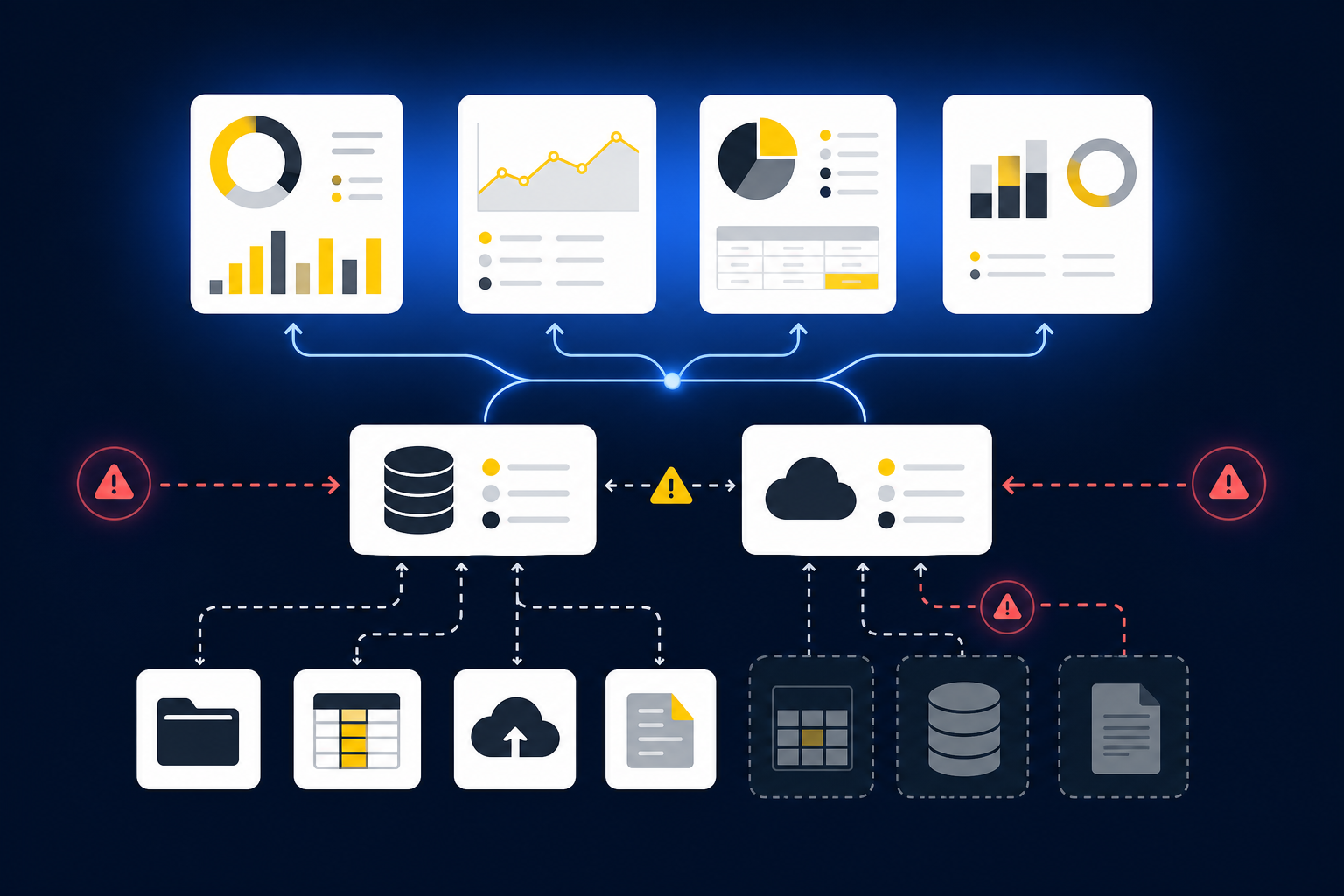
Feature lists matter after those requirements are clear. A dashboard cannot recover donor detail that disappeared when a processor deposit was posted as one net amount, and a report writer cannot reconstruct an allocation rule that lives only in a preparer’s spreadsheet. The software has to preserve the accounting path before it presents the reporting result. If you want to inspect that preparation and review path against a report your team already owns, See Truewind in action.
Build a report map before comparing software
A useful requirements process starts with a report matrix. Name who uses each report, what decision it supports, which dimensions it depends on, and who reviews it before distribution. Cadence belongs in the same map because a quarterly board report may depend on workpapers that have to be prepared and approved every month.
The matrix below is a starting point, not a prescribed report package. Your grant terms, entity structure, board process, and accounting policies determine the final design.
| Reporting output | Primary audience | Decision supported | Required source dimensions | Example cadence | Review owner | Common data-quality risk |
|---|---|---|---|---|---|---|
| Board financial package | Board and finance committee | Resource allocation, operating performance, and variance review | Fund, program, department, entity, period | Monthly or quarterly | Controller or finance leader | Stale allocations or incomplete restriction coding |
| Grantor report | Grant manager and grantor | Spending against an award and remaining activity | Grant, fund, program, purpose, period | Per grant schedule | Grant accountant or controller | Transactions missing grant codes or using the wrong cutoff |
| Restricted-fund activity | Finance leadership and program owners | Available restricted resources and activity by purpose | Restriction, fund, donor or campaign, program, period | Monthly | Controller | Net deposits losing donor-level detail |
| Budget versus actuals | Department and program leaders | Variance investigation and forecast updates | Budget version, program, department, fund, period | Monthly | Budget owner and controller | Budget and actual dimensions using different definitions |
| Program and functional expense view | Management and board | Cost review by program and function | Natural account, program, function, department, allocation basis | Monthly or quarterly | Controller | Unsupported changes to allocation treatment |
| Cash visibility | Finance leadership | Cash availability and near-term obligations | Bank account, fund, restriction, entity, settlement status | Weekly or monthly | Controller or treasury owner | Bank totals detached from restrictions or unsettled activity |
| Multi-entity reporting | Finance leadership and board | Entity performance and combined financial position | Entity, account, department, intercompany counterparty, period | Monthly | Controller | Inconsistent entity coding or incomplete intercompany support |
| Audit-support schedules | Accounting team and external auditor | Balance support and re-performance | Source document, account, fund, grant, preparer, reviewer | Monthly and year-end | Controller | Missing source links, unexplained adjustments, or absent approval |
The last column deserves as much attention as the report name. Reporting problems often appear as presentation issues even when the actual break happened during intake, coding, allocation, or reconciliation. If a donation platform, processor report, bank deposit, and ledger entry describe the same activity differently, the report inherits every unresolved difference.
A requirements document should therefore connect each report to its preparation workflow. For restricted-fund activity, that may mean donor exports, processor settlements, bank activity, dimensional coding, fee allocation, a reconciliation, and reviewer approval. Naming that chain makes it possible to evaluate whether software prepares reliable accounting support or simply displays whatever reached the GL.
The ledger and the preparation layer have different jobs
Nonprofit accounting software is often treated as one product decision. In practice, dependable reporting crosses two distinct jobs. The accounting system of record holds posted entries, account balances, dimensions, and financial statements. The preparation layer assembles the evidence and accounting work needed before those entries are ready to record.
Sage Intacct can remain the system of record without being asked to solve every upstream source problem. A donor platform export still has to be connected to processor fees, timing differences, bank deposits, fund coding, and the treatment the team used in prior periods. The ERP records the approved result. It does not remove the need to prepare and review that result.
Truewind sits in that preparation layer. It ingests supported source files, applies the team’s historical accounting rules, reconciles related activity across sources, preserves dimensions, and prepares workpapers, schedules, and journal-entry drafts. Missing statements, balance changes, inconsistent classifications, and unreconciled items are surfaced with source context rather than resolved without the accountant.
The reviewer then inspects the workpaper, follows source links, corrects treatment where needed, and signs off. Only after confirmation does Truewind push structured output to Sage Intacct or QuickBooks Online, with supported coding and dimensions preserved. Sage Intacct or QBO remains where the books live, and the accountant remains responsible for the result. Truewind’s Sage Intacct Marketplace integration describes that relationship without turning the preparation layer into another GL.
The distinction changes how you evaluate reporting. Ask whether the ledger can store the dimensions you need, then ask whether the preparation workflow preserves those dimensions from the original activity through review. If you want to walk through that boundary using one of your recurring reconciliations or workpapers, Book a Truewind demo.
Start with one report chain, not the entire close
A credible first workflow is recurring, bounded, and supported by a prior approved result. A donation reconciliation tied to restricted-fund reporting is a stronger starting point than a broad instruction to automate nonprofit finance. The team can supply the donor export, processor report, bank activity, prior workpaper, ERP balance, and known treatment, then compare the prepared result with what the reviewer already accepted.
Truewind aligns the activity across those sources, applies explicit dimensional and allocation rules, prepares the reconciliation and support schedule, and surfaces timing differences or unreconciled items. The reviewer can inspect what matched, what changed, and what still needs judgment. Corrections are captured against the workflow so later periods can reflect the team’s confirmed treatment without changing accounting policy on their behalf.
Controlled iteration matters because reporting workflows are specific to the organization. Two nonprofits may both report restricted-fund activity while using different fund structures, grant dimensions, allocation rules, and reviewer conventions. A generic template can organize the starting point, but the approved workpaper and reviewer corrections show how the work should actually be prepared.
In one customer conversation with an accounting firm, the team described an approximately 75% reduction in time spent categorizing credit-card transactions after adopting Truewind. That is one customer example, not a nonprofit benchmark or a reporting guarantee. The useful lesson is narrower: a defined workflow with repeatable inputs is easier to test, review, and expand than an open-ended automation project.
Data governance comes before report automation
Reliable reports require owned definitions. Fund, restriction, grant, program, function, department, purpose, and entity cannot be interchangeable labels added at the end of the close. Each dimension needs a defined meaning, an owner, and a rule for when it is required.
The same discipline applies to allocations and cutoffs. If a functional-expense allocation changes, the workpaper should show the approved rule and the period in which it changed. If a processor settlement crosses month-end, the reconciliation should show the timing difference rather than forcing the deposit into an expected total.
Before implementing a new preparation workflow, confirm that your team has:
- A documented chart of accounts and dimension structure
- Named owners for fund, grant, program, function, and entity definitions
- Prior approved workpapers for the workflows being automated
- Explicit cutoff and classification rules
- Reviewable allocation methods and approved changes
- A list of required source files for each reporting cycle
- Named preparers and reviewers, with clear sign-off responsibility
- A process for missing statements and incomplete source packages
- A record of reviewer corrections that should carry into later periods
- A defined boundary between prepared output and the system of record
Historical examples are operating context, not permission for autonomous policy decisions. The system can apply prior confirmed treatment to recurring activity, but novel items and rule changes still belong with the accountant. Governance is strongest when the workflow makes that boundary visible in the workpaper.
Report-design mistakes that software cannot repair later
One common mistake is designing the board package from the chart of accounts alone. Natural accounts may show what was spent, but nonprofit reporting often also needs the fund, program, function, grant, or entity attached to that activity. If those dimensions are missing during preparation, the final report starts with incomplete accounting context.
Another mistake is treating net cash as sufficient evidence of donation activity. A bank deposit may combine donor activity, processor fees, refunds, and settlement timing. Posting the net amount without reconciling the underlying sources can remove the detail needed for restricted-fund and campaign reporting.
Teams also weaken review when they hide exceptions to make a report appear finished. A missing statement or inconsistent classification is not a formatting problem. It is an accounting item that should remain visible, with its source context, until a reviewer decides how to treat it.
Allocation logic creates a similar risk when it sits outside the workpaper. A functional-expense view should not depend on an undocumented spreadsheet adjustment that changes from one preparer or period to the next. The calculation, basis, source, and reviewer approval belong with the supporting schedule.
Finally, audit support should not be assembled for the first time at year-end. Monthly workpapers can retain the source files, coding decisions, corrections, and sign-offs that produced each prepared balance. An audit trail documents that workflow, but it does not certify compliance or replace the auditor’s procedures.
Requirements checklist for nonprofit accounting software
Use the following questions to evaluate software by the accounting work and review controls it must support:
- GL, reporting, and integrations
- Which board, grantor, restricted-fund, budget, program, cash, entity, and audit reports must the finance team produce?
- Can every report balance be tied to an approved GL balance and its supporting workpaper?
- Which ERP integrations are documented, and what coding or dimensions are preserved?
- Dimensional accounting
- Which dimensions have to survive from donor or operational source through posting?
- Who owns changes to account mappings, cutoffs, dimensions, and allocation rules?
- Reconciliation and source completeness
- Can the workflow reconcile donor platforms, processors, bank activity, and ERP balances without forcing differences to zero?
- Are fees, refunds, allocations, and timing differences shown separately?
- Are missing files and inconsistent classifications routed to an accountant?
- Workpaper preparation and review
- Does the prepared output show source, calculation, treatment, exceptions, and reviewer sign-off?
- Can the reviewer inspect source records from the workpaper rather than searching through folders and email?
- Can prior approved workpapers and corrections guide the next period?
- Does any output reach the GL without explicit accountant confirmation?
- Workflow testing and audit support
- Can the team test the workflow against a known result before expanding the scope?
- Does the system preserve a history of source files, preparation steps, reviewer corrections, and approvals?
A useful evaluation does not end with a polished sample report. It follows one number from the source file through coding, reconciliation, workpaper review, approval, and the ledger. To test the checklist against one of your own recurring reporting workflows, Get a Truewind demo.
FAQs
What is nonprofit accounting software?
Nonprofit accounting software supports the accounting records and reporting structures a nonprofit finance team needs, including funds, grants, programs, restrictions, functional expense views, and entity context. The category can include a general ledger, reporting tools, and an upstream preparation layer. The important question is not whether one product claims every function, but whether the full workflow preserves evidence and reviewer control from source activity to approved reporting.
Which reports should a nonprofit finance team prioritize?
Start with the reports that support recurring decisions and external obligations. Board reporting, grantor schedules, restricted-fund activity, budget versus actuals, program and functional expense views, cash visibility, multi-entity reporting, and audit-support schedules are common requirements. Final priorities depend on the organization’s funding model, entity structure, grant terms, and review process.
Is Sage Intacct enough for nonprofit reporting?
Sage Intacct can remain the system of record for posted accounting, balances, dimensions, and downstream reporting. Upstream preparation may still involve donor exports, processor reports, bank activity, allocation schedules, prior workpapers, and reviewer notes. An execution layer can prepare and reconcile that work before approved output reaches Intacct, without replacing the ERP or overstating what an integration does.
How should AI fit into nonprofit accounting?
AI should prepare recurring work in a form an accountant can inspect. That means reading supported source material, applying confirmed mappings and classifications, reconciling related activity, preparing the workpaper, and surfacing exceptions with source context. The accountant owns policy, novel treatments, corrections, approval, and posting.
Why should exceptions remain visible?
Exceptions identify where the learned process does not fit the current period. A missing statement, unexpected balance change, new classification, or unreconciled deposit may require information that software does not have. Routing the item to a reviewer protects the accounting decision and creates a record of how the team resolved it.
What is the right first workflow to automate?
Choose work that recurs, has defined inputs, and ends in an artifact a reviewer already knows how to inspect. A donation reconciliation, restricted-fund schedule, prepaid rollforward, or fixed-asset schedule may fit when the team can provide prior approved workpapers and current source files. Compare the prepared result with the known answer, capture corrections, and expand only after the process is understandable and repeatable.
Can Truewind replace the nonprofit’s ERP?
No. Truewind is a preparation layer upstream of Sage Intacct and QuickBooks Online. It prepares supported workpapers, reconciliations, schedules, and journal-entry drafts for accountant review, then pushes approved output to the connected system of record. It does not post without confirmation, resolve exceptions autonomously, or replace accounting judgment.
Frequently Asked Questions
How do I ensure reliable reporting for my nonprofit?
To ensure reliable reporting, start by identifying the key reports your board, grantors, and program leaders expect. Work backward to determine the source files and dimensions each report needs. It's crucial to keep your accounting system, like Sage Intacct or QuickBooks Online, as the system of record while using a preparation layer to handle the upstream work. Make sure to have review-ready workpapers that document the source, calculations, and any exceptions, so everything is traceable back to the general ledger.
What if my reports are missing key dimensions?
If your reports are missing key dimensions, first review your preparation process to ensure that fund, program, and entity dimensions are preserved from the source through to posting. Identify where the breakdown occurs—whether during data intake, coding, or reconciliation. Make adjustments to your workflow to include these dimensions consistently, and ensure that your team understands the importance of maintaining this context for accurate reporting.
Can I automate my nonprofit's reconciliation process?
You can automate parts of your reconciliation process by using a structured workflow that ingests your source documents, like bank statements and processor reports. However, remember that while automation can streamline data intake and preparation, human review is essential. Ensure that your team is involved in reviewing the reconciliations to address any exceptions or discrepancies that arise, maintaining oversight and control over the process.
When should I prepare workpapers for my reports?
You should prepare workpapers for your reports well in advance of any deadlines. Start by gathering the necessary source documents and prior approved workpapers. This preparation should occur regularly—monthly or quarterly—depending on your reporting cadence. By organizing your workpapers ahead of time, you can ensure that all necessary dimensions are included and that any exceptions are identified and addressed before finalizing your reports.
Why does my nonprofit need a preparation layer?
A preparation layer is essential because it helps organize and structure your raw financial data before it reaches your accounting system. This layer allows you to apply your existing accounting rules, reconcile discrepancies, and prepare workpapers that are ready for review. It ensures that all necessary dimensions and context are preserved, which is critical for producing accurate and reliable reports that meet the needs of your board and stakeholders.
Turn this into a close-ready workpaper
Start with sample files or upload your own statements to see how Truewind prepares review-ready workpapers and journal entries.