

Automating the journal-entry push first leaves your close bottleneck exactly where it was. Your team still has to assemble source files and carry the right dimensions into Sage Intacct before a reviewer can approve the work. A useful month-end close automation roadmap starts with that preparation, because posting comes only after the reconciliation and workpaper are ready. Over the first 90 days, make recurring close work reviewable and repeatable while the accountant keeps control of every approval.
A month-end close automation roadmap that starts with the ERP starts too late. The real work is upstream: collecting source files, applying account mappings and dimensions, checking totals, preparing workpapers, and separating routine items from exceptions. Automate that preparation first, then let Sage Intacct record the approved result.
Key Takeaways:
- Build your close roadmap around reviewer-ready work, not faster posting.
- Use prior approved workpapers as the starting point for each recurring workflow.
- Spend the first 30 days reproducing known results before expanding scope.
- Define exception rules before connecting more source files or accounts.
- Expand only when the reviewer can trace each prepared amount to its source.
- Keep Sage Intacct as the system of record and require approval before posting.
Why Close Automation Stalls Before Posting
Close automation stalls before posting because the final ERP entry is only the last handoff. Most of the work happens earlier, where source files are combined, classifications are applied, totals are reconciled, and support is prepared for review. A faster push into Sage Intacct won’t fix preparation that still depends on spreadsheets and memory.
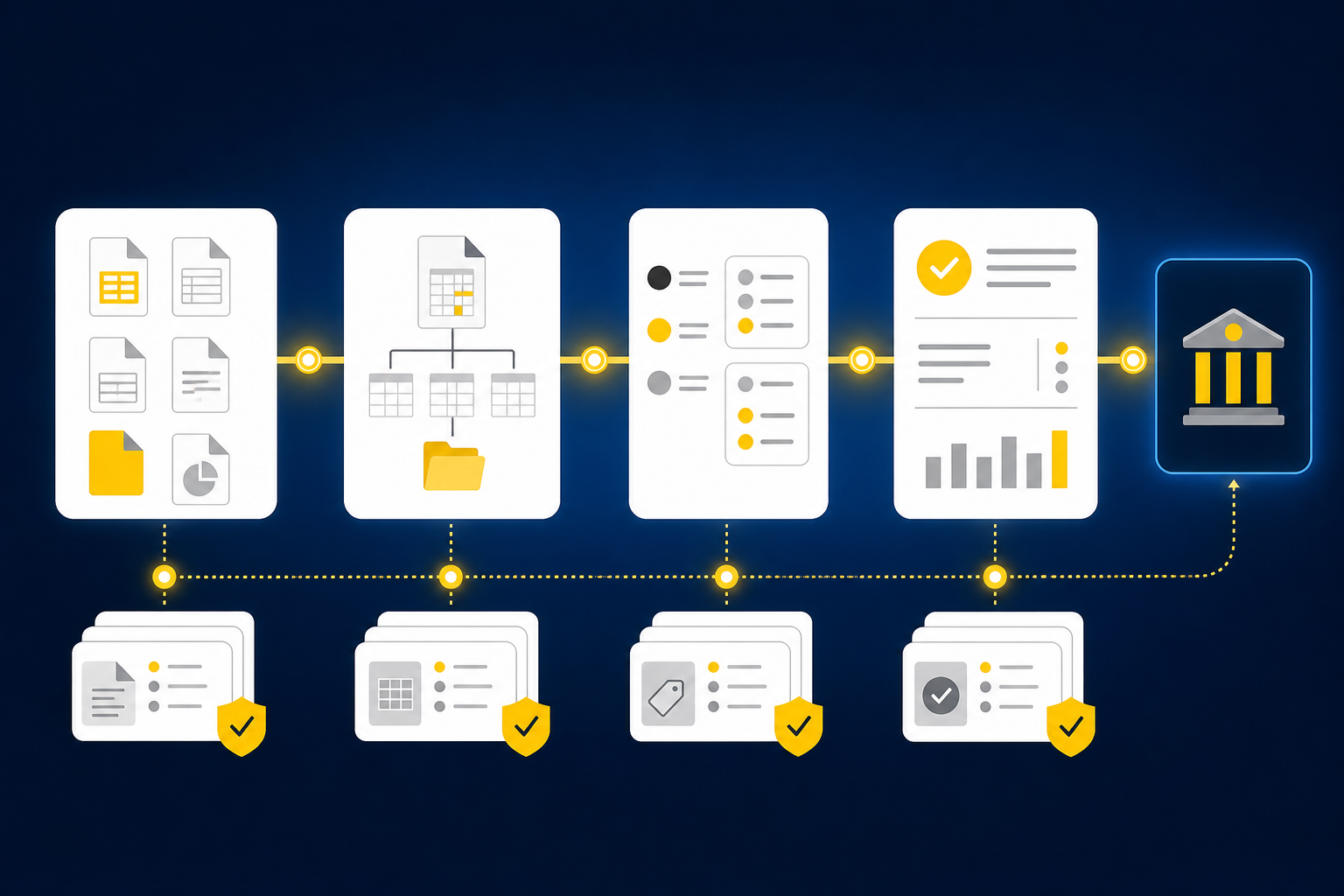
Preparation Determines Whether an Entry Can Be Reviewed
A nonprofit controller opens Sage Intacct in the morning and sees the bank deposit. The donor platform export shows the underlying gifts, while the processor report shows fees, refunds, and settlement timing. Neither source carries the complete fund, campaign, or program treatment the workpaper needs. Someone still has to bring those records together before the deposit can be reviewed.
That work is not simple extraction. The preparer has to decide which files describe the same activity, whether the period is complete, how prior classifications apply, and which difference needs the controller’s judgment. Until those questions are answered, the entry may exist, but the accounting work behind it isn’t ready.
A bank feed can show cash movement. It can’t explain the full accounting treatment on its own.
Manual Control Has Real Merits and Real Limits
Spreadsheets remain common for a reason. They’re flexible, reviewers know how to inspect them, and an experienced accountant can adapt a workbook when a source changes. That case is fair. Familiarity matters when the team is responsible for the result.
The limit appears when the same flexibility turns each close into a reconstruction exercise. A prior workpaper gets copied, source files arrive through different channels, mappings live in formulas, and reviewer notes stay in email. By the time the controller sees the file, review includes checking whether the preparation process itself was followed. That’s exhausting because judgment starts only after the assembly work has been re-performed.
A useful automation project preserves the familiar review surface while removing repeated preparation. If you want to inspect how source files, exceptions, and reviewer actions can sit in one preparation flow, See Truewind in action while you map the same handoffs in your current close.
Exceptions Show Where Judgment Belongs
Exceptions aren’t evidence that automation failed. They show where the learned process no longer explains the current period, which is exactly where an accountant should step in. Missing statements, unexpected balance changes, mixed activity, and inconsistent classifications belong in a visible review queue.
Silent resolution creates the greater risk. A clean reconciliation can look complete even when the source is missing or a classification changed without approval. The reviewer needs to see what differed, which source raised the issue, and what treatment was applied previously. Your roadmap should make those questions easier to answer, not remove them from view.
The first design decision is simple: decide what gets prepared automatically and what must stop for review.
Build the 90-Day Month-End Close Automation Roadmap
A 90-day month-end close automation roadmap should move through three stages: reproduce an approved result, connect the review handoffs, and expand into similar recurring work. Each stage needs a reviewer gate before the next begins. The calendar matters less than proving that the prepared output is understandable and repeatable.
A useful close roadmap works like a rollforward. Start from the last approved state, update it with current-period evidence, and explain every material difference before carrying the workflow forward. Starting from a blank automation template throws away the accounting history you already trust.
Diagnose the Preparation Surface Before Changing It
Your first task is to determine whether the selected pilot is ready to become a repeatable workflow. Recurrence alone isn’t enough. The team also needs known inputs, a prior approved output, visible accounting logic, and a reviewer who owns the final treatment.
Run the test against the actual workpaper, not the close checklist. A checklist may say “reconcile donations,” while the workpaper reveals five source files, two clearing accounts, several dimensional splits, and a reviewer note about a recurring timing difference. The workpaper contains the process the roadmap must preserve.
Ask these questions before day one:
- Can the reviewer trace every prepared balance to a named source?
- Does a prior approved workpaper show the expected format and treatment?
- Are account mappings, dimensions, cutoffs, and allocation rules visible?
- Can the team name the conditions that require reviewer judgment?
- Is there one person who owns approval before anything reaches Sage Intacct?
Use three affirmative answers as the minimum entry rule. If source support, prior treatment, or reviewer ownership is missing, fix that gap before automating the workflow.
Days 1 to 30: Reproduce the Known Workpaper
The first 30 days should prove that the current process can be reproduced without changing its accounting logic. Load the prior approved workpaper, current-period source files, relevant ERP balances, and any instructions that explain recurring treatment. Then compare the prepared result with what the team would have produced manually.
Reproduction is deliberately conservative. You’re testing whether the workflow preserves account mappings, entity or fund dimensions, cutoff decisions, and the reviewer’s expected format. New policy decisions stay with the accountant. If the existing workpaper doesn’t explain the treatment, automation can’t repair that policy gap for you.
Use the first phase to complete five actions:
- Freeze the pilot scope: Name the account, entity, period, sources, preparer, and reviewer.
- Load the approved history: Use the prior workpaper, prior entry, and reviewer notes as operating context.
- Prepare the current period: Apply the known mappings and classifications to current source files.
- Compare every difference: Separate source changes from preparation errors and new judgment items.
- Capture reviewer corrections: Record what changed and why before the next run.
By day 30, success means the reviewer can inspect a familiar workpaper and explain every departure from the prior period. A posted journal entry is not the acceptance test.
Days 31 to 60: Connect Handoffs and Route Exceptions
The second phase connects the preparation workflow around the workpaper. Source intake, reconciliation, reviewer actions, and journal-entry drafting should follow one visible path. The goal is to remove manual handoffs without weakening the point where judgment enters.
Consider a donation reconciliation. Routine activity may follow established mappings for funds, programs, processor fees, refunds, and clearing accounts. A missing processor report or a new restriction doesn’t belong in the routine path. It should stop with the source attached, the prior treatment visible, and a named reviewer responsible for the decision.
Define each exception with four fields:
- Trigger: What current-period condition falls outside the approved process?
- Evidence: Which source file and prior treatment should the reviewer inspect?
- Owner: Who can confirm or change the accounting treatment?
- Allowed action: Can preparation continue, or must the workflow stop?
A vague label such as “needs review” isn’t enough. The reviewer needs to know why the item stopped and what decision is required. A live walkthrough becomes useful once those paths are on paper, because you can compare each exception with the review surface instead of discussing automation in the abstract; Book a Truewind demo against the matrix your team has already defined.
Days 61 to 90: Expand by Similarity, Not Visibility
The last phase should add workflows that resemble the successful pilot. A high-profile account isn’t automatically the right next choice. Expansion works better when the next workflow has recurring sources, stable treatment, an approved workpaper, and the same reviewer pattern.
Score each candidate with one point for five conditions: recurring frequency, available source files, prior approved output, stable accounting treatment, and a named reviewer. Workflows scoring four or five belong in the current roadmap. A score of three can proceed only when the missing condition can be fixed during the phase. Defer anything lower.
Rank the expansion queue in this order:
- Same source, same treatment: Add another entity or account using the established workflow.
- Different source, same review pattern: Add a similar reconciliation with a new input format.
- Same source, new dimensional logic: Extend into another fund, program, department, or entity.
- New source and new treatment: Leave it outside the first 90 days.
Not every recurring task belongs in the initial month-end close automation roadmap. If policy is changing, source availability is unreliable, or reviewers disagree on the expected treatment, manual preparation may remain the better control for now. That limitation sharpens the roadmap because it keeps unstable work from weakening a proven workflow.
Measure Reviewer Burden Instead of Entry Volume
Journal-entry count is a weak measure of close automation. One entry may require several source files, complex allocations, and multiple review decisions, while another follows a stable rollforward with no exception. Count the work the reviewer still has to reconstruct.
Track source completeness, unexplained differences, coding corrections, exception ownership, and whether routine items can be reviewed from the workpaper alone. The key question is whether the reviewer can understand and re-perform the important steps without rebuilding the preparation outside the workflow. If routine items still send the reviewer back through folders and email, the preparation surface is incomplete.
Use four gates before expanding:
- Every prepared amount ties to retained source support.
- Differences from the prior approved result are explained.
- Exceptions identify the trigger, evidence, owner, and required action.
- Nothing reaches the GL without reviewer confirmation.
Corrections should also carry forward. A mapping change confirmed this period becomes context for the next period, while a one-time exception remains visibly separate. That distinction prevents a judgment call from turning into an unreviewed standing rule.
How Truewind Prepares Review-Ready Close Work
Truewind puts the roadmap into practice by preparing recurring accounting work before Sage Intacct or QuickBooks Online records it. Source files, prior workpapers, and reviewer corrections become context for workpaper preparation and reconciliation. Exceptions remain with the accountant, and approved output moves downstream only after review.
Prior Workpapers Become Operating Context
Workpaper generation and rollforward start with the artifact your reviewer already understands. The prior workpaper, current-period source documents, and ERP balances feed the current preparation. Supporting schedules update, required journal-entry drafts are prepared, and source links remain with the work.
Historical-example learning carries confirmed mappings, allocation choices, classification splits, and reviewer corrections into later periods. It doesn’t change accounting policy. The mechanism is narrower: apply established treatment where the current period fits, then surface what changed where it doesn’t.
For a nonprofit reconciliation, multi-source reconciliation can align donor-platform activity, processor settlements, fees, refunds, and bank deposits. For a family office, the same preparation pattern can combine custodian statements, investment-vehicle support, and ERP balances while keeping entity treatment intact. Unreconciled items remain visible rather than being forced to agree.
Review Stays Between Preparation and Sage Intacct
The human review workflow places prepared workpapers, reconciliations, schedules, journal-entry drafts, source links, and exceptions in front of the accountant. Reviewers can confirm the result, adjust it, or send it back for more preparation. Their decision remains part of the workflow history.
After sign-off, the Sage Intacct integration can push structured output with dimensional coding and source references preserved. Sage Intacct remains the system of record. The platform doesn’t post without reviewer confirmation, and it doesn’t resolve exceptions on the accountant’s behalf.
That sequence maps directly to the 90-day roadmap:
- Prepare from current sources and approved history.
- Route differences that fall outside established treatment.
- Present the complete workpaper for accountant review.
- Push only the approved output into Sage Intacct.
If you want to test that sequence against one recurring workpaper your team already runs, Get a Truewind demo with the prior-period file and exception rules in hand.
Carry the Roadmap Into the Next Close
A close automation roadmap succeeds when it makes preparation repeatable without moving judgment out of accounting. Start from approved work, preserve the team’s mappings and review conventions, route exceptions with source context, and keep Sage Intacct as the system of record. Each phase should leave the reviewer with more evidence, not less.
The practical 90-day goal is not autonomous posting. It is a close with fewer manual handoffs, consistent reviewer-ready workpapers, and less repeated preparation across recurring tasks. Once one workflow reaches that standard, expand from the known result instead of starting over.
Turn this into a close-ready workpaper
Start with sample files or upload your own statements to see how Truewind prepares review-ready workpapers and journal entries.