

Sage Intacct can hold the final entry, but it can't prepare the processor reconciliation your SaaS finance team needs before review. The real delay sits upstream, where someone combines settlement files, applies the team's coding history, checks totals, and explains every exception in a workpaper. A clean journal entry at the end doesn't remove that work. It only hides how much preparation happened before the reviewer could make a judgment.
The useful question isn't whether AI can generate a journal entry. It's whether your reviewer can trace that entry to source, inspect the accounting logic, resolve the exceptions, and approve the exact work before it reaches the GL. Anything less moves the work around instead of preparing it.
Key Takeaways:
- Judge AI by the workpaper it prepares, not the answer it generates.
- Start with a recurring workflow that has known inputs and a prior approved result.
- Preserve entity, account, and dimensional rules across every period.
- Route missing support and unusual treatment to an accountant.
- Keep Sage Intacct or QuickBooks Online as the system of record.
- Expand only after reviewer corrections persist in the next period.
Why SaaS Finance Teams Cannot Trust Finished Answers
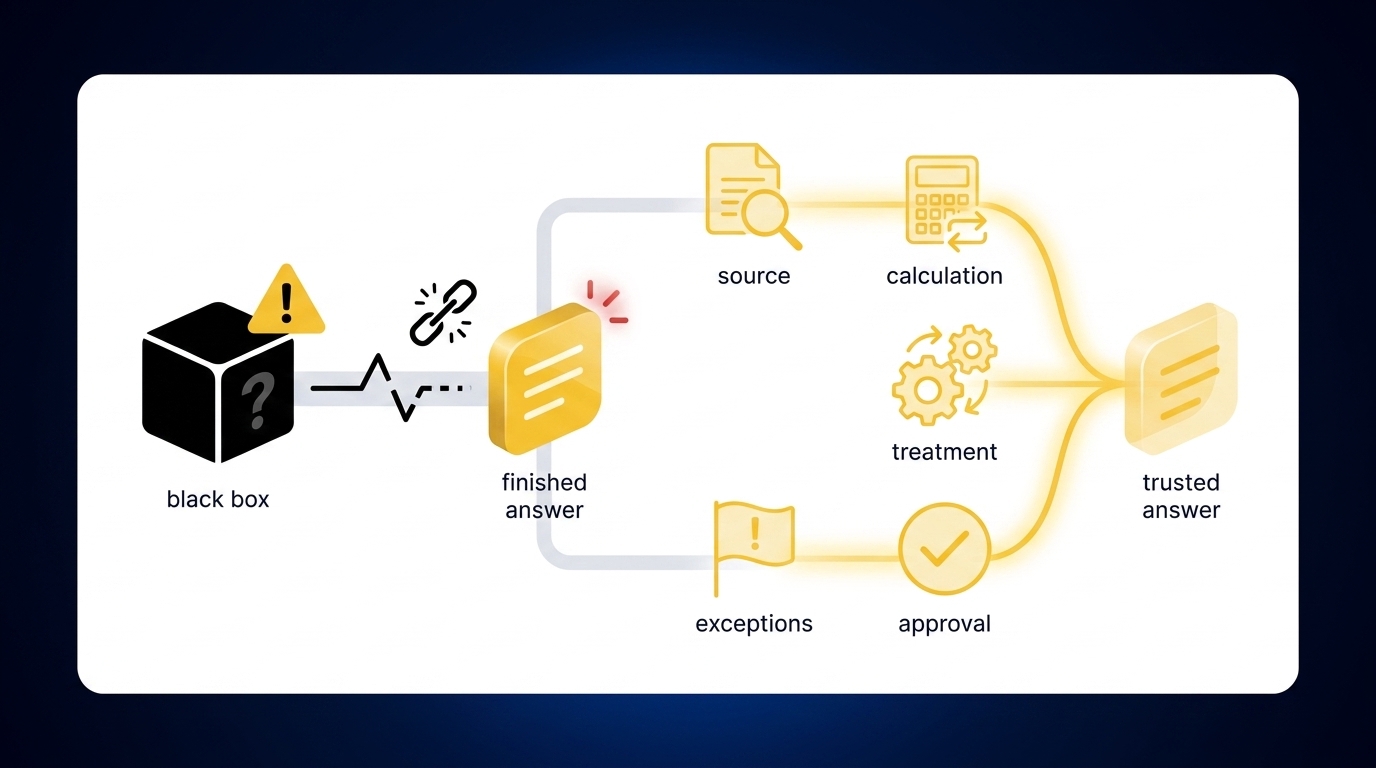
SaaS finance teams can trust AI-prepared accounting work only when the output exposes its source, calculation, treatment, exceptions, and approval status. A polished answer without that support creates another review problem. The controller has to reconstruct the preparation before deciding whether the number belongs in the ledger.
A Clean Journal Entry Can Hide More Work
At 8:30 on close day, a VP of Finance opens a prepared journal entry for processor activity. The debits and credits balance, the memo reads reasonably, and the account coding follows last month. What's missing is everything needed to approve it: the processor export, the bank settlement tie-out, the fee calculation, and the treatment of a cutoff item. Review stops before it starts.
A finished answer without trace is like a workpaper handed over with its support folder pulled out. The number may be right, but the reviewer has to rebuild what the preparer should have shown, line by line, from files they now have to go hunting for. Frankly, that's worse than receiving an obvious exception, because the clean presentation hides the exact place judgment is still required.
Manual Touch Is Familiar, but It Is Not Control
Spreadsheets are flexible, and that matters. A skilled accountant can adjust a rollforward, document an unusual classification, and respond to a late source file without waiting for software changes. The status quo has real merit when the workflow is small, the preparer knows every account, and the reviewer can follow the workbook end to end.
Scale changes the tradeoff. Once the close spans multiple entities, processors, deferred revenue schedules, and recurring allocations, the evidence gets spread across workbooks and inboxes. Control now depends on someone remembering where the support lives and why last period's treatment changed. Familiarity remains, but the review surface weakens with every new source added.
If you want to inspect how source files, exceptions, and reviewer actions meet in one workflow, See Truewind in action as you compare that review surface with your current workpaper.
The Missing Layer Sits Before the GL
Sage Intacct and QuickBooks Online record approved accounting output. They don't determine what a changed processor report represents, how a settlement maps across entities, or whether the current-period classification agrees with the prior workpaper. That preparation sits upstream, where SaaS finance teams still combine files, apply mappings, check totals, and assemble support.
A generic AI prompt doesn't solve that layer either. Recurring accounting work follows client-specific or company-specific rules, including cutoffs, dimensions, allocation choices, and reviewer conventions. Here is a rule worth keeping: if a workflow can't name its source package, its accepted treatment, and its escalation point before it runs, it isn't ready to automate. The next question isn't which model produces the cleanest answer. It's how to build a process your reviewer can actually approve.
How SaaS Finance Teams Build Reviewable AI Workflows
Reviewable AI workflows begin with a known accounting process, not an open-ended instruction. The team defines the source package, expected workpaper, accounting rules, exception path, and reviewer action before automating preparation. That structure is how SaaS finance teams turn AI from an answer generator into part of the close.
Can Your Current Workflow Be Reproduced?
Can another preparer run the workflow from the documents and instructions your team has today? If the answer depends on asking the same manager three questions every month, the process isn't ready for automation. Missing process knowledge becomes missing system context, and the reviewer still has to fill the gap by hand.
Start by watching one complete cycle. Record which source files arrive, what the preparer changes, where prior-period treatment is reused, and which decisions reach the reviewer. Don't clean up the process while documenting it. You need to see the real workflow first, including the spreadsheet tabs and reviewer notes nobody put in the SOP.
Before choosing a first workflow, ask:
- Does it recur on a predictable schedule?
- Can you identify the complete source package?
- Is there a prior approved workpaper or entry?
- Can the reviewer explain what requires judgment?
- Will a missing or changed source be obvious?
Four strong answers are enough to keep evaluating the workflow. Fewer than four usually means the team should document the process before automating it, because automation copies whatever gaps you hand it.
Bounded Workflows Beat Broad AI Mandates
"Automate the close" is a mandate, not a workflow, and it leaves too many decisions undefined. A bounded instruction identifies one account or process, the accepted source files, the historical treatment, and the point where a reviewer approves the work. Narrower scope may sound less ambitious, but it produces evidence the accounting team can inspect.
Controlled iteration has a downside. It feels slower than launching several workflows at once, especially when leadership wants visible progress across the close. That's a fair cost. The advantage is that every correction improves a known process instead of disappearing into a large rollout where nobody can tell whether the issue came from the source, the rule, or the review design.
Define the first workflow in this order:
- Name the recurring output: Identify the reconciliation, schedule, workpaper, or journal-entry draft.
- Fix the source boundary: List the files and ERP balances required before preparation begins.
- Document accepted treatment: Use the prior approved result, current SOP, and reviewer corrections.
- Set the escalation point: Specify which missing items, changes, or classification questions go to the accountant.
- Require approval: Keep downstream use blocked until the reviewer confirms the prepared output.
Build the Known Answer Before Testing AI
An approved marketplace customer case shows why baselines matter. The finance operation had grown more complex, while accounting, compliance, and investor support still depended on manual work. After the process became structured, the customer reported more than 10 hours saved per month and a month-end close shortened by four days. Those are case-specific outcomes, not a general promise.
The important part for an implementation isn't the number alone. A team needs the prior source package, the workpaper that was accepted, and the final entry that reached the ledger. Run the new preparation against that known period, then compare each difference. A reviewer can now separate a formatting choice from a missing source, an incorrect mapping, or a valid change in treatment. That separation is the whole point: a difference you can explain is signal, and a difference you can't is where review belongs.
A reviewable comparison should show:
- The source used for each material line
- The calculation that produced the balance
- The account and dimensional treatment applied
- The exceptions that prevented completion
- The reviewer correction or approval
Bring one recurring workpaper and its accepted result when you Book a Truewind demo; the comparison matters more than a broad feature tour.
Exceptions Belong in Front of the Accountant
Unexpected items aren't evidence that the workflow failed. They're evidence that the boundary worked. A missing statement, unusual balance movement, mixed activity, or changed classification should interrupt preparation because each item may require context the system doesn't have.
The dangerous alternative is a workflow that forces every line through the historical pattern. Totals may tie after a plug, and coding may look consistent after an old rule is applied, but neither outcome proves the treatment is right. Your accountant should receive the source, the proposed treatment, and the reason the item was flagged. Judgment starts there, not after the entry has already posted.
Write exception rules before launch:
- Stop when a required source is missing.
- Surface differences that don't reconcile across sources.
- Flag treatment that conflicts with prior confirmed rules.
- Keep new allocation logic pending until a reviewer approves it.
- Prevent unapproved output from reaching the GL.
Some teams prefer broader tolerance because it shrinks the visible exception queue. That approach can work for low-risk, highly standardized data. It's the wrong default for recurring close work where entity boundaries, cutoff decisions, or dimensional coding change the accounting result.
Make Corrections Persist Before You Expand
A lead-generation company provides the sharper test. In an approved customer case, monthly bookkeeping fell from about 10 hours to under 30 minutes, and a duplicated recurring charge was identified with a reported cost saving of $30,000. Again, those outcomes belong to that customer. The mechanism worth copying is the move from repeated checking toward preparation based on confirmed treatment.
Reviewer corrections must become operating context for the next period. If an accountant fixes a classification in January and has to fix the same item again in February, the workflow has automated execution without preserving the decision. That creates volume, not capacity. SaaS finance teams should expand only after they can inspect what changed, confirm that the correction carried forward, and see that new exceptions remain visible.
A practical expansion sequence is:
- Repeat the first workflow across another period.
- Confirm that accepted corrections remain in effect.
- Add another entity only when its rules are documented.
- Add a related workflow with similar source and review patterns.
- Recheck reviewer ownership before increasing volume.
The order matters. Scale the learned process, not the initial configuration. Only then does product choice become useful, because the team knows exactly which preparation and review mechanics the platform has to support.
How the Preparation Platform Keeps Review in Control
Truewind applies that method to recurring accounting work between source files and the GL. It structures the inputs, prepares workpapers and reconciliations using confirmed historical treatment, surfaces exceptions, and presents the output for accountant review. Sage Intacct or QuickBooks Online remains the system of record, and nothing is pushed without reviewer confirmation.
Multi-Source Preparation That Ends in a Workpaper
Multi-Source Ingestion accepts the files SaaS finance teams already handle, including bank activity, processor exports, credit-card statements, prior workpapers, and operational exports. Multi-Source Reconciliation then matches systems that describe the same activity differently. Unreconciled items aren't forced into agreement. They stay visible for the reviewer.
Historical-Example Learning applies confirmed coding decisions, allocations, and reviewer corrections to later periods. Workpaper Generation and Rollforward combines that context with the current source files and ERP balances, then prepares the current-period workpaper and any required journal-entry draft. The output isn't merely extracted data. It's accounting preparation in the format a reviewer already knows how to inspect.
Exceptions, Review, and Approved ERP Push
Proactive Anomaly Detection compares the current preparation with prior workpapers and the learned process. Missing statements, unexpected balance changes, and inconsistent classifications are handed to the accountant with source context. The Human-in-the-Loop Review Workflow lets that accountant confirm, adjust, or send the work back before it moves downstream.
Customer language can be more direct than product language. One customer said, "Categorization is accurate, and we stopped having to double-check everything." The same customer called the experience, "It's essentially perfect." Another said, "If I had to describe Truewind in one word: Lifechanging." Those comments describe individual experiences, not expected results, but they point to the same operating change: the reviewer spends less effort rebuilding routine preparation and more on the items that require a decision.
After approval, Native ERP Integration can push structured output to Sage Intacct or QuickBooks Online with coding, dimensions, and source references preserved. The ledger still owns the books. The accountant still owns the judgment. Take that exact workflow, with the source package and prior approved workpaper, when you Get a Truewind demo.
Start With the Workflow Your Team Already Knows
SaaS finance teams should start AI adoption with one recurring workflow whose source files, prior treatment, and accepted output are already known. Compare the prepared work to that answer, inspect every difference, capture reviewer corrections, and run it again next period. Confidence grows when the process becomes understandable and repeatable.
The goal isn't autonomous posting. It's a preparation layer that carries accounting logic forward, sends exceptions to the right person, and gives the reviewer a workpaper they can approve without reconstructing the close.
Frequently Asked Questions
How do I handle exceptions in my accounting workflow?
To manage exceptions effectively, start by defining clear rules for what constitutes an exception in your workflow. Use Truewind's Proactive Anomaly Detection feature to identify discrepancies like missing statements or unexpected balance changes. This feature surfaces these exceptions to the accountant with the necessary context, allowing for informed decision-making. Ensure that your team is trained to review these flagged items promptly so that they can be addressed before moving downstream.
What if my source documents are inconsistent?
Inconsistent source documents can create bottlenecks in your accounting process. Use Truewind's Automated Data Ingestion to streamline the intake of various formats like PDFs, spreadsheets, and bank statements. This feature organizes raw data into a structured workflow, reducing the manual effort needed to normalize documents. Make sure to establish a standard process for handling different document types, so your team can quickly adapt and maintain consistency during the close.
Can I automate my recurring accounting tasks?
Yes, you can automate recurring accounting tasks with Truewind. Start by identifying a specific workflow that your team already follows, such as monthly reconciliations. Use Truewind's Workpaper Generation and Rollforward feature to create repeatable workflows that incorporate prior approved results and current-period source documents. This will help maintain consistency and reduce the time spent on manual data entry, allowing your team to focus on higher-value tasks.
When should I escalate issues to my accountant?
You should escalate issues to your accountant when there are discrepancies that cannot be resolved within your established workflow. Truewind's Human-in-the-Loop Review Workflow allows for exceptions to be flagged and routed to the accountant with full context. This ensures that the accountant can make informed decisions on items that require judgment, such as unusual balance movements or classification changes. Make sure to document these escalations to improve future processes.
Turn this into a close-ready workpaper
Start with sample files or upload your own statements to see how Truewind prepares review-ready workpapers and journal entries.