

Month-end close means your team reviews every transaction that crosses the Sage Intacct review queue, whether it is a predictable recurring charge or a payment with a vendor name mismatch. That approach treats all transactions as equally risky, which stretches close timelines without improving accuracy. Exception-based reconciliation runs matching rules first and routes only the failures to human reviewers, so your team's attention goes where it matters.
TLDR:
- Exception-only reconciliation auto-approves matching transactions and flags only outliers for review.
- Manual reconciliation error rates hit 45%; zero of 250 payment professionals reported error-free processes.
- Well-tuned matching rules in Sage Intacct typically clear 80% of transactions without human review.
- Exceptions route by severity and type to the right reviewer, cutting resolution time and maintaining accountability.
- Truewind connects to Sage Intacct to flag only transactions needing review, with context and suggested resolutions attached.
What Is Exception-Only Reconciliation?
Exception-only reconciliation is a review approach where your team receives alerts only for transactions that fall outside predefined rules or thresholds. Transactions that match expected patterns are auto-approved and pass through without requiring any manual review.
In Sage Intacct, this works through configurable matching rules, tolerance bands, and sage intacct exception routing logic that sorts transactions into two buckets: auto-approved or flagged for review. Your sage intacct review queue then surfaces only the flagged items, keeping the volume of work manageable even as transaction counts grow.
The core shift here is one of default behavior. In a traditional close, every transaction waits for a human sign-off. In an exception-only workflow, approval is the default outcome, and human attention is reserved for reconciliation exception handling on items that actually warrant it.
Why Traditional Transaction Review Wastes Time
Reviewing every transaction feels thorough. The reality is that it creates a structural bottleneck that compounds at the worst possible time.
Month-end close is already the highest-pressure period for accounting teams. Add manual matching of thousands of transactions on top of that, and the process stalls. Error rates in manual reconciliation processes run as high as 45%. In a survey of 250 UK payments professionals, not a single respondent said their company's reconciliation process was error-free.
That zero-out-of-250 figure matters. Teams that feel confident in their review are still likely missing items. Errors often don't surface until a second reviewer catches them or an auditor flags a discrepancy weeks later.
The cost of uniform review
When every transaction gets the same level of scrutiny, your team spends equal time on a routine $12 SaaS charge and a $50,000 vendor payment with a mismatched PO. That misallocation of reviewer attention is where close quality actually breaks down.
- Low-risk, high-volume transactions flood the review queue and push genuinely unusual items further down the list.
- Reviewers build fatigue working through predictable matches, which reduces catch rates on the exceptions that actually warrant attention.
- Close timelines stretch not because the work is hard, but because the volume is undifferentiated.
Exception-only review in Sage Intacct's exception routing and review queue settings directly targets this problem by routing only flagged items to human reviewers.
How Exception Routing Works in Practice
Every transaction entering the reconciliation pipeline gets checked against matching criteria before a human sees it. Pass the criteria, and the transaction clears automatically. Fail, and it becomes an exception.
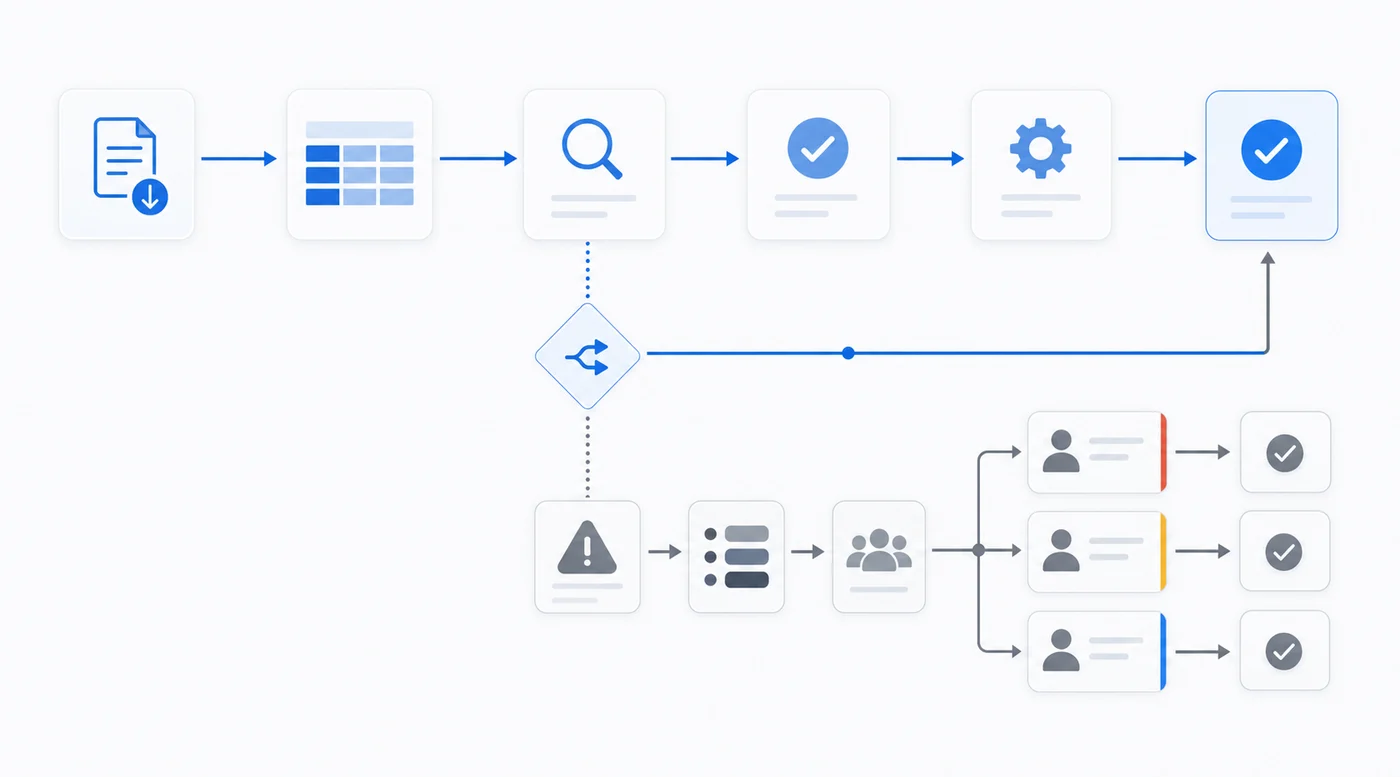
Three conditions typically trigger that failure:
- Timing differences, where a payment was recorded in one period but cleared in another, creating a temporary gap that still needs human confirmation before it closes.
- Missing entries, where a charge appears on the bank statement but has no GL counterpart, leaving the reconciliation open until someone investigates the source.
- Data mismatches, where amounts or vendor identifiers do not align with expected values, which can signal duplicate postings, coding errors, or vendor billing discrepancies.
Each exception gets tagged by type and severity the moment it is flagged. That tagging drives the routing. High-dollar variances go to senior reviewers. Classification mismatches get assigned to whoever owns that account. What lands in each reviewer's queue is specific to their role, which keeps resolution faster and accountability clear instead of every flag going to a shared inbox where ownership gets murky.
Setting Up Automated Matching Rules in Sage Intacct
Sage Intacct's matching engine works on a rule hierarchy where each rule defines the conditions a transaction must meet before it moves out of the review queue. You configure these under Accounts Payable or Accounts Receivable settings, depending on the workflow you're targeting.
A well-structured rule set typically layers conditions in this order:
- Match on vendor ID and invoice number first, since exact identifier matches carry the lowest false-positive risk and should clear the largest volume of routine transactions automatically.
- Apply amount tolerance thresholds second, using percentage-based or fixed-dollar bands that reflect your materiality policy, not arbitrary figures.
- Set date range parameters last, keeping the window tight enough to catch timing differences without pulling in transactions from prior periods.
Once a transaction satisfies all conditions in a rule, Sage Intacct marks it as matched and removes it from your sage intacct review queue. Only records that fail at least one condition get flagged for human review, which is where sage intacct exception routing and reconciliation exception handling take over.
Common Exception Types and How to Resolve Them
In any close cycle, exceptions tend to cluster around a handful of recurring categories. Knowing which type you're dealing with shapes how quickly your team can clear the queue.
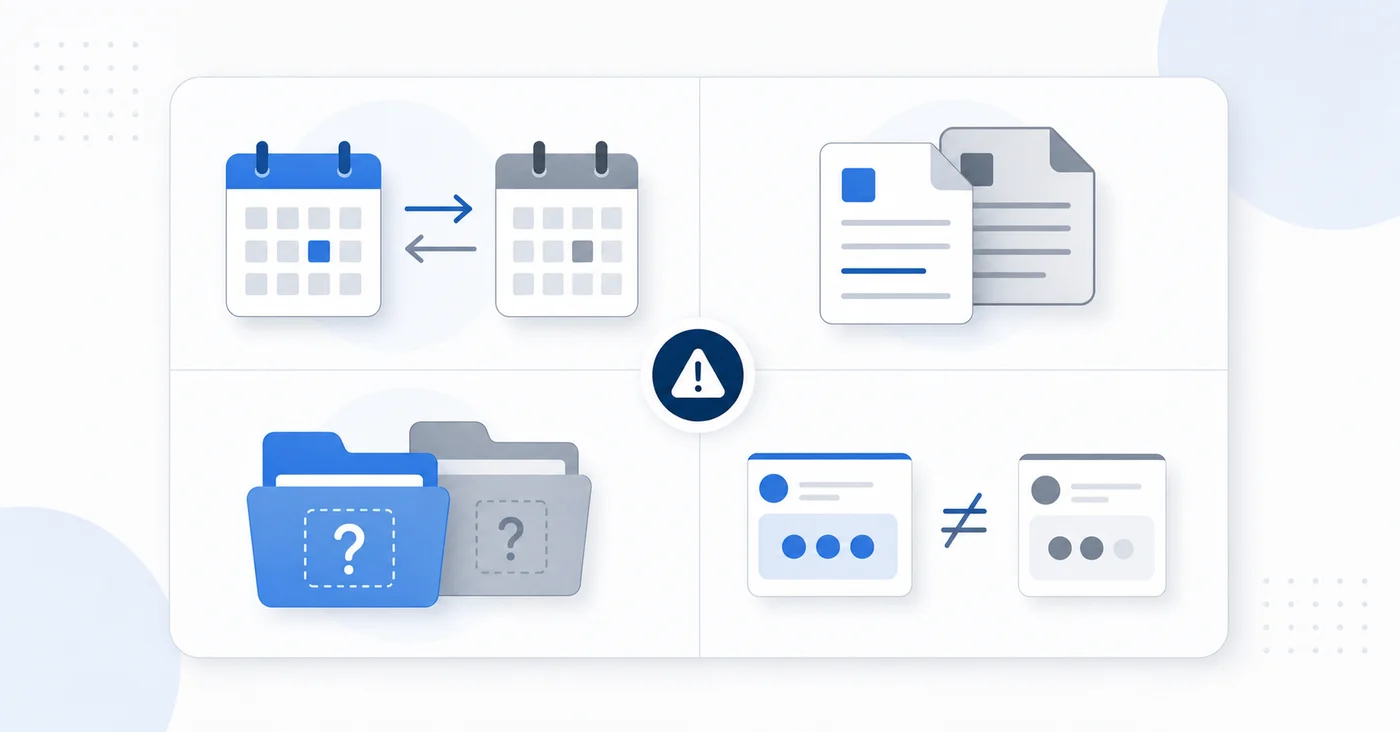
The Most Frequent Exception Categories
- Timing differences occur when a payment posts in one period but the corresponding invoice lands in the next. These are rarely errors, but they require documentation to satisfy auditors.
- Duplicate entries surface when the same transaction is recorded twice, often from manual data entry or overlapping import jobs in Sage Intacct.
- Missing source documents flag transactions that cleared the bank but have no matching receipt, PO, or invoice attached in the system.
- Amount variances appear when a vendor payment or customer receipt doesn't match the open balance exactly, usually due to discounts, fees, or partial payments applied inconsistently.
Resolution Patterns by Exception Type
| Exception Type | Typical Cause | Standard Resolution Path |
|---|---|---|
| Timing difference | Period cutoff mismatch | Document and defer to next period review |
| Duplicate entry | Manual input or import overlap | Void one entry, confirm GL impact |
| Missing document | Incomplete AP or AR workflow | Attach supporting file, re-route for approval |
| Amount variance | Discount or fee misapplication | Adjust line item, repost to correct account |
Routing each type to the right reviewer from the start cuts the back-and-forth that inflates your average resolution time.
Building Exception Queues and Review Workflows
Sage Intacct gives finance teams several tools to move away from line-by-line review and toward focused, exception-based workflows. The configuration work happens across a few interconnected areas.
Defining What Counts as an Exception
Before building any queue, your team needs to set the conditions that flag a transaction for review. In Sage Intacct, this typically involves:
- Variance thresholds by account or account group , so that small, expected fluctuations pass through without touching a reviewer's queue
- Matching rules that auto-clear transactions when supporting documentation aligns within defined tolerances
- Custom fields that carry contextual metadata, giving reviewers enough information to act without hunting through source records
Routing Flagged Items to the Right Reviewer
Once an exception is flagged, Sage Intacct routes it based on entity, department, or transaction type. Reviewers see only what falls within their scope. Items that clear matching rules never enter the queue.
This separation keeps review queues short and focused, which matters most during period close when volume spikes.
Measuring the Impact of Exception-Only Reconciliation
Four metrics tell you whether exception-only reconciliation is actually working.
Before walking through each one, note that these should be reviewed together across consecutive close cycles, never in isolation.
The Four Metrics to Track
- Auto-match rate measures the percentage of transactions cleared without human review. A well-tuned rule set typically pushes this to 80% or higher for routine volumes.
- Manual intervention rate is the inverse of auto-match. Track it by account type to identify which categories generate disproportionate exceptions.
- Time to resolution tracks how long each exception sits in the queue from flag to close. Spikes usually point to routing gaps or unclear ownership.
- Reconciliation cycle time measures total calendar days from period open to sign-off.
A declining auto-match rate signals rule drift. Rising resolution times point to staffing or routing problems. No single number tells the full story, but together they show exactly where matching rules need adjustment and where the workflow still has room to tighten.
Exception-Only Reconciliation for Sage Intacct Users with Truewind
Truewind connects directly to Sage Intacct and applies AI to flag only the transactions that need human review. Your team stops reading through every line item and focuses attention where judgment actually matters.
The core workflow looks like this:
- Truewind ingests your Sage Intacct transaction data and runs classification against your existing chart of accounts, vendor history, and policy rules.
- Transactions that match expected patterns are cleared automatically, with full audit trails written back to Sage Intacct.
- Transactions that fall outside normal ranges, carry ambiguous vendor names, or lack supporting documentation get routed to a review queue with context already attached.
- Reviewers see the flagged item, the reason it was escalated, and suggested resolution options, so decisions take seconds instead of minutes.
The result is a reconciliation process where your team's time concentrates on genuine exceptions. Close cycles get shorter because reviewers are not confirming what the data already makes obvious.
Final Thoughts on Moving to Exception-Based Reconciliation
Configuring reconciliation exception handling in Sage Intacct takes less time than manually reviewing another month of transactions. Your close quality improves because reviewers focus on items that actually need attention instead of confirming matches the system already validated. The workflow doesn't remove human judgment, it directs it where it matters. Track your auto-match rate and resolution times across a few cycles to see where rules need adjustment.
FAQ
Sage Intacct exception routing vs manual review queues?
Sage intacct exception routing filters transactions through matching rules before they reach reviewers, auto-clearing items that meet your criteria and flagging only the outliers. Manual review queues show everything without filtering, which means your team reads through routine matches alongside genuine problems.
Can I use exception-only reconciliation without changing my Sage Intacct setup?
Yes, but you'll need to configure matching rules and tolerance thresholds within your existing Sage Intacct instance. Once those rules are active, the sage intacct review queue automatically surfaces only flagged items while clearing everything else in the background.
What's the fastest way to reduce close time in Sage Intacct?
Start with automated matching rules for high-volume, low-risk transactions like recurring vendor payments and standard payroll entries. Teams typically see 80%+ auto-match rates within the first close cycle, which cuts review time immediately without changing approval workflows.
How do I know which transactions should trigger reconciliation exception handling?
Set variance thresholds based on materiality and account risk instead of arbitrary percentages. High-dollar variances, missing documentation, and timing differences outside your standard payment terms are the three conditions that warrant human review in most close workflows.
Turn this into a close-ready workpaper
Start with sample files or upload your own statements to see how Truewind prepares review-ready workpapers and journal entries.