
Your close doesn't break because AI missed a magic answer; it breaks when prepared work can't be traced back to source. That's where the accounting automation myths that sound reassuring in a sales deck start to cost the team time. A CAS practice can standardize checklists across clients, but each client still brings different mappings, reviewer notes, and close habits into the workpaper. The useful question is simple: can the workflow prepare the work your reviewer already knows how to inspect?
Recurring accounting work is not generic. Two CAS clients can run the same donation reconciliation, processor settlement, or accrual schedule and still use different mappings, cutoffs, dimensions, exceptions, and review conventions. If the workflow can't preserve that logic, the output may look finished while the reviewer still has to rebuild the work by hand.
Key Takeaways:
- Accounting automation myths usually fail because they confuse output with reviewable work.
- Generic templates break when client-specific mappings, cutoffs, and classifications matter.
- The workpaper is the right review surface because it ties source, calculation, treatment, exceptions, and sign-off together.
- CAS practices need repeatable workflows that preserve each client's rules without creating a bespoke process for every account.
- The accountant stays in the loop. AI prepares the work, routes exceptions, and waits for review before anything reaches the GL.
- Sage Intacct and QuickBooks Online should remain the system of record while preparation happens upstream.
Why Accounting Automation Myths Break Reviewer Trust
Accounting automation myths break reviewer trust when they promise finished answers without showing the preparation path. A reviewer needs source files, calculations, accounting treatment, exceptions, and sign-off in one place. Without that surface, automation just moves the rework from preparation to review.
Clean Output Can Still Be Unreviewable
A clean reconciliation is not the same as a reviewable reconciliation. You can have totals that tie, neat formatting, and a journal-entry draft that looks ready, while the reviewer still has no idea whether the processor fees were netted correctly or whether a grant restriction was carried into the right fund. That is where many accounting automation myths that sound plausible start to fail. They sell the appearance of completion.
Picture a CAS manager reviewing a nonprofit client close at 6:30 p.m. The bank feed is current, the donor export is in a spreadsheet, and the processor report has a fee column that changed from last month. One preparer used the prior workpaper, another copied a mapping from a different client, and the reviewer now has to decide whether the variance is real or just a format problem. The work is not glamorous, but it is the work.
To be fair, manual review exists for a reason. Accountants don't trust work because it is fast; they trust work because it can be traced, challenged, corrected, and signed off. The mistake is assuming manual touch is the only way to get that control. If the source, calculation, treatment, and exception path are visible, the reviewer can inspect the work without re-performing every clerical step. If that review surface is the gap you're trying to close, See Truewind in action inside the workflow where preparation meets review.
Generic Templates Fail on Client Reality
The useful unit of accounting automation is not the task name. It is the team's treatment of that task. A brokerage rollforward, a donation reconciliation, or an accrual schedule may look standard from a distance, but the actual work depends on account mappings, cutoffs, classifications, entity rules, and reviewer conventions that live in prior workpapers and staff memory.
CAS practices feel this first because they serve many clients at once. One client codes processor fees to a program dimension. Another splits the same fees across departments. A third has a donor platform export with campaign names that don't match the GL dimensions. A rigid workflow can force those clients into one template, and a fully bespoke process can preserve every rule, but neither scales well across a practice.
A better operating layer has to do something more specific: preserve client rules while producing consistent review artifacts. The reviewer should not have to ask, "Whose logic did the system use?" The workpaper should answer that question before the reviewer asks it.
The Real Risk Is the Clean-Looking Wrong Path
Controllers are not mainly afraid of obviously bad AI output. In practice, the scarier problem is clean-looking work that hides the path from source to conclusion. You can reject a bad answer quickly. You can't safely approve a polished reconciliation if you don't know how it was assembled.
That is why the accounting automation myths that focus only on speed feel incomplete. Speed matters. Nobody wants staff spending days normalizing exports and retyping statement activity. Still, the close does not get better if the reviewer has to slow down later because the output lacks support, exception notes, and visible logic.
The analogy I keep coming back to is the review binder. A good binder was never valuable because it was paper. It was valuable because the reviewer could move from source to schedule to journal entry without guessing which decision happened where. AI-prepared work has to recreate that property, not just produce a prettier answer.
How to Separate Accounting Automation Myths From Workflow Reality
The way to separate accounting automation myths from workflow reality is to test whether the system prepares work in the same review pattern your team already uses. If it can't learn prior treatment, show exceptions, and produce a traceable workpaper, it is not close automation. It is another input to review.
Start With the Workpaper, Not the Prompt
The fastest diagnostic is simple: ask what artifact the reviewer receives. If the answer is a paragraph, a chat response, or a spreadsheet with numbers but no treatment trail, the workflow is not ready for recurring close work. A workpaper is source, calculation, accounting treatment, exceptions, and reviewer sign-off in one place, in that order. Miss one piece and the reviewer has to fill the gap.
Before approving any accounting automation workflow, check five things. Does the output show the source file behind each material line? Does it show how the number was calculated? Does it identify the accounting treatment applied? Does it separate exceptions from ordinary activity? Does it capture who reviewed, corrected, and approved the result? If the system can't answer those questions, the risk is not that AI is too bold. The risk is that the reviewer can't see enough.
A generic prompt can still be useful for explanation, drafting, or research. That concession matters because not every finance use case needs a controlled workflow. Month-end preparation does. Once the output feeds a reconciliation, schedule, or journal entry, the reviewer needs an artifact they can inspect, not an answer they have to interrogate.
Use Prior Periods as the Test Set
Prior-period workpapers are the cleanest way to test whether accounting automation is real. Take a completed workflow from last month, provide the same source files and ERP balances, and ask the system to prepare the known result. Then compare the prepared output to the reviewed workpaper and examine the differences. Not just the final number. The path.
The test should be specific. For a donation reconciliation, compare bank deposits, donor platform totals, processor fees, fund restrictions, campaign coding, and any timing differences. For a family-office brokerage workflow, compare dividends, interest, realized activity, fees, transfers, entity treatment, and rollforward balances. For a CAS practice, compare how the same workflow behaves across two clients with different rules. The goal is not to prove the system is perfect. The goal is to see whether it can reproduce the known process and expose where it differs.
One customer phrase captures the practitioner standard better than any abstract claim: "Categorization is accurate, and we stopped having to double-check everything." Read carefully, though. The important part is not blind trust. The important part is that review effort moves from checking every routine item to inspecting the places that need judgment.
Treat Exceptions as a Feature of the Workflow
An exception queue is not a sign the workflow failed. It is often the sign the workflow understood its boundary. Missing statements, unexpected balance changes, mixed personal and business activity, and inconsistent classifications should not be smoothed over because they interrupt a clean report. They belong in front of an accountant.
Set a rule for recurring workflows: if the item changes the accounting treatment, source completeness, entity boundary, or reviewer convention, it should surface as an exception. If it is ordinary activity that follows the learned process, it can be prepared for review. That split is where capacity comes from. The accountant does not leave the loop; the accountant stops spending the first pass on items that already follow the known rule.
This is especially important for CAS firms because client reality changes. A donor platform adds a field. A processor report changes columns. A custodian statement arrives with a new footnote format. If the workflow pretends all of that is normal, reviewer trust breaks. If the workflow flags what changed and shows the source, the reviewer can make a call without starting from a blank spreadsheet.
Preserve Client Rules Without Freezing the Firm
A CAS practice needs consistency at the review artifact level, not sameness at the accounting treatment level. That distinction is easy to miss. The firm wants every client workflow to produce a readable reconciliation, support schedule, reviewer note trail, and journal-entry draft. The firm does not want every client forced into the same chart mapping, allocation rule, or cutoff convention.
A useful test is to choose one recurring workflow across three clients and ask what must be standard. The format of the workpaper should be standard, the source trace should be standard, the exception queue should be standard, and the sign-off pattern should be standard. The mappings, dimensions, allocations, and cutoff rules may differ by client, and the workflow should preserve those differences instead of hiding them.
That is where the old spreadsheet model had one real advantage: it let teams adapt. We should admit that. Spreadsheets are flexible, familiar, and easy to change when a client has an odd case. The cost is that the logic often lives in formulas, tabs, emails, and one senior person's memory. For firms trying to make client-specific logic inspectable without rebuilding the same close from scratch, Book a Truewind demo after you map the recurring workflow you want to standardize first.
Keep the GL as the System of Record
Sage Intacct and QuickBooks Online should remain the source of truth. The accounting automation myths that position AI as a new ledger misunderstand how controllers actually operate. The GL owns the posted books, reporting structure, financial statements, and downstream analysis. The preparation layer should sit upstream, where source files become workpapers and approved entries.
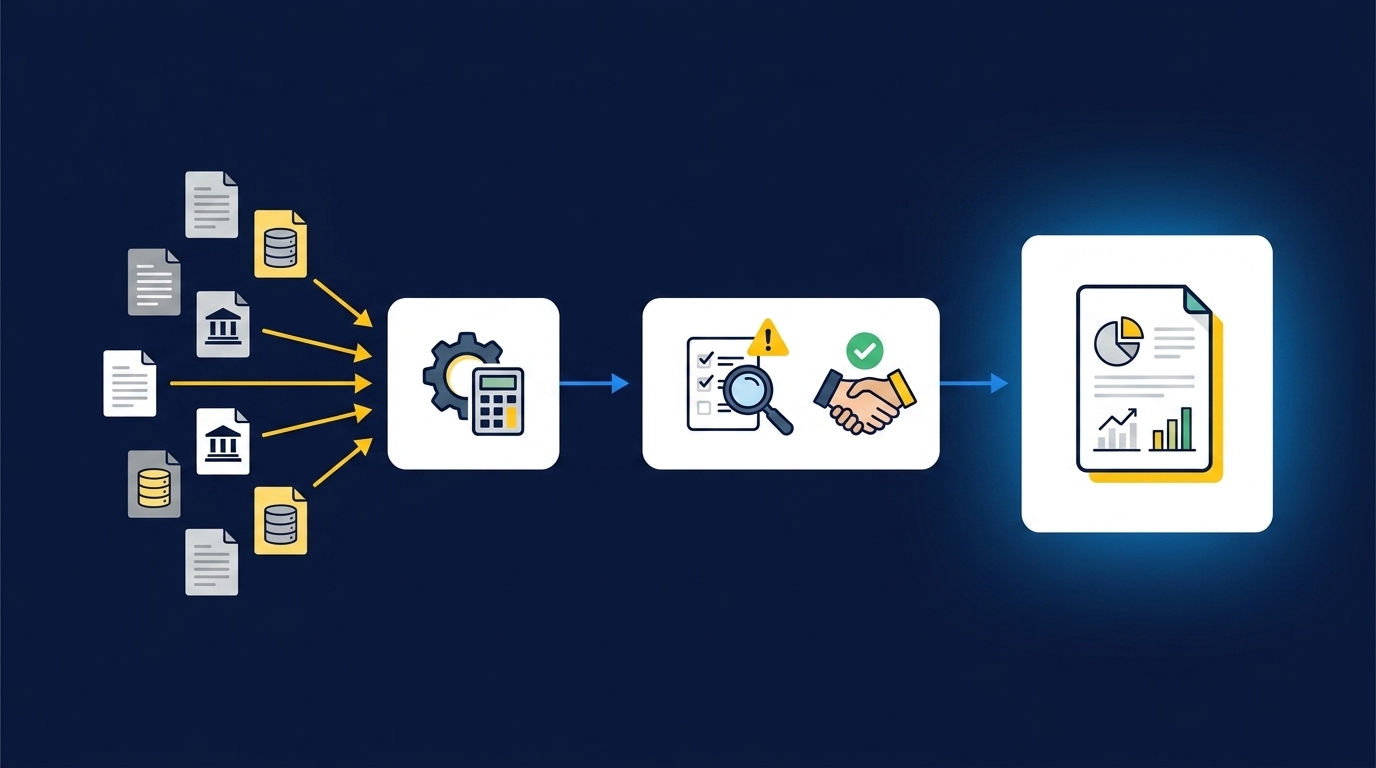
The operating model is straightforward. Source files come in from banks, processors, donor platforms, custodians, payroll registers, and prior workpapers. The preparation workflow structures those inputs, applies learned accounting logic, prepares reconciliations and schedules, and routes exceptions to the reviewer. After sign-off, the approved output moves into the GL. Keep that boundary clear and the team knows who owns each decision.
If a vendor says the system posts autonomously, ask what happens when the reviewer disagrees with the accounting treatment. If the answer is vague, stop there. The goal is not to move decision-making away from accountants. The goal is to move clerical assembly out of the way so judgment can begin earlier.
How Truewind Prepares Reviewable Accounting Work
Truewind prepares reviewable accounting work by sitting between source files and the GL, not by replacing either one. It ingests recurring inputs, applies the team's learned accounting logic, prepares workpapers and reconciliations, surfaces exceptions, and waits for reviewer sign-off before approved output moves downstream.
Source Files Become Workpapers, Not Loose Extracts
Truewind starts with the materials finance teams already receive: bank activity, credit-card statements, processor exports, donor-platform files, custodian brokerage statements, capital statements, payroll registers, prior workpapers, and operational exports. The point is not extraction by itself. The point is to structure those inputs into a workflow that feeds coding, reconciliation, schedule creation, exception review, and workpaper preparation.
That matters because the hardest accounting automation myths that teams encounter usually treat source files as a preprocessing nuisance. In real close work, source files are the evidence. A donor export has campaign and restriction context. A processor report has fee and settlement detail. A custodian statement carries activity that has to respect entity treatment. Truewind keeps that source context attached to the prepared work so the reviewer can trace the line back to the file.
Truewind also learns from historical examples, including prior workpapers, prior treatment, reviewer corrections, and confirmed classifications. That does not mean the system invents accounting policy. It means the next period starts from the team's known process rather than a generic default. A customer described the practical effect plainly: "Truewind automates a huge chunk of that busywork." The valuable word in that sentence is busywork, because the accountant still owns the accounting call.
Exceptions Stay With the Accountant
Truewind's review workflow is built around the idea that exceptions should be visible. Prepared workpapers, reconciliations, schedules, and journal-entry drafts sit alongside source links and exception queues. Accountants confirm, adjust, or send items back to preparation, and those decisions are captured against the workflow for later periods.
That is the difference between controlled close automation and open-ended autonomy. Multi-source reconciliation can match activity across a donor platform, processor, and bank, or across a custodian, an investment-vehicle statement, and an ERP balance. Proactive anomaly detection can identify missing statements, unexpected balance changes, mixed activity, or inconsistent classifications. Human-in-the-loop review keeps the accountant in control of what gets accepted.
The GL boundary stays intact. Truewind connects prepared output to Sage Intacct and QuickBooks Online, the documented systems of record, after reviewer confirmation. Coding, dimensions, and source references are preserved on the push. Nothing in that pattern asks the accountant to trust a black box, and nothing asks the finance team to replace the ledger that already owns the books.
A few customer comments are worth reading as examples, not universal promises. One said, "If I had to describe Truewind in one word: Lifechanging." Another said, "It's not just about making bookkeeping simpler; it's about freeing up teams, and helping them focus on higher-value projects." A third put it more broadly: "It's like having an entire accounting department at our fingertips - efficient, accurate, and effortless." The common thread is not that accountants disappear. The common thread is that preparation stops consuming the whole close. If that is the operating model you want to inspect against your own workpapers, Get a Truewind demo after you choose one recurring workflow with enough prior-period examples to test.
What Controllers Should Automate Next
Controllers should automate the recurring preparation work that has clear prior examples, reviewer ownership, and repeatable source files. Start where the team already has evidence of the right answer. The best first workflow is not the flashiest one; it is the one your reviewer can compare against last period.
Pick a reconciliation, rollforward, or schedule that repeats every month and already has a known review pattern. Donation and processor reconciliations work well when donor exports, payout reports, bank activity, and fund coding repeat. Brokerage and capital statement workflows work when entity rules and prior workpapers are available. CAS client workflows work when the firm can standardize the review artifact while preserving each client's mappings and dimensions.
The accounting automation myths that deserve to go away are the ones that flatten this work into data entry or pretend the accountant should leave the loop. Real preparation is source, logic, exception, and sign-off. What goes away is not the accountant. What goes away is the pile of clerical assembly that used to happen before the accountant could use judgment.
Frequently Asked Questions
How do I handle edge cases effectively?
To handle edge cases effectively, start by defining clear rules for exceptions in your workflow. Use Truewind's proactive anomaly detection to identify discrepancies like missing statements or unexpected balance changes. This feature helps surface items that need your judgment instead of hiding them. Once identified, review these exceptions carefully, ensuring that you understand the context and source before making any decisions. Document your findings and adjust your processes as needed to improve future handling of similar cases.
What if my source documents are inconsistent?
If your source documents are inconsistent, Truewind can help by automatically ingesting and structuring these materials. Upload your raw financial data, such as bank statements and credit card activity, into Truewind. The platform organizes this data into a structured workflow, making it easier to reconcile and prepare for review. This reduces the manual effort of normalizing documents and allows your team to focus on the actual accounting work rather than formatting issues.
Can I automate my recurring accounting tasks?
Yes, you can automate your recurring accounting tasks with Truewind. Start by identifying the workflows that repeat each month, like reconciliations or journal entries. Once you've mapped out these processes, Truewind can ingest the necessary source documents and apply your team's established rules for transaction coding. This way, you can automate the preparation of workpapers and schedules, freeing up your team to focus on higher-value tasks while maintaining control over the review process.
When should I review prepared workpapers?
You should review prepared workpapers before any output is posted to the general ledger. Truewind's human-in-the-loop review workflow allows you to inspect reconciliations, schedules, and journal-entry drafts alongside their source documents. This ensures that you can trace each entry back to its origin and confirm the accuracy of the work. Regular reviews help maintain trust in the automation process and ensure that all exceptions are addressed before finalizing entries.
Why does my team need to maintain control over the accounting process?
Your team needs to maintain control over the accounting process to ensure accuracy and accountability. Truewind enhances this control by automating repetitive tasks while keeping the human review component intact. This means that while Truewind prepares the work, your team can focus on judgment calls and exceptions that require deeper analysis. By preserving the review process, you can trust that the outputs are reliable and that any discrepancies are addressed before they affect your financial reporting.
Turn this into a close-ready workpaper
Start with sample files or upload your own statements to see how Truewind prepares review-ready workpapers and journal entries.