

Article title (separate field): A Close Checklist Template Built for Reviewer Control
Clean reader-facing draft
You opened the close tracker this week and found green checkmarks attached to workpapers nobody had actually reviewed. A close checklist template can tell you that a task is done while hiding whether the source arrived, the workpaper ties, or the reviewer saw the exception. Completion looks like control from a distance.
The checklist isn’t the problem by itself. The problem is what each row asks your team to prove. If a row ends at “reconciliation complete,” the real work still lives in source files, spreadsheet tabs, reviewer notes, and someone’s memory of last month.
Key Takeaways:
- Make each checklist row end in a reviewable accounting artifact.
- Name the required sources before preparation begins.
- Separate preparation, review, and posting into distinct states.
- Route missing support and unusual treatment to the accountant.
- Pilot recurring workflows against a known prior-period answer.
- Keep Sage Intacct or QuickBooks Online as the system of record.
Why Close Checklists Break Before Review Starts
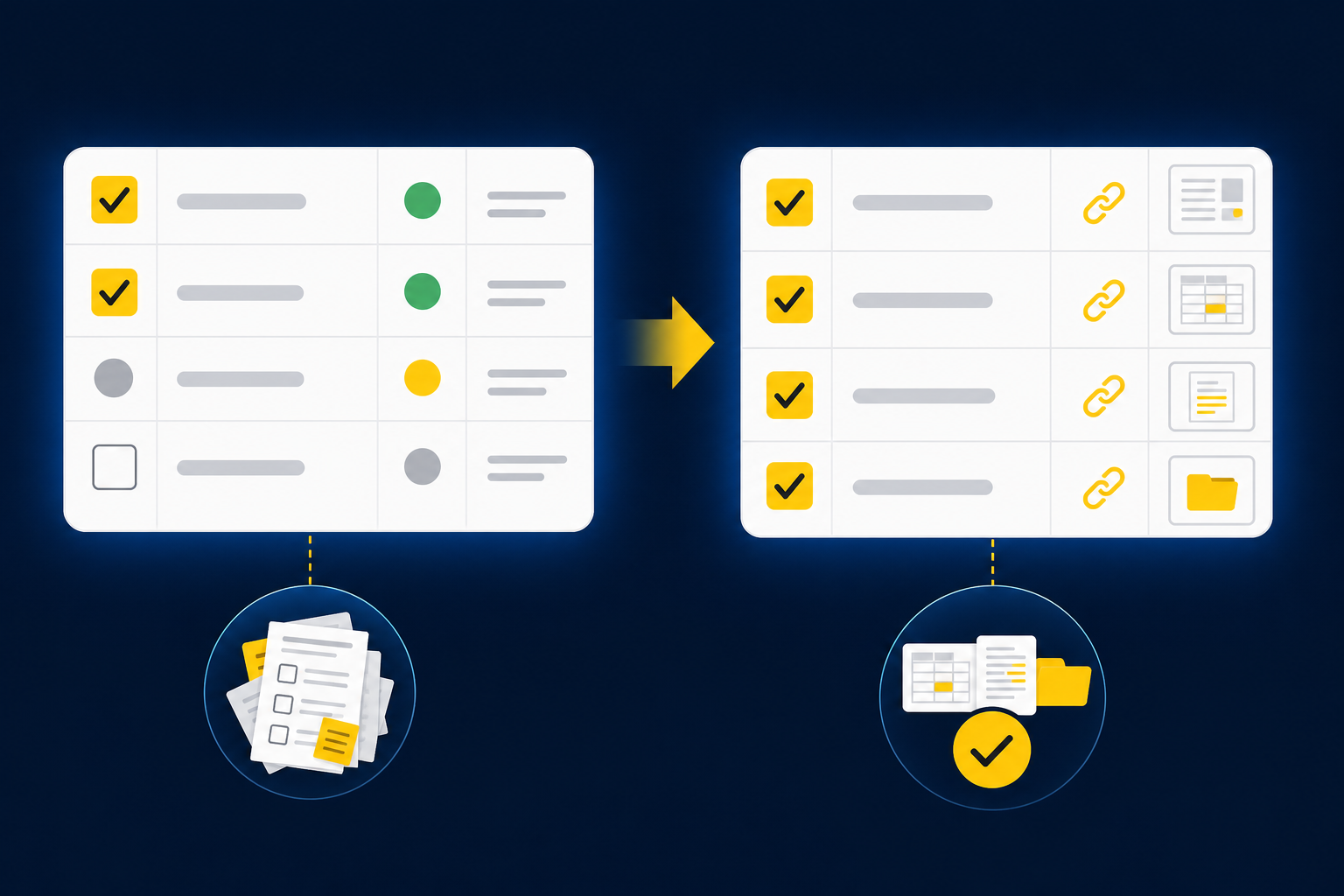
Close checklists break when they track task status instead of accounting evidence. A completed row should tell the reviewer which source supports the work, what artifact was prepared, which treatment was applied, and what remains unresolved. Without that chain, a close checklist records activity but can’t show whether the work is ready for approval.
Source-file work is accounting work
A processor export doesn’t become accounting support because someone converted it to a spreadsheet. The preparer still has to determine which deposits belong to which settlement period, how fees were treated, whether refunds are complete, and how the activity maps to the GL. Extraction is only the first move.
The same problem appears in donor and custodian files. One source may describe activity by campaign, another by settlement, and the bank by net deposit. The accountant has to connect those views without losing restrictions, entity boundaries, or timing differences. A checklist row that says “upload statements” misses the work that follows.
A completed task may still fail review
A task-based checklist has real merits. It’s easy to assign, easy to scan, and familiar to anyone who has run a close in a spreadsheet. The weakness appears when the reviewer opens a completed item and has to reconstruct the source, calculation, and treatment before review can begin.
A close checklist built around status is like a workpaper with formulas but no source tabs. It may calculate correctly, yet the reviewer can’t trace the answer or re-perform the key steps. In our view, that isn’t a small documentation gap. It means the checklist stopped one stage too early.
Exceptions need a destination
Missing statements, unexpected balance changes, mixed activity, and inconsistent classifications don’t belong inside a general comment box. Each one can change whether the work is complete or which accounting treatment applies. The checklist has to route those items to a named reviewer with the source context still attached.
A controller shouldn’t have to inspect every clean item to find the few that require judgment. The workflow should prepare the recurring work and make departures from the known process visible. If you want to inspect how that exception path connects source, preparation, and review, See Truewind in action.
The checklist becomes useful when its unit of completion changes from “task performed” to “artifact ready for review.”
How to Build a Close Checklist Around Evidence
A review-centered checklist starts with the artifact the reviewer expects, then works backward to sources, preparation rules, exceptions, and sign-off. A close checklist template built this way doesn’t merely organize deadlines. It defines what must be true before an account, schedule, or journal entry can move forward.
Test whether each row can survive review
Can a reviewer understand a completed row without messaging the preparer? That question exposes weak checklist design faster than a longer list of tasks. If the reviewer has to ask where the source lives or which version is final, the row tracks activity rather than a reviewable result.
Run the same test against a few recurring accounts before rewriting the whole close checklist. Pick one reconciliation, one supporting schedule, and one journal-entry workflow. If two or more of the following questions produce an unclear answer, the row needs more structure:
- Is the required source named? The row should identify the statement, export, ERP balance, or prior workpaper needed for preparation.
- Is the expected artifact clear? The preparer should know whether the output is a reconciliation, support schedule, journal-entry draft, or rolled-forward workpaper.
- Can the reviewer trace the calculation? Key numbers should connect back to source rather than a pasted value.
- Are exceptions visible? Missing support and treatment questions should remain open until a reviewer resolves them.
- Is approval separate from completion? Preparation can be finished while review is still pending.
Define the artifact before the task
The expected output should be named more precisely than “reconcile cash” or “update prepaids.” Those labels describe an area of work, not the workpaper a reviewer needs. A better row names the account, period, required support, expected tie-out, exception treatment, and final reviewer.
Take a donation reconciliation. “Reconcile donations” leaves the preparer to decide which donor export, processor report, bank activity, fee treatment, and fund dimensions belong in the work. “Prepare the monthly donation reconciliation from the approved donor, processor, and bank files, with fee and timing differences surfaced for review” gives the row a finish line.
Not every item needs that much accounting detail. Administrative tasks such as scheduling the close meeting or confirming team availability can remain simple. The stronger requirement applies wherever a completed item supports a balance, schedule, journal entry, or reviewer conclusion.
Attach the source and prior logic
A nonprofit reconciliation may begin with a donor-platform export, two processor files, and bank activity that records only net deposits. The checklist should name those inputs before the preparer starts. Otherwise, file collection becomes an untracked task that delays the work without appearing anywhere in the close calendar.
Prior workpapers matter for a different reason. They preserve account mappings, cutoff choices, classification splits, and reviewer corrections that may not exist in an SOP. The preparer shouldn’t copy last month without question, but the prior workpaper should be available as evidence of the known process.
For each accounting row, include four references:
- Current-period source: The statement, export, feed, or operational report used for preparation.
- Prior-period artifact: The last approved workpaper, schedule, reconciliation, or entry.
- Ledger reference: The account and relevant dimensions the work must support.
- Review owner: The accountant responsible for treatment and sign-off.
If you want to see how source-linked workpapers keep those references together during preparation, Book a Truewind demo. The point isn’t to add links for their own sake. It’s to keep the reviewer from rebuilding context after the preparer marks the row complete.
Separate preparation from review and posting
Preparation, review, and posting are different control states. Combining them into one checkbox makes the close appear further along than it is. It also blurs who made the accounting decision and who confirmed the output.
A clear close checklist gives each state an owner and a gate. The preparer assembles the sources, applies the documented process, and produces the workpaper. The reviewer inspects the support, resolves exceptions, and confirms the treatment. Only approved output can move to Sage Intacct or QuickBooks Online.
Use a simple sequence for rows that affect the ledger:
- Sources received: Required inputs are present and identified.
- Preparation complete: The workpaper, reconciliation, schedule, or journal-entry draft is ready.
- Exceptions assigned: Open questions have an owner and supporting context.
- Review complete: The accountant has confirmed or corrected the treatment.
- Approved for posting: The final output can move into the system of record.
More states create more administration, which is a fair concern. The answer isn’t to turn every close task into a five-stage workflow. Use the full sequence only when the row supports a financial balance or posting decision; keep low-risk administrative work simple.
Make exceptions part of the checklist
One missing statement can invalidate an otherwise complete rollforward. The preparer may have updated balances correctly from the files on hand, yet the work still isn’t ready for review because the source set is incomplete. A general completion checkbox can’t express that difference.
Create an exception field that records what changed, why the known process couldn’t finish, which source supports the question, and who owns the decision. If the exception affects completeness, accounting treatment, the ability to tie, or the proposed entry, the row stays open. Items outside those conditions can remain preparer notes.
Useful exception categories include:
- Missing or incomplete source material
- Unexpected balance or activity changes
- New classification or allocation questions
- Differences between current and prior treatment
- Unreconciled items across source systems
- Reviewer decisions that should carry into the next period
Exceptions aren’t evidence that the workflow failed. They show where the recurring process ended and accountant judgment began. Hiding that line creates risk; making it visible gives the reviewer a manageable queue.
Start with one known workflow
A pilot should begin with a recurring workflow that has a known prior-period answer. Brokerage rollforwards, processor reconciliations, donation reconciliations, and prepaid schedules work because the team can supply current sources, an approved workpaper, and reviewer history. A novel transaction with no established treatment is a poor first test.
The controlled comparison does require more attention upfront. That’s a real cost. The team has to compare the prepared output to the known answer, classify every difference, and decide whether the cause was a changed source, an existing rule, a judgment item, or a preparation error.
Use three gates before adding another workflow:
- Traceability: The reviewer can move from each material line to its source and calculation.
- Repeatability: Confirmed corrections and treatment are available when the workflow runs again.
- Escalation: Missing support and edge cases reach the accountant instead of being treated as ordinary items.
If any gate fails, keep the workflow narrow and correct the process. Expansion should follow reviewer confidence, not a successful demo.
How Truewind Prepares Review-Ready Close Work
Truewind prepares recurring accounting work from source files while keeping review and posting under accountant control. The platform applies the team’s historical treatment, produces source-linked workpapers, surfaces departures from the known process, and waits for reviewer confirmation before approved output moves to Sage Intacct or QuickBooks Online.
Source-linked preparation and exception review
Multi-source ingestion organizes the bank activity, processor reports, donor exports, custodian statements, prior workpapers, and other connected inputs used in the workflow. Workpaper generation then combines current-period sources with the prior artifact and ERP balance. The output is a workpaper, reconciliation, schedule, or journal-entry draft built for review.
Proactive anomaly detection compares the current preparation with the learned process and prior workpapers. Missing statements, unexpected changes, mixed activity, and inconsistent classifications appear as review items with source links. The human-in-the-loop review workflow lets the accountant confirm, adjust, or send the work back before anything is used downstream.
The close checklist can point to four concrete outputs:
- A prepared artifact tied to current-period sources
- A visible queue of unresolved exceptions
- Reviewer actions recorded against the workflow
- Approved output ready for the connected ERP
An example from a customer conversation described the review change in plain terms: “It’s essentially perfect. Categorization is accurate, and we stopped having to double-check everything.” That statement belongs to one customer’s experience, not a promised result for every workflow.
Approved work stays upstream of the ledger
Sage Intacct and QuickBooks Online remain the systems of record. Once the reviewer confirms the preparation, structured output can move to the connected ERP with coding, dimensions, and source references preserved. The platform doesn’t make policy decisions or post without reviewer confirmation.
Another example from a customer conversation put the capacity point directly: “Truewind automates a huge chunk of that busywork. It’s not just about making bookkeeping simpler; it’s about freeing up teams, and helping them focus on higher-value projects.” A separate customer described the experience this way: “If I had to describe Truewind in one word: Lifechanging”.
Those comments matter because they describe the work that changed, not a claim that accountants disappeared from the close. The accountant still owns treatment, exceptions, approval, and posting. To inspect that full path against one of your recurring workpapers, Get a Truewind demo.
Put Reviewer Control at the Center of Close
A close checklist template should show more than what your team finished. It should show which source supports the work, which artifact was prepared, where the treatment came from, what remains open, and who approved the result. Build those requirements into each accounting row, then test the design on one recurring workflow with a known answer.
The checklist will still manage deadlines. More importantly, it will define when preparation is actually ready for judgment.

Frequently Asked Questions
How do I ensure all sources are accounted for in my close checklist?
To ensure all sources are accounted for, start by clearly naming each required source in your checklist before preparation begins. Use Truewind's Multi-Source Reconciliation feature to bridge different systems and align activity across various sources like bank statements and processor exports. This way, you can create a structured workflow that captures all necessary inputs, making it easier for your team to prepare accurate workpapers.
What if I encounter missing statements during the close process?
If you encounter missing statements, make sure to document these exceptions in your checklist. Truewind's Proactive Anomaly Detection can help surface these issues, allowing you to route missing items to the appropriate accountant for resolution. This visibility ensures that exceptions are managed effectively and do not disrupt the overall close process.
Can I track exceptions in my close checklist?
Yes, you can track exceptions by creating a dedicated field in your close checklist for them. Use Truewind's Human-in-the-Loop Review Workflow to ensure that any exceptions, such as missing support or unexpected balance changes, are routed to the right reviewer. This way, you maintain accountability and ensure that all exceptions are addressed before finalizing the close.
When should I separate preparation from review in my checklist?
You should separate preparation from review whenever a task involves significant accounting decisions. Clearly define stages in your close checklist, such as 'Sources received,' 'Preparation complete,' and 'Review complete.' Truewind supports this approach by keeping the preparation process distinct from the review, ensuring that nothing moves to your ERP system without proper oversight.
Why does my checklist need to focus on reviewable artifacts?
Focusing your checklist on reviewable artifacts is crucial because it ensures that each completed task is backed by concrete evidence. This means that every row should not just indicate a task performed but should also specify the supporting source and expected output. By using Truewind's Workpaper Generation and Rollforward, you can create repeatable workflows that maintain this focus, enhancing the reliability of your close process.
Turn this into a close-ready workpaper
Start with sample files or upload your own statements to see how Truewind prepares review-ready workpapers and journal entries.